Att driva ett litet detaljhandelsföretag innebär att man måste hantera dussintals uppgifter samtidigt. Du hanterar lagret, hanterar betalningar, följer upp kundorder och försöker hålla ordning på allt utan att det kostar skjortan. Det är där butiksprogramvara för småföretag kommer in i bilden. Rätt verktyg förvandlar kaos till ordning, halverar din administrationstid och hjälper dig att skala upp verksamheten utan att behöva anställa extra personal.
Men här ligger utmaningen: det finns ingen universallösning. Ett kassasystem räcker inte när du öppnar en andra butik. Kalkylblad slutar fungera så fort du överskrider några hundra artiklar. Och att välja mellan specialiserad butikshanteringsprogramvara, lageruppföljning eller till och med ett lagerhanteringssystem kan kännas överväldigande.
Den här guiden ger dig en översikt över allt du behöver veta om butiksprogramvara för småföretag. Vi går igenom vad de olika systemen gör, hur de skiljer sig åt, när du faktiskt behöver uppgradera och hur du väljer rätt kombination för ditt företags tillväxtfas.
Vilken butiksprogramvara behöver ett litet företag?
Vilken programvara du behöver beror på hur komplex din verksamhet är. De flesta små detaljhandlare börjar med ett eller två grundläggande system och utökar med fler i takt med att verksamheten växer.
Kassasystem (POS)
Ett kassasystem är din kassa. Det hanterar försäljningen, registrerar transaktioner och samlar in kunddata. För små detaljhandlare med en eller två butiker är ett modernt molnbaserat kassasystem som Squares POS-lösning för detaljhandeln hanterar betalningshantering, kvitton och grundläggande försäljningsrapporter. Det är prisvärt, enkelt att installera och kräver inget IT-team för att drivas.
Programvara för lagerhantering
Lagerhanteringsprogrammet håller reda på vad du har i lager, varnar dig när lagernivån börjar bli låg och förhindrar att du säljer mer än du har i lager. Det synkroniseras med ditt kassasystem så att varje försäljning automatiskt uppdaterar lagerstatusen. För ett småföretag som behöver ett program för detaljhandelshantering finns verktyg som Sages programvarusvit för detaljhandelshantering Kombinera kassasystem och lagerhantering i en och samma plattform och spara tid på datainmatning.
Redovisnings- och finansverktyg
Du behöver ha överblick över vinstmarginaler, skatteförpliktelser och kassaflöde. Många kassasystem kan integreras med bokföringsprogram för att automatiskt hämta försäljningsdata. Andra använder separata verktyg som Wave eller Xero för att hantera fakturering och rapportering.
Lagerhantering (när verksamheten växer)
När du har flera lagerplatser eller överstiger 500 SKU:er blir ett specialiserat lagerhanteringssystem oumbärligt. Ett välfungerande WMS automatiserar plockning och packning, optimerar lagerplaceringen mellan flera lager och säkerställer att du följer lageromsättning följer reglerna korrekt. Det är här Vad är ett WMS? blir relevant för er detaljhandelsverksamhet.
Kassasystem, lagerhantering och WMS: Vad är skillnaden?
Dessa tre nivåer fyller olika syften, och förväxlingar mellan dem kostar små detaljhandlare tusentals i form av bortkastat lager och ineffektiv drift.
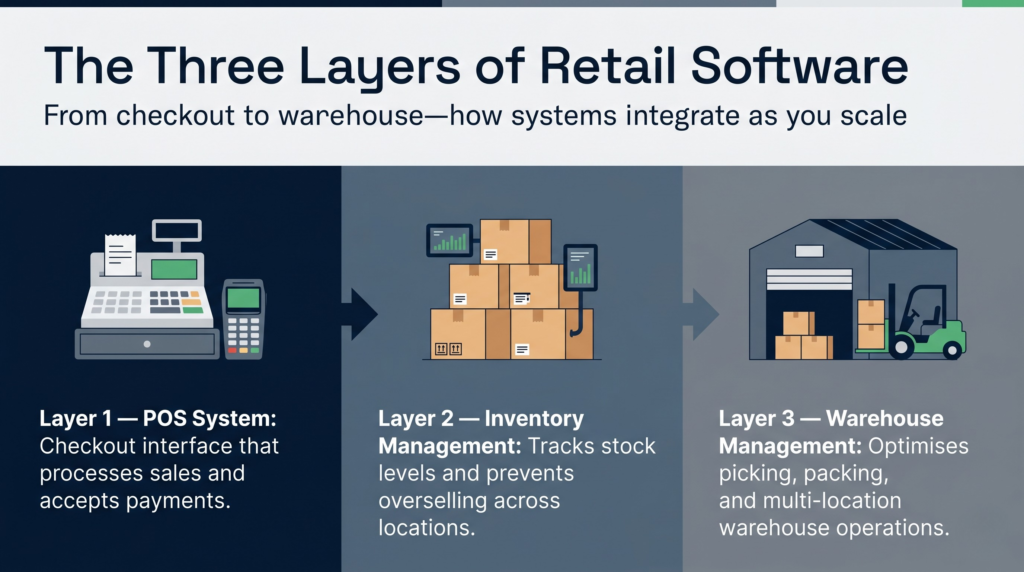
Kassasystem
Ett POS-system är kassagränssnittet. Det är där personalen registrerar försäljningen, tar emot betalningar och skriver ut kvitton. De flesta moderna POS-system har grundläggande funktioner för lageruppdateringar, men de optimerar inte lagerhanteringen eller logistiken mellan flera verksamhetsställen.
Programvara för lagerhantering
Lagerhanteringsprogrammet går ett steg längre. Det håller reda på lagernivåerna på olika platser, fastställer beställningsgränser, skapar inköpsorder och tillhandahåller analyser av vad som säljer bäst. De bästa kassasystemen för småföretag ofta kombinerar de lagerhanteringsfunktioner med kassafunktionen.
Lagerhanteringssystem
Ett WMS är operativsystemet för ditt lager eller din distributionscentral. Det styr var produkterna ska lagras, automatiserar plockning och packning, hanterar returer och optimerar lageromsättningshastigheten över flera anläggningar. I vissa fall kan WMS-programvara vara överdimensionerad för en detaljhandlare med endast en anläggning, men den är oumbärlig när man driver flera lager eller hanterar beställningar i stor skala.
Hur de samarbetar
Tänk på det så här: ditt kassasystem (POS) är frontend (kundkontakten), lagerhanteringsprogrammet är mellanlagret (lagerstatus) och ett WMS är backend (lagerverksamheten). De flesta växande detaljhandlare börjar med en kombination av kassasystem och lagerhanteringsprogram och lägger sedan till ett lagerhanteringssystem (WMS) när de har flera butiker eller en egen lagerverksamhet.
Hur mycket kostar butiksprogramvara för småföretag?
Kostnaden varierar kraftigt beroende på vad du köper och hur många användare du behöver. Här är en realistisk översikt.
Kassasystem
Molnbaserade kassasystem kostar vanligtvis 60–300 pund per månad, beroende på funktioner och transaktionsvolym. Betalningshantering för småföretag och kassasystem inkluderar ofta kortbehandlingsavgifter (1,5–2,91 TP3T per transaktion) utöver programvaruabonnemanget.
Programvara för lagerhantering
Specialiserade lagerhanteringsverktyg kostar mellan 30 och 200 pund per månad för småföretag. Vissa tar betalt per användare, andra per plats. Räkna med en extra kostnad på 50–100 pund per månad om du integrerar verktyget med ditt kassasystem.
Lagerhanteringssystem
Priset på ett WMS-system beror i hög grad på vilken driftsmodell som väljs. Ett molnbaserat WMS-system kostar vanligtvis 500–3 000 pund per månad för mindre verksamheter, plus kostnader för implementering och utbildning. Det kan låta dyrt, men investeringen betalar sig genom färre plockfel, snabbare orderhantering och bättre lagerprecision. Priser för Clarus WMS är transparent och skalbar utifrån genomströmningen i ditt lager.
Dolda kostnader att ta hänsyn till
- Integration avgifter: För att koppla samman system krävs ofta mellanprogramvara eller specialanpassad utveckling.
- Träning Personalen måste lära sig att använda ny programvara; budgetera för introduktionsutbildningen.
- Dataöverföring: Att övergå från kalkylblad eller äldre system tar tid och medför ibland kostnader.
- Support Premium-supportavtal kostar extra, men besparar dig en hel del besvär när något går sönder.
De flesta små detaljhandlare lägger varje månad mellan 150 och 400 pund på detaljhandelsprogramvara när de har expanderat till fler än en butik.
När bör en mindre detaljhandlare gå över från kalkylblad till specialiserad programvara?
Kalkylblad är visserligen smidiga, men de är en falsk besparing. Här är några tecken på att det är dags att uppgradera.
Du tappar koll på lagret
Om du inte på ett ögonblick kan se hur många enheter du har eller var de förvaras går du miste om intäkter. Kalkylblad uppdateras inte i realtid. En kund köper den sista svarta tröjan i storlek M i din butik i London samtidigt som du beställer ytterligare 50 stycken från leverantören. När du väl inser misstaget har du redan beställt varor som du inte behöver.
Manuell datainmatning tar flera timmar
Om ditt team lägger mer än 5 timmar per vecka på att uppdatera kalkylblad behöver ni ett program. En medarbetares lön täcker kostnaden för lagerhanteringsprogrammet i flera år.
Du öppnar en andra filial
Det är nästan omöjligt att hantera lagerstatusen på två platser med hjälp av kalkylblad. Du behöver ett centralt system som visar lagerstatusen i realtid på varje plats och förhindrar att varor säljs ut innan de finns i lager.
Du begår kostsamma misstag
Att beställa dubbla lager, sälja mer än vad som finns i lager eller räkna fel vid inventering är alla tecken på brister i hanteringen av kalkylblad. Redan en enda onödig beställning på 2 000 pund täcker kostnaden för tre års programvara.
Du vill ha bättre rapporter
Kalkylblad ger dig inga insikter. Specialutvecklad butiksprogramvara för småföretag visar vilka produkter som genererar vinst, säsongstrender och kundernas köpmönster. Denna information hjälper dig att fatta smartare inköpsbeslut.
Hur integreras kassasystem med lager- och lagerhanteringsprogram?
Ett bra kassasystem fungerar inte på egen hand. Det måste kunna kommunicera med ditt lagerhanteringssystem och, i förlängningen, med din lagerprogramvara.
Flödet: Från kassan till lagret
Varje försäljning i kassasystemet minskar omedelbart ditt lagerstånd. Inga manuella uppdateringar behövs. Om du använder ett högkvalitativt kassasystem för småföretag synkroniseras lagerstatusen mellan alla butiker i realtid.
Lager till inköp
När lagernivån sjunker under en beställningsgräns kan ditt lagersystem automatiskt meddela dig eller till och med skapa en inköpsorder. Detta förhindrar att varor tar slut och minskar den tid du lägger på beställningshantering.
Lager till WMS
När du driver ett lager kommunicerar ditt lagersystem med WMS-systemet. WMS-systemet registrerar inkommande varor, tilldelar lagringsplatser och optimerar plockvägarna. Clarus-integrationer fungerar smidigt tillsammans med de flesta lager- och kassasystem, så att du slipper bygga om hela din systemarkitektur.
Nyckeln: API-integration
Leta efter programvara som använder moderna API:er (applikationsprogrammeringsgränssnitt). API:er gör det möjligt för system att kommunicera utan manuellt ingripande. Undvik verktyg som kräver att du exporterar och importerar data manuellt – det är långsamt, felbenäget och motverkar syftet med uppgraderingen.
Så här väljer du den bästa butiksprogramvaran för ditt företag
Det finns ingen perfekt lösning, men det finns en lösning som passar just din verksamhet. Använd dessa kriterier för att begränsa din sökning.
Anpassa efter dina nuvarande behov, planera för tillväxt
Köp inte utifrån hur det ser ut idag. Köp istället utifrån hur det kommer att se ut om två år. Om du planerar att öppna en andra filial behöver du ett lagerhanteringsprogram som klarar flera anläggningar. Om du når ordervolymer på över 100 per vecka kommer du så småningom att behöva ett WMS.
Prioritera integration
Era system måste kunna kommunicera med varandra. Innan ni väljer programvara bör ni kontrollera om den kan integreras med er kassasystem, ert bokföringsverktyg och eventuella andra system ni använder. Bristfällig integration leder till dubbelarbete.
Testa innan du bestämmer dig
De flesta leverantörer erbjuder en kostnadsfri provperiod. Utnyttja den. Låt ditt team testa den under en vecka. Om de inte gillar den kommer den inte att användas, oavsett hur kraftfull den är.
Se supporten
Bra programvara + dålig support = ett frustrerat team. Sök efter leverantörer som erbjuder utbildning, lyhörd kundsupport och regelbundna produktuppdateringar. Funktioner i den bästa butiksprogramvaran för småföretag se till att erbjuda tillgänglig kundsupport under era mest intensiva handelstider.
Förstå skalbarhet
Kommer verktyget att kunna anpassas efter era behov? Kan ni lägga till användare, platser och artikelnummer utan att stöta på några fasta begränsningar? Kommer ni så småningom att kunna koppla in ett lagerhanteringssystem?
Att bygga upp din mjukvarustack: ett praktiskt exempel
Så här anpassar en typisk liten detaljhandlare sin programvara i takt med att verksamheten växer.
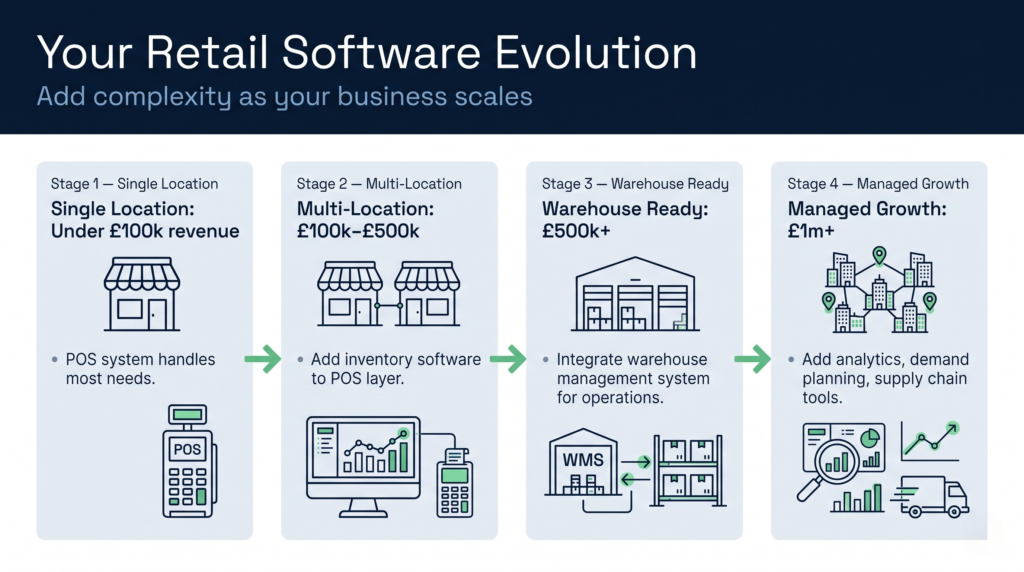
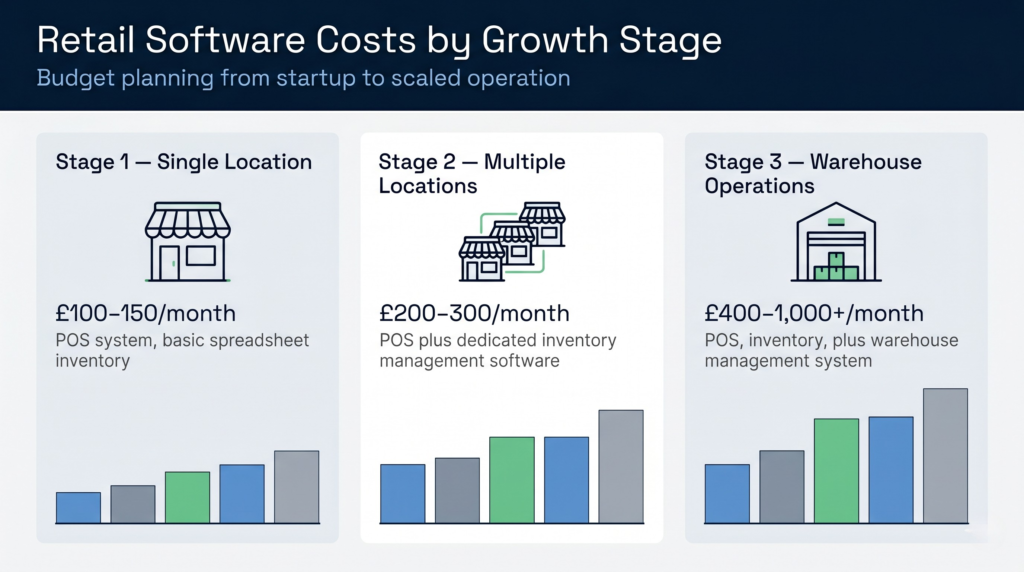
Steg 1: En enda verksamhetsplats (omsättning under 100 000 pund)
Ett molnbaserat kassasystem som Square eller Till, manuellt kalkylblad för lagerhantering. Kostnad: 100–150 pund per månad. Fungerar bra i startfasen eftersom lagerhanteringen är relativt enkel.
Etapp 2: Flera verksamhetsställen (omsättning på 100 000–500 000 pund)
Lägg till en särskild lagerhanteringsprogramvara i kassasystemet. Nu kan du hålla koll på lagret på två eller tre platser och undvika att sälja mer än vad som finns i lager. Kostnad: 200–300 pund per månad.
Steg 3: Lagerverksamhet (omsättning på minst 500 000 pund)
Inför ett lagerhanteringssystem för att hantera flera lagerplatser, större volymer och eventuellt extern logistik. Det är i det här läget som en programvara för detaljhandelshantering avsedd för småföretag inte räcker till – då behöver du ett WMS. Kostnad: 400–1 000+ pund per månad.
Steg 4: Kontrollerad tillväxt (omsättning på minst 1 miljon pund)
Etablerade detaljhandlare inför ofta avancerade analysverktyg, verktyg för efterfrågeplanering och verktyg för insyn i leveranskedjan. De kan också samarbeta med en 3PL-partner som använder ett särskilt lagerhanteringssystem (WMS) för sin lagerverksamhet.
Det viktigaste är att anpassa din programvara efter vilket utvecklingsskede ditt företag befinner sig i. Lägg inte för mycket pengar i början, men se till att inte spara för mycket när du är redo att skala upp verksamheten.