

Selecting an enterprise resource planning system is one of the largest investment decisions a business makes. The right ERP solution can simplify operations, improve visibility, and support growth. The wrong one can lock you into expensive, inflexible systems that constrain your business for years. This guide walks you through how to compare ERP systems, what features matter most, and how to position yourself for both immediate gains and future scalability.
What is enterprise resource planning (ERP)?
Enterprise resource planning is a suite of integrated software modules that centralise and automate business processes across finance, supply chain, human resources, manufacturing, and customer management. Instead of data sitting in isolated spreadsheets or disconnected systems, ERP brings everything into one source of truth.
The core idea sounds straightforward: one database, one set of rules, one reporting engine. In practice, ERP systems are complex. They touch every department, require deep configuration, and demand commitment to how you’ll operate. A typical large ERP implementation, such as SAP, Oracle, or Microsoft Dynamics, takes 18 months to three years and costs millions. Cloud-based alternatives like NetSuite are often faster and lower cost, but still require significant customisation.
For 3PLs and warehouse-heavy businesses, ERP is essential for financial control and customer reporting. But it’s not a warehouse management tool. That’s where specialised WMS platforms matter.
ERP vs WMS: understanding the difference
The most common question is: do I need both ERP and a warehouse management system?
The answer is almost always yes, and here’s why.
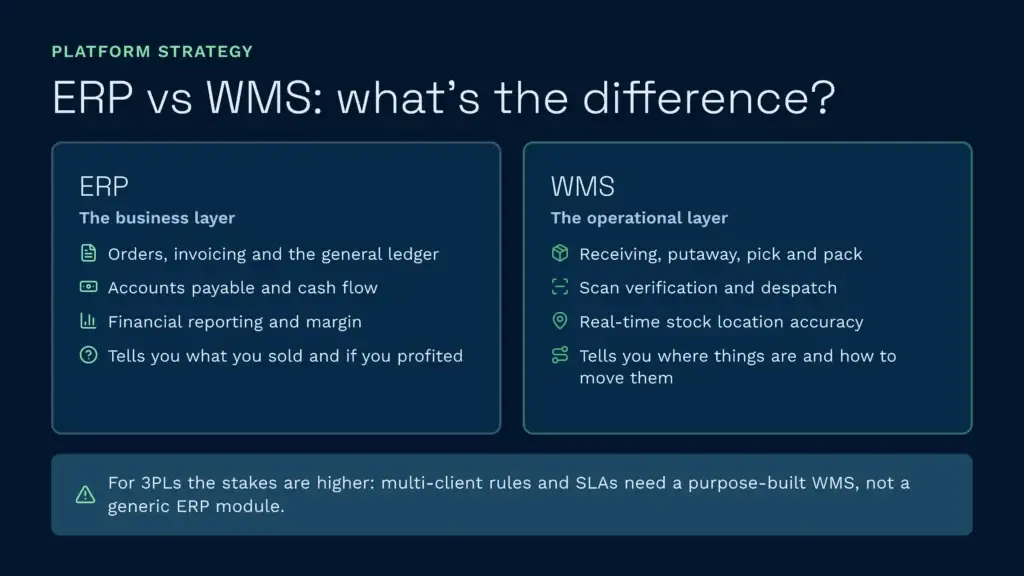
ERP handles the business layer: orders, invoicing, general ledger, purchase orders, accounts payable, cash flow, and financial reporting. It tells you what you’ve sold, what it cost, and whether you made money.
WMS handles the operational layer: receiving, putaway, picking, packing, despatch, inventory accuracy, and real-time stock visibility. It tells you where things are, how to move them efficiently, and whether every transaction was correct.
An ERP module can manage basic warehouse operations, but it’s not optimised for the physical reality of a warehouse. ERP systems are built to control data flow and financial transactions. They don’t handle directed putaway, wave picking optimisation, scan verification, or real-time inventory adjustments the way a purpose-built WMS does.
For 3PLs especially, the stakes are higher. Each client may have different billing rules, product handling requirements, and SLA expectations. A generic ERP can’t capture the complexity of multi-client operations. That’s why specialised 3PL WMS platforms exist: they layer on the operational precision that ERP alone cannot provide.
How to compare ERP systems
Choosing an ERP requires evaluating multiple dimensions. Don’t just look at features; understand the deployment model, total cost of ownership, and whether it will grow with your business.
1. Deployment model: cloud vs on-premise
On-premise ERP systems (like SAP, Infor, or Dynamics on-premise) sit on your servers. You own the infrastructure, pay for upgrades, and carry the burden of maintenance and security patching. Implementation is slow and expensive because you’re building a custom technology foundation alongside business process redesign.
Cloud ERP (like NetSuite, cloud-native Dynamics 365, or Oracle Cloud) runs on the vendor’s infrastructure. You get automatic updates, no server maintenance, and typically faster deployment, often 12 to 18 months instead of three years. You also avoid the capital expenditure of hardware.
For most mid-market businesses today, cloud is the rational choice. It reduces operational burden, lowers upfront cost, and scales predictably. The trade-off is loss of control: you’re dependent on the vendor’s roadmap and uptime.
2. Industry-specific capability
Generic ERP works for general business. Industry-specific ERP works for you.
If you’re in manufacturing, you need bill-of-materials (BOM) management, work-order execution, and production scheduling. If you’re in 3PL logistics, you need multi-client accounting, activity-based billing, and client self-service portals. If you’re in food and beverage, you need batch and lot tracking, expiry-date management, and recall-readiness reporting.
Evaluate whether the ERP vendor has actually solved your industry’s constraints, or whether you’ll be retrofitting their generic platform to your needs. Retrofitting costs more, takes longer, and leaves you with less competitive advantage.
3. Integration breadth
No ERP does everything. You’ll integrate it with e-commerce platforms, shipping carriers, accounting software, CRM systems, and, yes, warehouse management software. Evaluate how easily the ERP connects to tools you already use or plan to use.
ERP vendors offer pre-built connectors to major platforms (Shopify, Amazon, common carriers, accounting packages). Check whether those connectors exist, whether the vendor maintains them, and whether you’ll need custom integration development. Custom integration is expensive and creates technical debt.
4. Scalability and future-proofing
Will the system grow with you? If you’re currently a £5 million operation planning to become £50 million in five years, can the ERP handle ten times the transaction volume? Can you add new warehouse locations, new product categories, or new business units without architectural rework?
Cloud ERP vendors are generally better at this because they’re built for multi-tenant scale. On-premise systems often hit ceilings where performance degrades or you need to upgrade infrastructure significantly.
5. Total cost of ownership (TCO)
ERP pricing is rarely transparent. Vendors quote licence fees, but the real cost includes implementation (often two to four times the licence cost), training, customisation, and ongoing support. A “cheap” ERP can become expensive once you factor in a 24-month implementation.
Create a five-year TCO model: licence fees, implementation costs, annual support, infrastructure (if on-premise), staff training, and contingency. Compare that against the operational gains you expect (labour reduction, fewer billing errors, better visibility). If TCO exceeds the value you’ll capture, walk away.
What the Gartner Magic Quadrant says about ERP
Gartner now publishes separate Magic Quadrants for cloud ERP, split between product-centric and service-centric enterprises, and ranks vendors on two dimensions: completeness of vision (how well they understand where the market is heading) and ability to execute (how well their current product delivers). The highest-ranked vendors appear in the Leader quadrant: they execute well today and have a credible roadmap for tomorrow.
Recent Leaders across these quadrants have included SAP, Oracle, and Microsoft Dynamics 365, alongside Infor CloudSuite. NetSuite, being Oracle-owned and mid-market focused, tends to sit outside these enterprise-oriented Leader rankings. Vendors like Sage, Epicor, and Plex typically appear as Niche Players or Visionaries depending on the specific category. Smaller vendors and legacy on-premise specialists generally rank lower.
The Magic Quadrant is worth checking because it reflects analyst consensus on product quality and vendor investment. A Leader is likely to maintain competitive parity and keep its roadmap moving. A Niche Player might serve a vertical exceptionally well but lack horizontal breadth.
That said, Gartner rankings don’t replace due diligence. Some vendors rank lower but excel at specific use cases, such as 3PL or food manufacturing. Always evaluate whether the vendor’s strength aligns with your industry and size, and check the current quadrant yourself, since rankings shift each year.
Building an ERP shortlist: what to compare
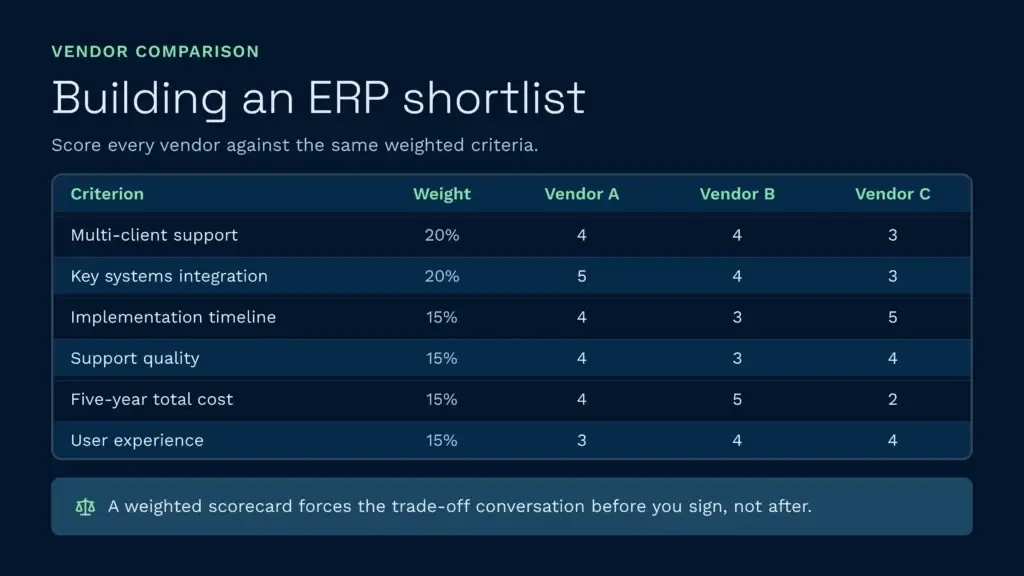
Once you’ve narrowed your choices, create a structured ERP comparison chart and score each vendor against weighted criteria. The key is to make criteria explicit so stakeholders agree on trade-offs upfront.
Use a matrix like this:
| Criterion | Weight | Your Score (1-5) | Vendor A | Vendor B | Vendor C |
|---|---|---|---|---|---|
| Multi-client or multi-location support | 20% | Requirements | 4 | 4 | 3 |
| Integration with your key systems | 20% | Requirements | 5 | 4 | 3 |
| Implementation timeline | 15% | 6-12 months ideal | 4 | 3 | 5 |
| Support quality and response time | 15% | Requirements | 4 | 3 | 4 |
| Total five-year cost | 15% | Under £500K | 4 | 5 | 2 |
| User experience and training burden | 15% | Requirements | 3 | 4 | 4 |
A weighted scorecard forces clarity. If Vendor A scores highest on integration but Vendor B costs half as much, your team has to decide explicitly whether the integration advantage is worth the cost premium. That conversation is worth having before you commit.
The ERP and WMS Partnership
Here’s the practical truth: your ERP will handle orders and invoicing beautifully. But it will not move inventory faster, reduce picking errors below 99.5%, or give your clients real-time stock visibility without a dedicated warehouse management platform.
A purpose-built WMS layer, especially one designed for 3PL operations, complements your ERP by handling the physical warehouse and client-facing operational detail. It captures every billable event (receiving, storage, picking, packing, despatch, value-added services) in real time so your ERP’s invoice is accurate before it’s even generated. It provides the scan verification, directed putaway, and wave picking optimisation that generic ERP modules simply don’t offer.
For example, when a 3PL uses Clarus WMS alongside their ERP, invoicing moves from a two-person, multi-day reconciliation process to an automated daily transaction feed. St John’s Hall Storage reduced their invoicing workload from four hours per day to twenty minutes because the WMS captured every billable event in real time. That’s not an ERP strength; it’s a WMS specialist strength.
The same applies to stock accuracy. Clarus customers like JODA Freight brought stock accuracy from the low 90s to 99.8% because the WMS enforces scan verification at every point of contact, receiving, putaway, picking, despatch. Your ERP doesn’t see warehouse reality; it sees transaction records. The WMS is the lens that makes those records accurate.
And for clients demanding real-time visibility, a specialised WMS offers a client portal where they can see stock levels, order status, and shipment tracking 24/7. Your ERP can generate reports; a WMS gives clients live operational control.
If you’re evaluating ERP, also consider the ERP software shortlist alongside warehouse management tools that will sit alongside it. The ERP is the financial backbone; the WMS is the operational nervous system. Both matter.
Best Practices for ERP Evaluation and Selection
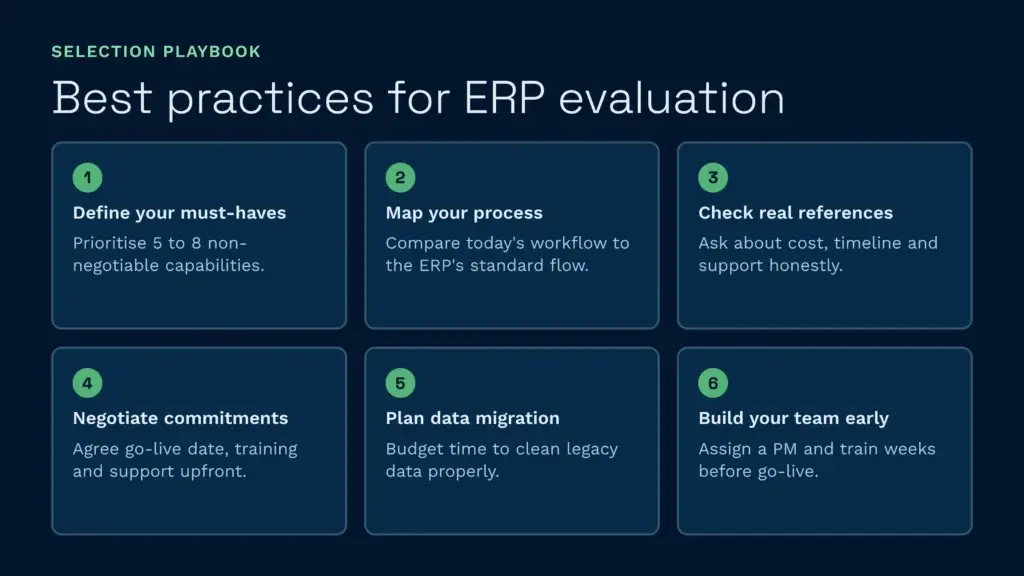
Before you sign a contract, follow these steps to avoid expensive mistakes:
- Define your must-haves and nice-to-haves. Don’t evaluate every feature equally. Prioritise the five to eight capabilities that are non-negotiable for your business. Everything else is negotiable.
- Run a detailed process-mapping exercise. Document how your business actually works today—how orders flow, how you handle exceptions, where manual steps exist. Compare that against how the ERP’s standard process operates. The gap represents customisation cost and risk.
- Get references from similar-sized customers in your industry. Ask them about implementation timeline, actual costs versus quoted costs, support quality, and what they’d do differently. Vendor references are predictably positive; third-party reviews (G2, Capterra) are more honest.
- Negotiate implementation support and success metrics. Don’t just buy software; buy a vendor commitment to your success. Agree upfront on go-live date, training hours, post-launch support duration, and what happens if the vendor misses milestones.
- Plan your data migration carefully. Legacy data (customer masters, open orders, inventory records) is almost always messier than you think. Budget extra time and budget for data-quality remediation. Garbage in, garbage out applies to ERP more than any other system.
- Build your team and training plan now. ERP success depends more on change management than on software. Assign a strong internal project manager, identify power users from each department, and schedule training weeks before go-live, not days.
What Is the Best ERP System for Your Business?
There’s no universal “best.” The right ERP depends on your industry, size, complexity, and budget. A manufacturing company with 500 employees across four locations needs something different from a three-person consultancy. A 3PL needs different depth than a wholesaler.
That said, some vendors are stronger in specific dimensions:
- For fastest cloud deployment: NetSuite and Dynamics 365 lead. NetSuite’s implementation methodology is optimised for 6–9 month go-lives. Dynamics 365 integrates smoothly if you’re already in Microsoft’s ecosystem.
- For 3PL and multi-client operations: Infor CloudSuite, Epicor, and Plex have strong multi-tenant billing and client visibility. But these require deeper customisation than NetSuite.
- For manufacturing complexity: SAP and Oracle Cloud lead on BOM management, production scheduling, and quality control. The trade-off is longer implementation and higher cost.
- For mid-market simplicity: Sage Intacct and Acumatica offer good balance of feature breadth and usability. Neither requires years of implementation.
- For warehouse cost control and visibility: Pair your ERP with a purpose-built WMS. The WMS will give you real-time fundamentals of logistics execution, from receiving through picking and despatch, that no ERP module matches.
When you’re selecting an ERP, allocate budget for a complementary warehouse management platform. The combination delivers the financial control ERP provides plus the operational precision WMS delivers. And if you’re a 3PL, the WMS automation around warehouse picking and billing will unlock scaling you couldn’t achieve with ERP alone.
Speak to a warehouse expert
If you’re evaluating your options and want to see how a purpose-built WMS works in practice, Clarus is worth a conversation. We work with 3PLs and distributors across the UK to implement warehouse management software that fits the way you operate, not the other way around.
Get in touch with our team to talk through your requirements.