

Acumatica has a warehouse management system of its own. The company describes its Warehouse Management module as “Acumatica’s native Warehouse Management System (WMS)”, used to manage receiving, inventory movement, picking, packing and shipping. This article explains what the Acumatica warehouse management system covers, how Acumatica packages it, and how to decide whether a business already running Acumatica also needs a dedicated or 3PL WMS. Acumatica is a cloud and browser-based ERP for small and medium-sized businesses, according to Wikipedia. A lagerhanteringssystem controls stock movement inside the building, while an ERP holds the business-side records of stock, orders and purchasing.
Does Acumatica have a warehouse management system?
Yes. Acumatica’s product page presents the Warehouse Management module as its native WMS and says it adds mobile scanning and automated workflows to the warehouse. The module sits alongside Acumatica’s inventory functions. What the product page does not settle is whether a particular subscription includes the module, which depends on edition and tier, covered in the packaging section below.
Inventory management and warehouse management in Acumatica
Two terms come up together in Acumatica material, and they do different jobs. Inventory management is the record of what stock a business holds, how much of it there is and where it sits in the books. Warehouse management is the floor layer that tracks where each item is in the building, how it is received, moved, picked and shipped.
Acumatica’s October 2025 licensing guide marks inventory as included in its Distribution Edition. Warehouse management is a separate module, and the next sections explain what it covers. Acumatica also publishes its own explainer on the difference between ERP and WMS. For the wider question of where an ERP stops and a WMS starts, our ERP vs WMS guide for 3PLs covers the same ground from a warehouse operator’s side.
How Acumatica packages warehouse management
Acumatica says its pricing is tailored around three factors: the applications a business needs, its expected usage and resource requirements, and its deployment preferences, as set out on its prissättningssida. This article does not quote any figures. If cost matters to your decision, ask Acumatica or your partner for a written quote based on your own requirements.
The packaging question is more useful to settle first. Acumatica’s October 2025 licensing guide lists Warehouse Management as an optional module in each edition, rather than part of the edition by default. The editions are Distribution, Retail, Manufacturing, Construction, Professional Services and General Business, and the tiers are Essentials, Select, Prime and Enterprise. Check with Acumatica or your partner what your own subscription includes before you plan a warehouse project around the module.
What the warehouse management module covers
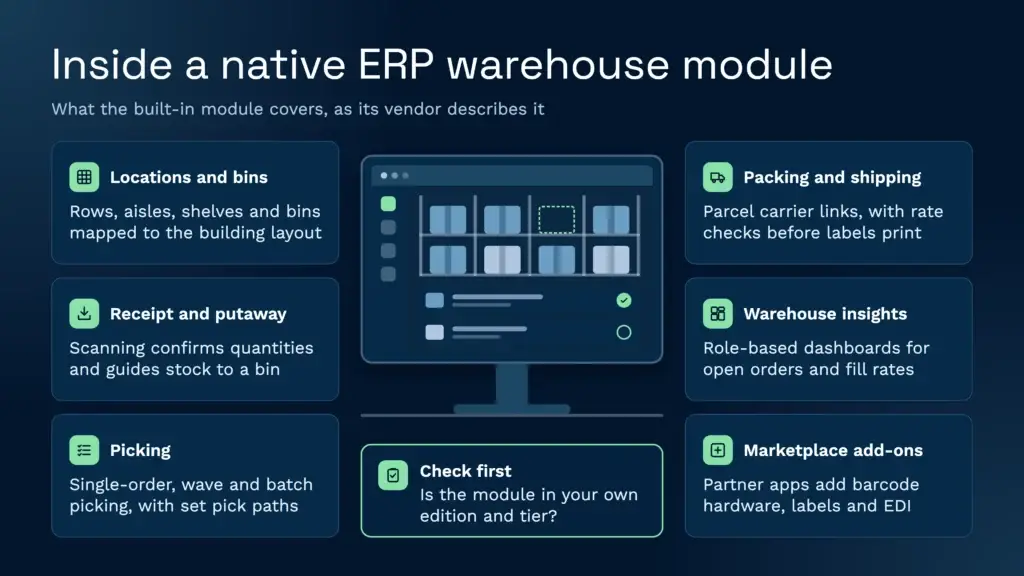
Acumatica’s product page groups the module into four areas. The table uses its own descriptions of each area, so read it as Acumatica’s list of what the product does, not as an independent test.
| Area (as Acumatica groups it) | What Acumatica says it covers |
|---|---|
| Warehouse administration | Rows, aisles, shelves, bins and warehouse locations; carts for warehouse transactions; ABC classifications to analyse inventory movement |
| Receipt and putaway | Mobile devices and barcode scanning to receive stock, confirm quantities and guide workers to a bin or storage location |
| Order processing (pick, pack, ship) | Single-order, wave and batch picking; order prioritisation and pick paths; allocation across bulk, case-pick and fast-pick zones; shipping through carrier integrations |
| Warehouse insights | Role-based dashboards for open orders, shipping status, employee productivity, fill rates and inventory turns, with alerts and exception reporting |
Source: Acumatica, Lagerhanteringssystem product page, read 20 November 2026.
Locations and bins
Acumatica says the module lets a business set up rows, aisles, shelves, bins and warehouse locations. Holding stock by bin rather than as a single warehouse total is what lets a picker be sent to the exact place an item sits. The same page mentions ABC classifications for analysing inventory movement.
Mottagning och inlagring
Acumatica describes mobile devices and barcode scanning that confirm received quantities and guide a worker to a bin or storage location. Inventory updates as items move from receiving to putaway. For a warehouse that receives many inbound deliveries a day, the question to ask is how much of the receiving check happens at the dock and how much happens at the shelf.
Plockning
Acumatica lists single-order, wave and batch picking, with order prioritisation and pick paths. It also offers a choice of unit-by-unit scanning, required manual entry or a default that fills in the requested quantity. Its FAQ says barcode, lot, serial, expiration and short-pick validations stay in force. Anyone running lot-controlled or date-controlled stock should test those validations against their own rules before go-live.
Frakt
Acumatica says the module connects to parcel carriers such as UPS, FedEx and USPS through EasyPost and ShipEngine integrations, with rate shopping and address correction before labels print. Its page uses US carriers as examples, so a business outside the US should confirm which carriers and services it needs and whether they are supported.
Warehouse insights
Acumatica describes role-based dashboards for open orders, shipping status, employee productivity, fill rates and inventory turns, with alerts and exception reporting. Dashboards are only as useful as the scanning discipline behind them, so the data quality questions in the sections below apply here too.
Add-ons from the Acumatica Marketplace
Acumatica says its Marketplace can extend the warehouse module with connected barcode hardware, label design software, shipping applications, EDI, inventory tools and other specialised warehouse solutions. The Marketplace lists third-party warehouse and warehouse-adjacent add-ons from several vendors. This article does not name any of them or assess what they do. Before adopting one, check its listing for what it covers, what it needs from the ERP, and how it is licensed.
When a business on Acumatica adds a dedicated or 3PL WMS
The built-in module may be enough for many warehouses. Six questions help decide whether a business should stay with it or add a separate system alongside the ERP.
- Edition and tier: Which edition and tier does the business run, and does its subscription include the Warehouse Management module today?
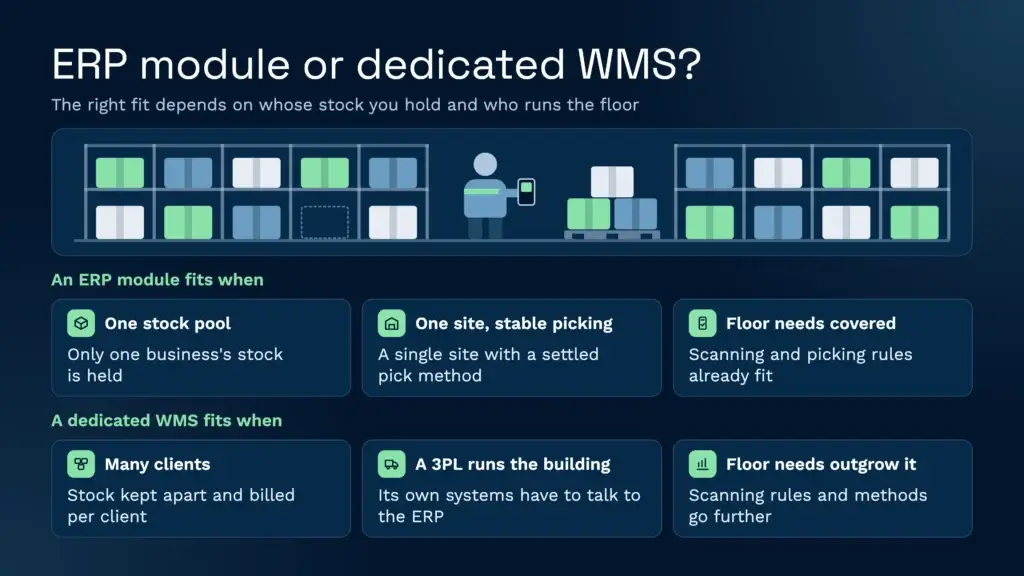
- Whose stock: Does the warehouse hold one business’s stock, or the stock of many clients that must stay separate and be reported and billed per client? A third-party logistics operation usually faces the second case.
- Who runs the building: Is the warehouse run by the same company as the ERP, or handed to a 3PL whose systems the ERP has to talk to?
- Floor needs: What do pickers and handheld users need, in terms of scanning rules, location types and picking methods, and does the current set-up give it to them?
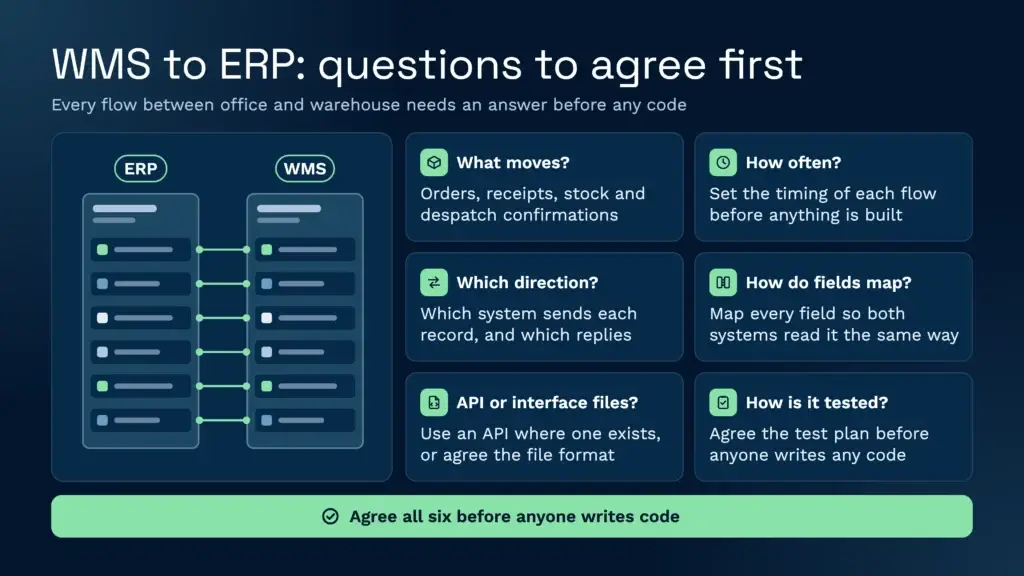
- Data flows: What has to move between ERP and warehouse, such as orders, receipts, stock levels and despatch confirmations, how often, and in which direction?
- Ownership of changes: Who maintains the ERP configuration, in-house or through a partner, and who will change the warehouse process when a client’s requirements change?
A business that runs one stock pool, one site and a stable picking method may well be right to stay with the module. For a 3PL with many clients, the multi-client questions usually decide the matter. Our 3PL WMS guide sets out what a 3PL should look for in a system.
Connecting a separate WMS to an ERP: what to agree first
Whichever WMS sits beside the ERP, the integration work starts with the data, not the connection. Mat Buttar, Head of Solutions at Clarus, says an integration starts with the full mapping of the data: what the sending system calls each item, how it converts inside the WMS, and where and how often the result needs to go. His questions before anything is built are what you want to send, what you can send, what you want done with it, and what you want to see back. Clarus is built API-first, so where the ERP offers an API, he says the exchange is close to instant. Where it does not, Clarus maps interface files into its own format to create a sales order or a receipt, then sends a file back to confirm that it has happened.
Clarus connects to ERPs by API or interface files. Our guide on what to connect between a WMS and an ERP, and how to test it, sets out the agreements to make before go-live. Whatever the platform, agree the field mapping, the timing of each flow and the test plan before anyone writes code.
Where a purpose-built 3PL WMS fits
A 3PL that holds stock for several clients needs the warehouse system to keep that stock apart, not only the ERP. Clarus WMS is a purpose-built system for 3PLs and is cloud-native, so there are no servers to maintain and no version upgrades to schedule. Each client’s stock, reporting and billing stays separate within one warehouse. Clients can check their own stock levels and order status through the kundportalen, or receive scheduled stock reports by email. Our fakturering av kunder feature page covers how charges are set up per client.
Clarus also supports more than one warehouse from a single environment, and its handhållna arbetsflöden can be built around the scanning steps a site uses. A single-client business with one site and a simple picking method may find the built-in module enough, and we would say so. For a business on Microsoft Dynamics, our Microsoft WMS explainer covers that set-up. For Sage 200, see Sage 200 Warehouse Management.
Tala med en lagerarbetare
If you’re evaluating your options and want to see how a purpose-built WMS works in practice, Clarus is worth a conversation. We work with 3PLs and distributors to implement warehouse management software that fits the way you operate, not the other way around.
Kom i kontakt med vårt team att diskutera dina krav.