

A sortation system reads what each item is, decides where it needs to go and diverts it to the right lane, chute, bin or workstation. Automated sortation systems do this with conveyors, trays or robots, while manual sortation uses people, sort lanes and put-walls to do the same job by hand. For many growing warehouses the first question is not which sorter to buy. It is how much sorting the operation really needs, and what the warehouse management system has to tell the floor before the first item moves.
What a sortation system is
Sortation means separating a mixed flow of goods into the groups they need to reach, usually by destination, carrier, route, order or customer. A sortation system is the equipment, software or combination of the two that does the separating. The term covers a manual sort with labelled bins as much as a conveyor sorter with many chutes.
Most people in the industry describe sortation as three steps: identify, decide and divert. The Wikipedia entry on sorters in logistics sets out the same idea. The Material Handling Institute’s Conveyor and Sortation Systems group in the United States is a useful place to see how the equipment side describes the category.
What is a conveyor sorting system? A conveyor sorting system uses a conveyor system to carry items past a reader, then diverts each one to its destination with a mechanical device such as a tray, a shoe or a pusher.
How a sortation system works
A sortation system identifies each item, decides its destination and diverts it to the right point, usually at the end of a conveyor or through a set of lanes. Identification comes from a barcode or RFID tag that the reader can see. The decision comes from data that a warehouse management system (WMS) has already attached to the order or container. The diversion is the physical move to a chute, lane, bin or workstation.
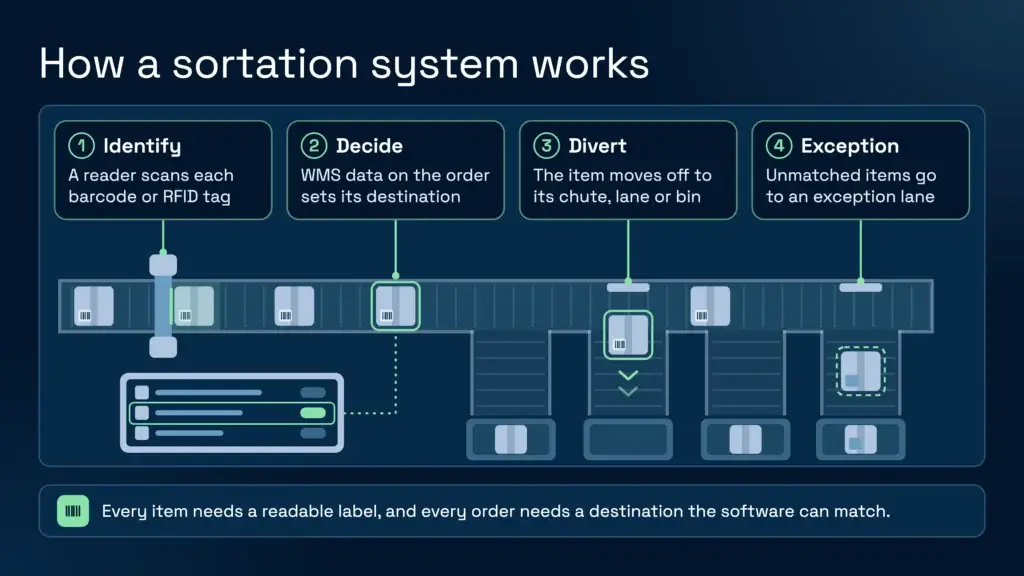
Sortation depends on data more than most buyers expect. Every item needs a readable label. Every order or container needs a destination the software can match. If either is missing, a well-run process sends the item to an exception lane rather than guessing where it belongs. Labels and identifiers are covered in more detail below.
The main types of sortation system
The main sorter types are sliding shoe, cross-belt, tilt-tray, pop-up wheel, pusher, bomb-bay and robotic, and each moves an item off the main flow in a different way. The table gives the basic mechanism of each. It does not rank them, because the right choice depends on the goods and the layout.
| Sorter type | How it moves an item to its destination | Typical use |
|---|---|---|
| Sliding shoe | The item slides along a tray or belt until a shoe pushes it onto a chute | Cartons and parcels |
| Cross-belt | Small belts on a moving carrier discharge the item sideways into a chute | Parcels and mixed shapes |
| Tilt-tray | A tray tilts at the destination and drops the item into a chute | Parcels and small items |
| Pop-up wheel | Wheels rise through the belt surface and push the item sideways | Flat items and cartons |
| Pusher | A paddle or arm pushes the item off the conveyor at its destination | Cartons on a simple line |
| Bomb-bay | A tray opens at the bottom and drops the item to a lower level | Compact sorting across two levels |
| Robotic | Robots or mobile units carry the item or tote to a destination | Flexible layouts and changing volumes |
Two broader distinctions matter more than the mechanism when you first talk to a supplier. A case sorter handles full cartons or cases, while a unit sorter handles single items, often in polybags or small boxes. Many sites run a hybrid, with a case sorter for cartons and unit sorting further along the process. The cross-belt sorter and tilt-tray sorter are the two types most often described in trade literature, so they are a good starting point for reading supplier material.
Specialist types such as pouch sorters and garment-on-hanger systems exist for particular goods. Most 3PL sites will not need one.
Where sortation sits in the outbound flow
In a typical outbound process, orders are picked, sorted, packed and then dispatched. Sortation sits between picking and despatch. It is the step that gets each picked order to the right outbound lane, whether that lane is organised by courier, route, service level or customer. The stages after the sort are covered in our guide to the warehouse despatch process.
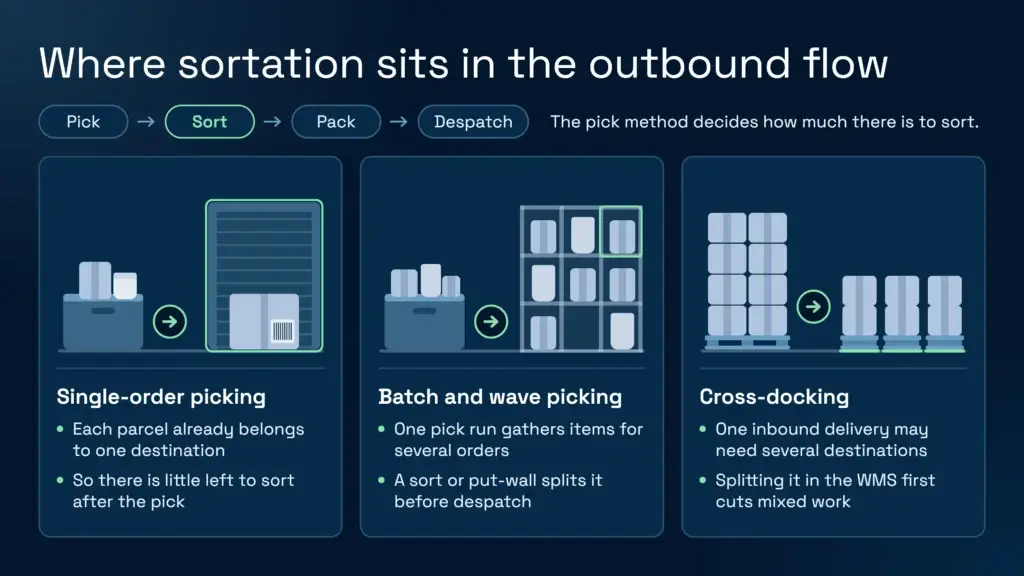
The pick method decides how much sorting there is. Single-order picking produces parcels that already belong to one destination, so there is little to sort afterwards. Batch and wave picking gather several orders into one pick run, and that run has to be split again before dispatch. That split is where sorting, or a put-wall, earns its place. Our warehouse order picking guide covers the pick methods in more depth.
Cross-docking adds another split. One inbound delivery may need dividing across several outbound destinations. Clarus can split a single incoming delivery into several smaller deliveries, and each one can have its own pick list and dispatch. The cross-docking feature page sets out how that works. That is a decision made in the software before anything is physically moved, and it reduces how much mixed work reaches the floor at once.
What the WMS has to supply to a sorter
A sorter is only as good as the data behind it. The warehouse management system holds the information that tells the sort where each item should go, so its setup decides how much the sort can do without a person deciding.
Order and carrier data
The WMS needs to know which carrier and service each order is for. Clarus lets a warehouse pick by carrier and service, so the system asks which carrier and service the pick run is for. Mathew Buttar, Head of Solutions at Clarus, describes the typical case in paraphrase: 100 orders split across two carriers with different collection times, where the team wants everything for the first collection picked first. He is clear that most customers still pick from a list ordered by expected dispatch date, so carrier picking is a choice some sites make, not the default. This sorts the work at the pick. It does not physically sort parcels, but it can mean less mixed work reaches the sort area at one time. You can read more on our picking features page.
Release order and priority
When a transport management system sends back priority numbers or load references, Clarus can be configured to release sales orders in that order. The first orders released are the first to leave, so the pick does not start with whatever happens to sit at the front of the list. Pick routes can also follow the layout. Walk sequence is set on each location, so a pick run can finish at goods out. The pick and pack process is where these choices land on the floor.
Labels and barcodes
A sorter reads labels, so the labels have to be right. GS1 standards define the identifiers used on pallets and cases, and the Serial Shipping Container Code (SSCC) identifies a logistics unit such as a pallet. Clarus can read GS1 identifiers on supplier labels by scanning, and it can receive a pallet by scanning its SSCC when the advance shipping notice carries the matching data. Our SSCC labels guide sets out the label structure.
Scanning reduces errors but does not remove them. A scanned location, a scanned pallet and a scanned product can still be the wrong set of items if a person is involved in the move. Keep that in mind when you design the exception process.
Despatch files and advance shipping notices
When a pick list is complete, an automation can send an advance shipping notice file over SFTP with the scanned data included, so nobody re-keys it. Where an ERP or TMS offers an API integration, the connection can be direct. Where it does not, Clarus maps interface files to the format the other system expects.
Exceptions
Every sorter has exceptions: unreadable labels, damaged cartons and items with no destination. The design question is who clears them, how quickly and what the record shows afterwards. Decide that before you specify the sort, not after the first busy week.
WMS and WCS: who does what
A warehouse management system manages orders, stock and tasks. A warehouse control system (WCS) sits closer to the equipment and directs machines in real time. Where a site runs automated sorting, both layers matter.
Clarus is a WMS. It does not make sortation hardware. If your site has automation equipment, ask the equipment supplier which interfaces it offers and how it expects to receive work.
Manual sortation and put-walls: when they are enough
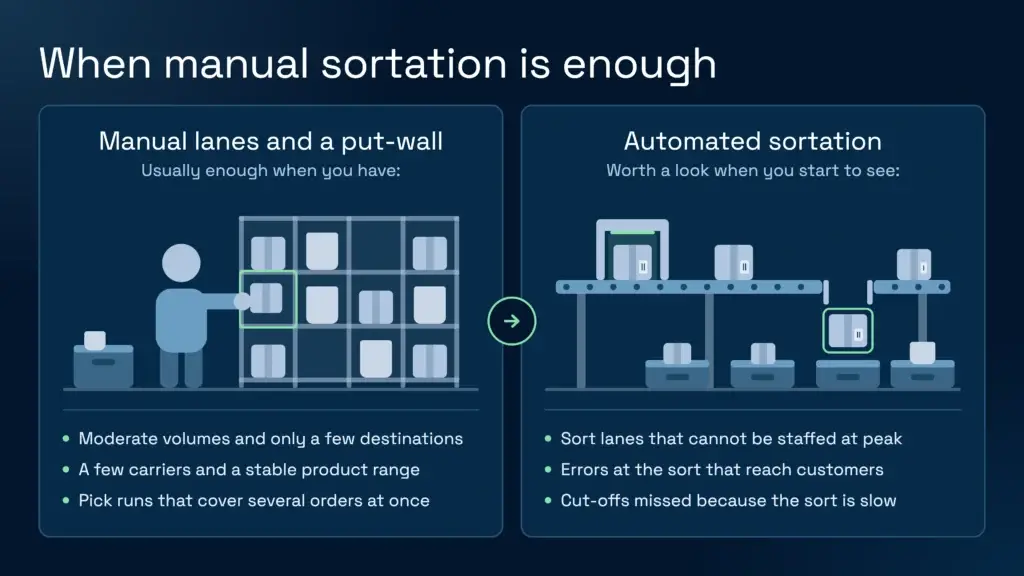
Plenty of warehouses run sortation without any automation. A manual sort uses labelled lanes or bins, staff and a clear rule for each destination. A put-wall is a grid of cubbies where each cell holds one order or destination, and pickers place items straight into the right cell. Both have a cost, because people walk, reach and make a decision at every item. Both work well when volumes are moderate and destinations are few.
| Method | How it works | When it tends to fit |
|---|---|---|
| Manual sort lanes | Staff sort items into labelled lanes or bins by hand | Few destinations and moderate volumes |
| Put-wall | Pickers place items into cubbies, one per order or destination | Pick runs that cover several orders |
| Conveyor sorter | Scanned items are diverted automatically to chutes or lanes | Steady volume with many destinations |
| Robotic sortation | Robots or mobile units bring items to their destinations | Changing layouts or spiky volumes |
The sensible test is the shape of the work, not the size of the business. Ask how many orders leave at each cut-off, how many carriers and services they use, how many items each order holds and how often the product mix changes. A 3PL with many clients and many cut-off times often has more destinations than a single-brand warehouse of similar size, and that complexity can justify automation sooner. A site with steady volumes, a few carriers and a stable product range may run well on lanes and a put-wall for years.
When a warehouse needs an automated sortation system
Automation pays back when manual sorting becomes the constraint. That usually shows up as lanes that cannot be staffed at peak, errors at the sort that reach customers, or cut-offs missed because the sort is slow. You will see these signals in your own data before a supplier can quantify them for you.
Conveyors and sorters are work equipment, so they fall under the Provision and Use of Work Equipment Regulations 1998 (PUWER). The HSE explains what that means in practice on its PUWER guidance, and its guide to warehousing and storage covers the wider risks of moving goods. Both should shape the layout before the equipment is chosen. Automation also needs a fixed floor plan and planned maintenance, so it suits steady, predictable flows better than a site that changes shape every month.
The Automated Material Handling Systems Association (AMHSA) is the UK trade body for automated material handling, so its material is a reasonable starting point for the equipment side.
How to work out what you need before you specify a sorter
Work out these points before you talk to a supplier. Most of them are data you already hold, and they will shape the sorter more than any headline feature.
- Volumes: orders and items per day, your peak days, and how the work arrives across the day.
- Item mix: size, weight, fragility and packaging. Polybags, cartons and bottles sort differently.
- Destinations: the number of carriers, services, routes, client lines and cut-off times.
- Space: floor area, height and how the area needs to change at peak.
- Data: what the WMS can read from the order, carrier and label, including the destination, service, weight and barcode on each item.
- Exceptions: what happens to unreadable labels, damaged items and mis-sorts, and who clears them.
- Growth: whether the plan has to take on new clients or new sites.
Speak to a warehouse expert
If you’re evaluating your options and want to see how a purpose-built WMS works in practice, Clarus is worth a conversation. We work with 3PLs and distributors to implement warehouse management software that fits the way you operate, not the other way around.
Get in touch with our team to talk through your requirements.