

An SSCC label is a GS1 barcode that carries a Serial Shipping Container Code, an 18-digit number that identifies one logistics unit, usually a pallet or a case. Scanning that one code at goods in or dispatch tells the system what the unit is, so nobody has to key in its contents by hand. The number is built from your GS1 company prefix, an extension digit, a serial reference and a check digit, and the label encodes it under application identifier 00.
What is an SSCC?
An SSCC (Serial Shipping Container Code) is a GS1 identifier for a logistic unit. GS1 describes a logistic unit as any combination of items packed together for storage or transport, such as a pallet, a case or a parcel. GS1 Netherlands puts it plainly: “With an SSCC you code a shipment.” The code expires once the shipment has been received and booked in, so its job is to follow the goods through the receiving process and the warehouse.
In practice the SSCC does two jobs. It gives a pallet a unique identity for its whole journey, and it gives the receiving team one barcode to scan in place of a barcode for every case on it.
How the 18 digits are built
Each part of the SSCC has a fixed role. The extension digit, the GS1 company prefix and the serial reference make up the first 17 digits, and the check digit is the eighteenth. The table sets out the parts.
| Part | Length | Was es bewirkt |
|---|---|---|
| Extension digit | 1 digit | Lets one prefix produce more codes. Any value from 0 to 9. |
| GS1 Company Prefix | Set by your GS1 allocation | Identifies your company. Your national GS1 organisation allocates it when you join. |
| Serial reference | The remaining digits of the first 17 | Gives each logistic unit its own number, so the serial part shortens as the prefix gets longer. |
| Check digit | 1 digit | Calculated with the GS1 modulo-10 method, so a mistyped code fails validation. |
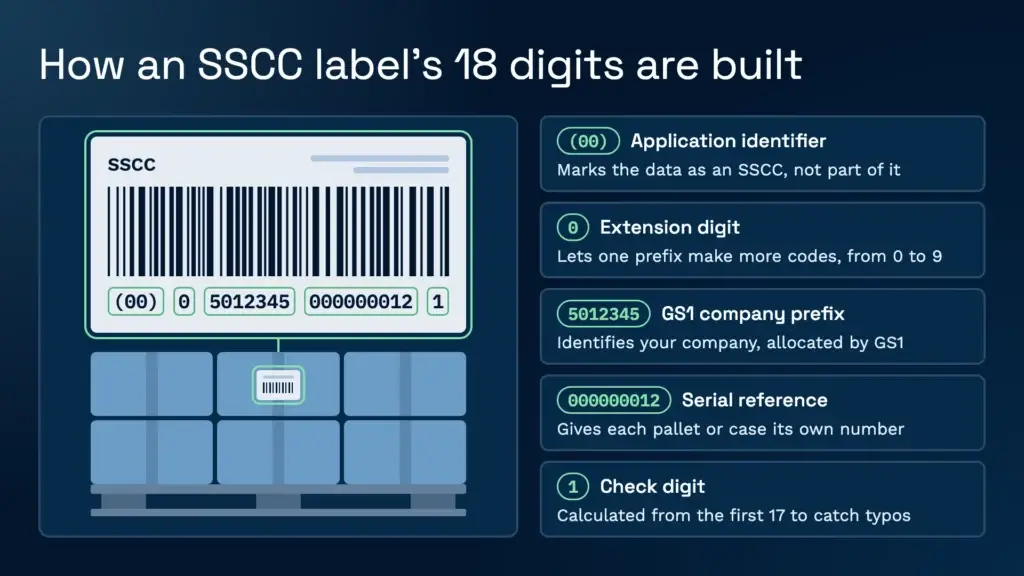
The printed label shows 20 digits in human-readable text, because the 00 application identifier sits in front of the 18-digit SSCC. The 00 is a prefix the scanner reads, not part of the number. Most label and WMS software works out the check digit automatically. If it is wrong, the code can fail to scan or fail validation, which is one of the first things to check when a pallet will not receive.
When do you need an SSCC label?
You need one when a logistic unit has to be identified on its own, and in warehousing that usually means pallets. A pallet can carry one SSCC rather than every parcel on it getting its own, and that is what makes a single scan at goods in useful. GS1 Netherlands gives the same reason: scanning the SSCC on entry books the goods in straight away. GS1 UK’s guide to which barcode to use for pallets and shippers is worth reading before you agree a label spec with a customer.
Whether a customer or retailer requires SSCCs is set in their labelling specification, not by the warehouse. Check it before the first delivery arrives, because a missing or non-compliant label is far easier to deal with before the lorry is unloaded than after. Mixed standards are common. Mathew Buttar, Head of Solutions at Clarus, describes two Benelux customers whose GS1 labels were laid out differently: one carried the article number and sell-by date, the other the batch and production date. The SSCC was the constant. Everything else changed.
What does a GS1-128 SSCC label look like?
An SSCC is printed as a GS1-128 barcode, with application identifier 00 marking the data as an SSCC. Other identifiers can sit on the same label, such as a product number or batch, and the receiving system has to know which ones to read. The GS1 General Specifications set out the placement rules for pallets, including that each barcode and its quiet zones should be at least 50 mm from any vertical edge, so the label is less likely to be damaged in transit.
GS1 Netherlands makes a practical point too: the code is most useful when it is also scannable, so a number can be turned into a barcode where the supplier has not printed one. Label quality matters as much as the label design. A printer running low on ink, or a label torn in transit, will fail at the dock long before the software is at fault.
How a WMS generates and scans SSCC labels
The quickest route is an advance shipping notice (ASN) that carries an SSCC for each pallet line. If the ASN is in the system, the handheld accepts a pallet with one scan, and the data on the notice fills in the rest. Where there is no ASN, the handheld reads the labels already on the pallet. Where the warehouse labels its own stock, the system creates the reference itself.
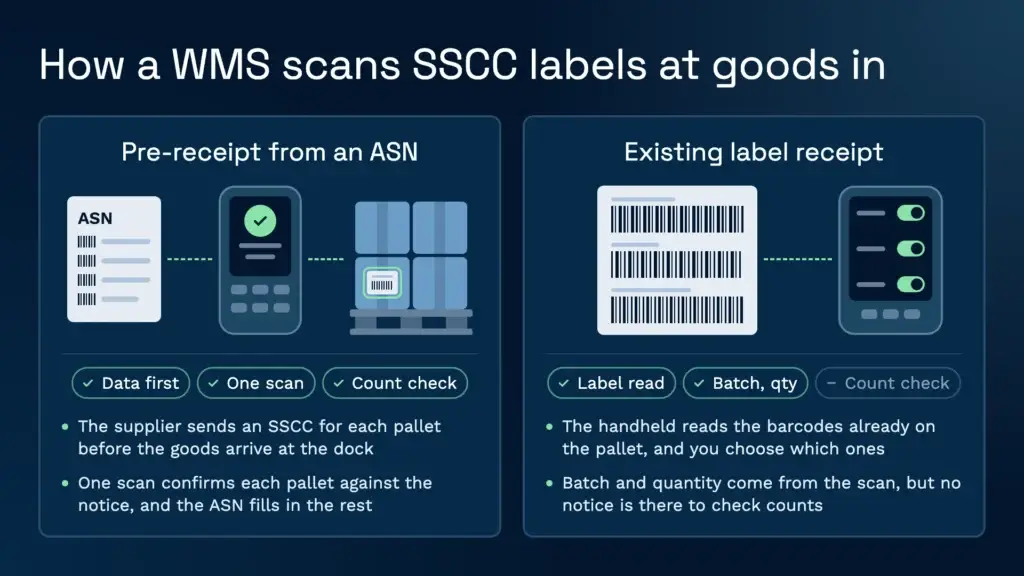
Pre-receipt from an ASN
Here the supplier sends the data first, including an SSCC for each pallet, so the goods are known before they arrive. Mathew Buttar, Head of Solutions at Clarus, puts the working principle in paraphrase: when the supplier sends everything over a defined interface or API, the receiver only has to confirm the pallets they were told about. On a lorry carrying 26 pallets, that is 26 scans and the load is received. Clarus’s Eingangslogistik flow is built around that sequence, and the scan confirms each pallet against the notice.
Existing label receipt
When the data is not sent ahead, the handheld can read the barcodes already on the supplier’s label. A standard GS1 pallet label often carries three barcodes: one with the article number and quantity, one with the batch, and one with the SSCC. Within Clarus’s warehouse scanning system, you choose which identifiers the handheld looks for and switch the rest off. The batch and quantity then come from the scan, so nobody types them in.
Storage unit labels in Clarus
For stock that the warehouse labels itself, Clarus gives each pallet or other storage unit its own reference, which works as a licence plate for that unit. Once a goods receipt is received, the team can print storage unit labels and attach them to the goods, and a label can be reprinted at any time. The pallet management feature handles these references from receipt through to dispatch.
Dispatch and the ASN going out
The same logic runs in reverse at dispatch. An automation can send an ASN to a customer or carrier as soon as a pick list is completed, over SFTP, with the data captured by scan so that nobody re-enters it. Pick and pack choices affect how those pallets are built and sent, and the pack and dispatch strategies page covers the options.
Pallet and LPN tracking after the scan
An SSCC gives a pallet its identity, and the WMS builds the history on top of it. Every move, hold and pick is recorded against that reference, so you can see where the pallet has been and who handled it. Quarantine works the same way. Clarus builds it from automations rather than a separate module. For example, where each batch has to be certified before release, an automation can put every pallet on hold as it is received, so it cannot be allocated until someone releases it.
There is a limit to what the system can see. It tracks what happens inside the building. Once a load leaves the back door, the system does not control what happens to it. Mathew Buttar makes the point in paraphrase: the warehouse can get the pallet perfect to the door, and what happens on the lorry is a separate problem. If you build mixed loads, the mixed palletising guidance shows how each logistic unit is kept separate.
Common SSCC label errors and what they mean
Most SSCC problems at goods in come down to a short list of causes. The table pairs each symptom with its usual cause and the first thing to check.
| Symptom | Likely cause | What to check first |
|---|---|---|
| Pallet will not scan at goods in | Check digit wrong, or the SSCC does not match the ASN line | Compare the scanned code with the notice, and check the label for a damaged or mistyped number |
| Pallet scans but a reference is rejected | The reference already belongs to another storage unit | Find where it is held, because each reference must be unique |
| Quantity or batch comes through blank | The handheld is not set to read the identifiers on that label | Switch on the identifiers the label carries, and test with a sample of each label type |
| Barcode will not read | Faded print, a torn label or a failing printer | Reprint the label and check the printer’s ink or toner |
| Pallet received with no notice to match | Blind receipt, so nothing is there to check counts against | Capture the data at receipt, and flag any over or short quantities |
| Two labels from one supplier read differently | Different label layouts carrying different identifiers | Record each layout, and set the handheld for each one |
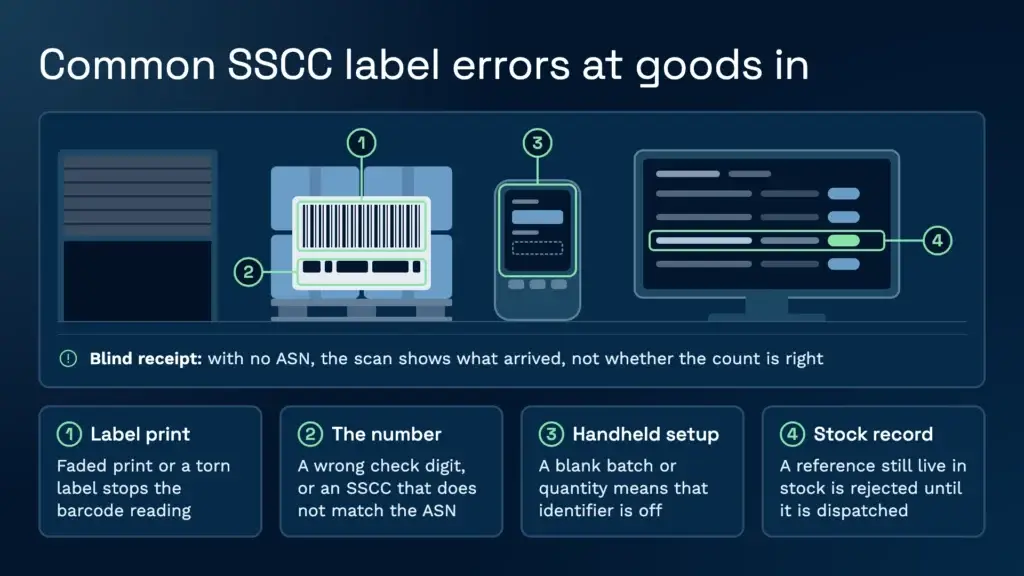
Blind receipts deserve a special mention. Without an ASN, the system cannot tell you whether the count is right, only what was scanned. That is why a clear pre-receipt process, or at least a prompt for the batch and best-before date at goods in, matters so much.
Setting up SSCC labels: a short checklist
Before you print live labels, check the current layout rules in the GS1 General Specifications, published through the GS1 reference site, and read GS1 UK’s guide to creating SSCCs and logistics labels.
A label project is mostly a data project, and the checks are simple to list.
- Confirm your GS1 company prefix and who issues serial numbers, so that two sites never generate the same SSCC.
- Collect a sample of every label your suppliers and customers use, and record the identifiers each one carries.
- Agree the route with the customer, whether that is ASN pre-receipt, existing label receipt or storage unit references.
- Test with real pallets at goods in, including one with a damaged or missing label, so you know what the operator sees.
- Check the layout against the current GS1 General Specifications before printing in volume.
Our verdict: use the ASN route whenever a supplier can send one. One scan per pallet only works when the data arrives first. Labels read on arrival are the fallback, and they work well once the layouts are known and tested.
Sprechen Sie mit einem Lagerfachmann
If you are reviewing how your warehouse receives and tracks pallets, or you are about to change label standards with a customer, it is worth a conversation. We work with 3PLs and distributors to set up receiving that fits the labels they actually get.
Kontaktieren Sie unser Team um Ihre Anforderungen zu besprechen.