

Le choix d'un système de gestion intégrée (ERP) est l'une des décisions d'investissement les plus importantes qu'une entreprise ait à prendre. Le bon PGI Une solution adaptée peut simplifier vos opérations, améliorer la visibilité et soutenir votre croissance. Une solution inadaptée peut vous enfermer dans des systèmes coûteux et rigides qui freineront votre activité pendant des années. Ce guide vous explique comment comparer les systèmes ERP, quelles sont les fonctionnalités les plus importantes et comment vous positionner pour bénéficier à la fois de gains immédiats et d'une évolutivité future.
Qu'est-ce qu'un progiciel de gestion intégré (ERP) ?
La planification des ressources d'entreprise (ERP) est une suite de modules logiciels intégrés qui centralisent et automatisent les processus métier dans les domaines de la finance, de la chaîne d'approvisionnement, des ressources humaines, de la production et de la gestion de la clientèle. Au lieu de laisser les données dispersées dans des feuilles de calcul isolées ou des systèmes déconnectés, l'ERP rassemble toutes ces informations au sein d'une source unique et fiable.
Le principe de base semble simple : une seule base de données, un seul ensemble de règles, un seul moteur de reporting. Dans la pratique, les systèmes ERP sont complexes. Ils concernent tous les services, nécessitent une configuration approfondie et exigent un engagement quant à la manière dont vous allez les exploiter. Une mise en œuvre typique d’un grand système ERP, telle que SAP, Oracle, ou Microsoft Dynamics, cela prend entre 18 mois et trois ans et coûte des millions. Les alternatives basées sur le cloud, telles que NetSuite sont souvent plus rapides et moins coûteuses, mais nécessitent tout de même un travail de personnalisation important.
Pour les prestataires logistiques (3PL) et les entreprises dont les activités reposent largement sur la gestion d’entrepôts, un progiciel de gestion intégré (ERP) est indispensable pour le contrôle financier et le reporting client. Mais ce n’est pas un outil de gestion d’entrepôt. C’est là qu’intervient plateformes WMS spécialisées question.
ERP ou WMS : comprendre la différence
La question qui revient le plus souvent est la suivante : ai-je besoin à la fois d'un ERP et d'un système de gestion d'entrepôt?
La réponse est presque toujours « oui », et voici pourquoi.
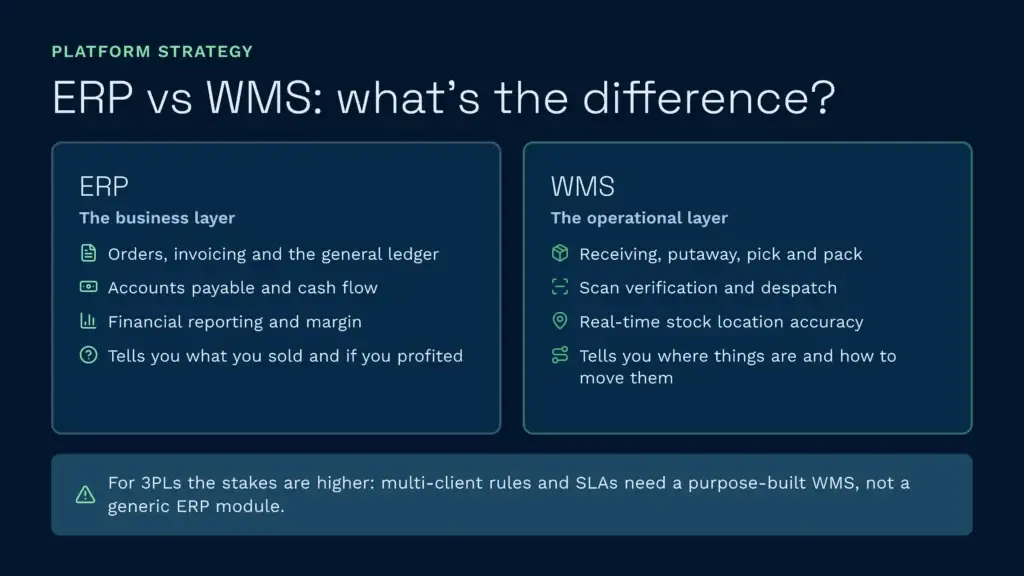
Un progiciel de gestion intégré (ERP) gère la couche opérationnelle : commandes, facturation, grand livre, bons de commande, comptabilité fournisseurs, trésorerie et reporting financier. Il vous indique ce que vous avez vendu, ce que cela vous a coûté et si vous avez réalisé un bénéfice.
Le WMS gère la couche opérationnelle : réception, mise en stock, préparation des commandes, emballage, expédition, exactitude des stocks et visibilité en temps réel sur les stocks. Il vous indique où se trouvent les articles, comment les déplacer efficacement et si chaque opération a été effectuée correctement.
Un module ERP permet de gérer les opérations de base d'un entrepôt, mais il n'est pas optimisé pour la réalité physique d'un entrepôt. Les systèmes ERP sont conçus pour contrôler les flux de données et les transactions financières. Ils ne prennent pas en charge le stockage dirigé, l'optimisation de la préparation des commandes par vagues, vérification de la numérisation, ni les ajustements de stock en temps réel, comme le fait un système de gestion d'entrepôt (WMS) spécialement conçu à cet effet.
Pour les prestataires logistiques tiers (3PL) en particulier, les enjeux sont encore plus importants. Chaque client peut avoir des règles de facturation, des exigences en matière de manutention des produits et des attentes en matière de SLA différentes. Un ERP générique ne peut pas rendre compte de la complexité de opérations multi-clients. C'est pourquoi il existe des plateformes WMS 3PL spécialisées : elles apportent le niveau de précision opérationnelle que les systèmes ERP ne peuvent à eux seuls offrir.
Comment comparer les systèmes ERP
Le choix d'un progiciel de gestion intégré (ERP) nécessite de prendre en compte plusieurs critères. Ne vous limitez pas aux fonctionnalités : renseignez-vous sur le modèle de déploiement, le coût total de possession et vérifiez si la solution pourra évoluer au rythme de votre entreprise.
1. Modèle de déploiement : cloud ou sur site
Les systèmes ERP sur site (tels que SAP, Infor, ou Dynamics sur site) sont hébergés sur vos serveurs. Vous êtes propriétaire de l’infrastructure, vous prenez en charge les mises à niveau et vous assumez la responsabilité de la maintenance et de l’application des correctifs de sécurité. La mise en œuvre est lente et coûteuse, car vous devez mettre en place une infrastructure technologique sur mesure tout en repensant vos processus métier.
Les solutions ERP dans le cloud (telles que NetSuite, Dynamics 365 natif du cloud ou Oracle Cloud) fonctionnent sur l’infrastructure du fournisseur. Vous bénéficiez de mises à jour automatiques, vous n’avez pas à vous occuper de la maintenance des serveurs et le déploiement est généralement plus rapide, souvent de 12 à 18 mois au lieu de trois ans. Vous évitez également les dépenses d’investissement liées au matériel.
Pour la plupart des entreprises de taille moyenne aujourd’hui, le cloud est le choix le plus judicieux. Il allège la charge opérationnelle, réduit les coûts initiaux et offre une évolutivité prévisible. En contrepartie, il implique une perte de contrôle : vous dépendez de la feuille de route et de la disponibilité du fournisseur.
2. Compétences spécifiques au secteur
Les progiciels de gestion intégrée (ERP) génériques conviennent aux entreprises en général. Les ERP sectoriels sont faits pour vous.
Si vous travaillez dans le secteur de la fabrication, vous avez besoin de fonctionnalités de gestion des nomenclatures (BOM), d’exécution des ordres de fabrication et de planification de la production. Si vous travaillez dans la logistique 3PL, vous avez besoin d’une comptabilité multi-clients, d’une facturation basée sur les activités et de portails en libre-service pour les clients. Si vous travaillez dans le secteur agroalimentaire, vous avez besoin d’un suivi des lots, d’une gestion des dates de péremption et de rapports de préparation aux rappels de produits.
Déterminez si le fournisseur de progiciel de gestion intégré (ERP) a réellement résolu les contraintes propres à votre secteur d’activité, ou si vous devrez adapter sa plateforme générique à vos besoins. Cette adaptation coûte plus cher, prend plus de temps et vous laisse avec un avantage concurrentiel moindre.
3. Étendue de l'intégration
Aucun progiciel ERP ne fait tout. Vous devrez l'intégrer à des plateformes de commerce électronique, à des transporteurs, à des logiciels de comptabilité, à des systèmes CRM et, bien sûr, à des logiciels de gestion d'entrepôt. Évaluez la facilité avec laquelle le progiciel ERP s'intègre aux outils que vous utilisez déjà ou que vous prévoyez d'utiliser.
Les éditeurs de progiciels de gestion intégrée (ERP) proposent des connecteurs prêts à l'emploi pour les principales plateformes (Shopify, Amazon, opérateurs de télécommunications, logiciels de comptabilité). Vérifiez si ces connecteurs existent, si le fournisseur les met à jour et si vous devrez recourir à un développement d'intégration sur mesure. Une intégration sur mesure coûte cher et génère une dette technique.
4. Évolutivité et pérennité
Le système évoluera-t-il au rythme de votre croissance ? Si votre chiffre d'affaires s'élève actuellement à 5 millions de livres sterling et que vous prévoyez d'atteindre 50 millions de livres sterling d'ici cinq ans, le progiciel de gestion intégré (ERP) sera-t-il capable de gérer un volume de transactions dix fois supérieur ? Pouvez-vous ajouter de nouveaux sites d'entrepôt, de nouvelles catégories de produits ou de nouvelles divisions sans avoir à remanier l'architecture du système ?
Les fournisseurs d'ERP dans le cloud s'en sortent généralement mieux dans ce domaine, car leurs solutions sont conçues pour fonctionner à grande échelle en mode multi-locataires. Les systèmes sur site atteignent souvent leurs limites, ce qui entraîne une baisse des performances ou nécessite une mise à niveau importante de l'infrastructure.
5. Coût total de possession (TCO)
La tarification des progiciels de gestion intégrée (ERP) est rarement transparente. Les fournisseurs indiquent le prix des licences, mais le coût réel comprend la mise en œuvre (qui représente souvent deux à quatre fois le coût des licences), la formation, la personnalisation et l'assistance continue. Un ERP “ bon marché ” peut s'avérer coûteux si l'on tient compte d'une mise en œuvre s'étalant sur 24 mois.
Élaborez un modèle de coût total de possession (TCO) sur cinq ans : frais de licence, coûts de mise en œuvre, assistance annuelle, infrastructure (en cas d'installation sur site), formation du personnel et réserve pour imprévus. Comparez ce montant aux gains opérationnels que vous espérez en retirer (réduction des effectifs, diminution des erreurs de facturation, meilleure visibilité). Si le TCO dépasse la valeur que vous en tirerez, renoncez à ce projet.
Ce que dit le « Magic Quadrant » de Gartner à propos des progiciels de gestion intégrée (ERP)
Gartner publie désormais des « Magic Quadrants » distincts pour les ERP dans le cloud, en distinguant les entreprises axées sur les produits de celles axées sur les services, et classe les fournisseurs selon deux critères: l'exhaustivité de leur vision (leur capacité à cerner les tendances du marché) et leur capacité d'exécution (la performance de leur produit actuel). Les fournisseurs les mieux classés figurent dans le quadrant « Leader » : ils font preuve d'une bonne capacité d'exécution aujourd'hui et disposent d'une feuille de route crédible pour l'avenir.
Parmi les leaders récents dans ces différents quadrants, on peut citer SAP, Oracle, et Microsoft Dynamics 365, aux côtés d'Infor CloudSuite. NetSuite, qui appartient à Oracle et cible le marché des moyennes entreprises, a tendance à ne pas figurer dans ces classements des « leaders » destinés aux grandes entreprises. Des fournisseurs tels que Sage, Epicor, et Plex apparaissent généralement comme des « acteurs de niche » ou des « visionnaires », selon la catégorie concernée. Les petits fournisseurs et les spécialistes des solutions sur site traditionnelles occupent généralement des positions moins élevées dans le classement.
Le « Magic Quadrant » mérite d'être consulté, car il reflète le consensus des analystes sur la qualité des produits et les investissements des fournisseurs. Un « leader » est susceptible de maintenir son niveau de compétitivité et de poursuivre la mise en œuvre de sa feuille de route. Un « acteur de niche » peut très bien répondre aux besoins d'un secteur vertical spécifique, mais manquer d'envergure horizontale.
Cela dit, les classements de Gartner ne remplacent pas une analyse approfondie. Certains fournisseurs occupent des places moins élevées dans le classement, mais excellent dans des cas d'utilisation spécifiques, tels que la logistique 3PL ou l'industrie agroalimentaire. Évaluez toujours si les atouts du fournisseur correspondent à votre secteur d'activité et à la taille de votre entreprise, et consultez vous-même le quadrant actuel, car les classements évoluent chaque année.
Établir une liste restreinte de solutions ERP : quels critères comparer ?
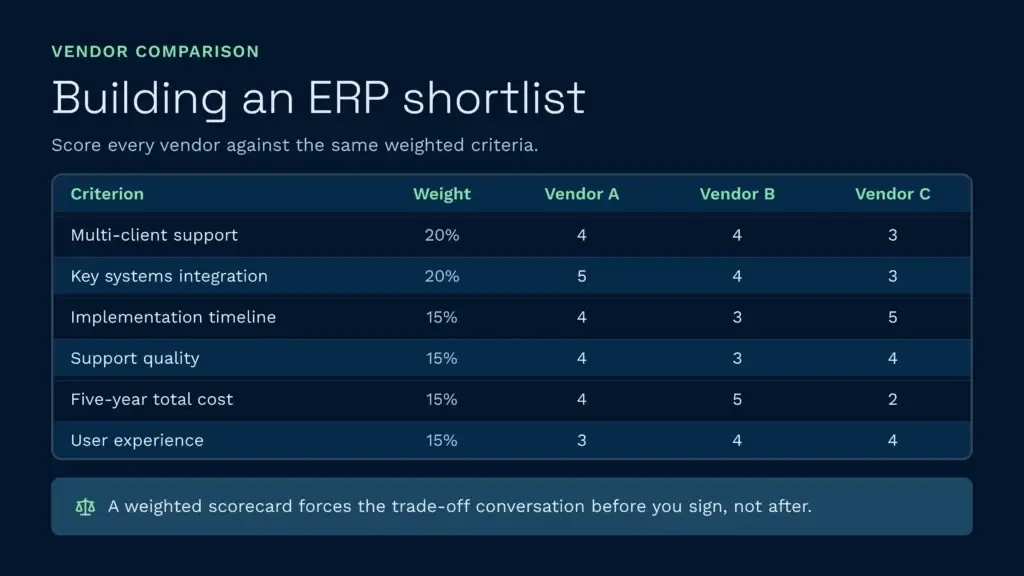
Une fois que vous aurez réduit votre sélection, établissez un tableau comparatif structuré des progiciels de gestion intégrée (ERP) et attribuez une note à chaque fournisseur en fonction de critères pondérés. L'essentiel est de définir clairement ces critères afin que les parties prenantes s'accordent dès le départ sur les compromis à accepter.
Utilisez une matrice comme celle-ci :
| Critère | Poids | Votre note (1 à 5) | Fournisseur A | Fournisseur B | Fournisseur C |
|---|---|---|---|---|---|
| Prise en charge multi-clients ou multi-sites | 20% | Conditions requises | 4 | 4 | 3 |
| Intégration avec vos principaux systèmes | 20% | Conditions requises | 5 | 4 | 3 |
| Calendrier de mise en œuvre | 15% | 6 à 12 mois (idéal) | 4 | 3 | 5 |
| Qualité du service d'assistance et délai de réponse | 15% | Conditions requises | 4 | 3 | 4 |
| Coût total sur cinq ans | 15% | Moins de 500 000 £ | 4 | 5 | 2 |
| Expérience utilisateur et charge de formation | 15% | Conditions requises | 3 | 4 | 4 |
Un tableau de bord pondéré impose une certaine clarté. Si le fournisseur A obtient le meilleur score en matière d'intégration, mais que le fournisseur B coûte deux fois moins cher, votre équipe doit déterminer clairement si l'avantage lié à l'intégration justifie le surcoût. Il est important d'avoir cette discussion avant de vous engager.
Le partenariat entre l'ERP et le WMS
Voici la réalité : votre ERP gérera à merveille les commandes et la facturation. Mais il ne permettra pas d'écouler les stocks plus rapidement, de réduire les erreurs de préparation de commandes en dessous de 99,51 TP3T, ni d'offrir à vos clients une visibilité en temps réel sur les stocks sans une plateforme dédiée à la gestion des entrepôts.
Une couche WMS spécialement conçue, notamment pour les opérations 3PL, vient compléter votre ERP en gérant les aspects physiques de l'entrepôt et les détails opérationnels liés aux clients. Elle enregistre en temps réel chaque opération facturable (réception, stockage, préparation de commandes, emballage, expédition, services à valeur ajoutée) afin que la facture générée par votre ERP soit exacte avant même d’être émise. Elle offre des fonctionnalités de vérification par scan, de mise en stock dirigée et d’optimisation de la préparation de commandes par vagues que les modules ERP génériques ne proposent tout simplement pas.
Par exemple, lorsqu’un prestataire logistique tiers (3PL) utilise le WMS Clarus en complément de son ERP, la facturation passe d’un processus de rapprochement nécessitant deux personnes et plusieurs jours à un flux quotidien automatisé des transactions. St John’s Hall Storage a réduit sa charge de travail liée à la facturation de quatre heures par jour à vingt minutes, car le WMS enregistrait chaque événement facturable en temps réel. Ce n’est pas là un point fort de l’ERP ; c’est un point fort propre aux WMS.
Il en va de même pour la précision des stocks. Les clients de Clarus apprécient notamment JODA Fret La précision des stocks est passée d’un peu plus de 90 % à 99,81 % (TP3T), car le WMS impose une vérification par scan à chaque étape du processus : réception, mise en stock, préparation des commandes et expédition. Votre ERP ne perçoit pas la réalité de l’entrepôt ; il ne voit que les enregistrements des transactions. Le WMS est le prisme qui garantit l’exactitude de ces enregistrements.
Et pour les clients qui exigent une visibilité en temps réel, un SGA spécialisé met à leur disposition un portail client leur permettant de consulter les niveaux de stock, l'état des commandes et le suivi des expéditions 24 heures sur 24, 7 jours sur 7. Votre ERP peut générer des rapports ; un SGA offre aux clients un contrôle opérationnel en temps réel.
Si vous êtes en train d'évaluer un progiciel de gestion intégré (ERP), pensez également à prendre en compte les Liste restreinte de logiciels ERP ainsi que des outils de gestion d'entrepôt qui viendront le compléter. L'ERP est la colonne vertébrale financière ; le WMS est le système nerveux opérationnel. Les deux sont essentiels.
Bonnes pratiques pour l'évaluation et la sélection d'un progiciel de gestion intégré (ERP)
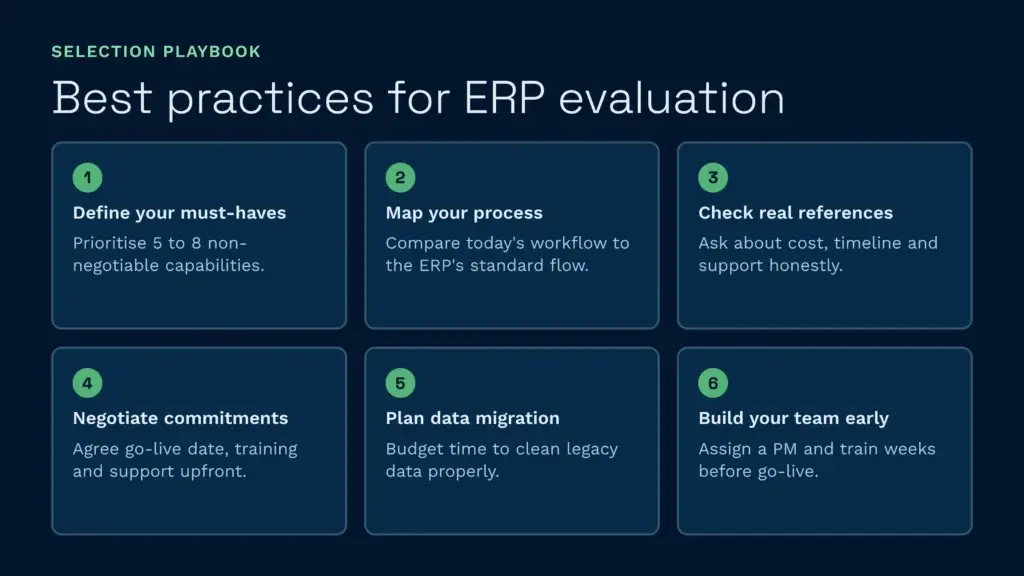
Avant de signer un contrat, suivez ces étapes pour éviter des erreurs coûteuses :
- Définissez ce qui est indispensable et ce qui serait un plus. Ne considérez pas toutes les fonctionnalités sur un pied d'égalité. Donnez la priorité aux cinq à huit fonctionnalités indispensables à votre entreprise. Tout le reste est négociable.
- Réalisez une analyse détaillée des processus. Décrivez le fonctionnement actuel de votre entreprise : le déroulement des commandes, la manière dont vous gérez les exceptions, les étapes manuelles existantes. Comparez ces éléments au fonctionnement du processus standard de l'ERP. L'écart ainsi mis en évidence correspond au coût et au risque liés à la personnalisation.
- Demandez des témoignages à des clients de votre secteur d'activité dont la taille est similaire à la vôtre. Interrogez-les sur le calendrier de mise en œuvre, les coûts réels par rapport aux coûts estimés, la qualité de l'assistance et ce qu'ils feraient différemment. Les témoignages des fournisseurs sont, comme on peut s'y attendre, positifs ; les avis de tiers (G2, Capterra) sont plus honnêtes.
- Négocier les modalités d'accompagnement à la mise en œuvre et les indicateurs de réussite. Ne vous contentez pas d'acheter un logiciel ; assurez-vous que le fournisseur s'engage à vous aider à réussir. Convenez dès le départ de la date de mise en service, du nombre d'heures de formation, de la durée de l'assistance après le lancement, ainsi que des mesures à prendre si le fournisseur ne respecte pas les étapes clés.
- Préparez soigneusement la migration de vos données. Les données historiques (fiches clients, commandes en cours, registres de stock) sont presque toujours plus désordonnées que vous ne le pensez. Prévoyez du temps supplémentaire et un budget pour la mise en conformité de la qualité des données. Le principe « si les données d'entrée sont erronées, les données de sortie le seront aussi » s'applique davantage aux systèmes ERP qu'à tout autre système.
- Constituez dès maintenant votre équipe et élaborez votre programme d'entraînement. La réussite d'un projet ERP dépend davantage de la gestion du changement que du logiciel lui-même. Désignez un chef de projet interne compétent, identifiez les utilisateurs avancés dans chaque service et prévoyez des sessions de formation plusieurs semaines avant la mise en service, et non quelques jours seulement.
Quel est le meilleur système ERP pour votre entreprise ?
Il n'existe pas de “ meilleure ” solution universelle. Le choix du système ERP adapté dépend de votre secteur d'activité, de la taille de votre entreprise, de sa complexité et de votre budget. Une entreprise industrielle comptant 500 salariés répartis sur quatre sites n'aura pas les mêmes besoins qu'un cabinet de conseil de trois personnes. Un prestataire logistique tiers (3PL) aura besoin d'un niveau de fonctionnalités différent de celui d'un grossiste.
Cela dit, certains fournisseurs se distinguent davantage dans certains domaines spécifiques :
- Pour un déploiement dans le cloud ultra-rapide : NetSuite et Dynamics 365 sont en tête. La méthodologie de mise en œuvre de NetSuite est optimisée pour des mises en service de 6 à 9 mois. Dynamics 365 s'intègre sans difficulté si vous faites déjà partie de l'écosystème Microsoft.
- Pour les opérations 3PL et multi-clients : Infor CloudSuite, Epicor et Plex offrent des fonctionnalités avancées de facturation multi-locataires et de visibilité sur les clients. Cependant, ces solutions nécessitent une personnalisation plus poussée que NetSuite.
- En ce qui concerne la complexité de fabrication : SAP et Oracle Cloud sont les leaders en matière de gestion des nomenclatures, de planification de la production et de contrôle qualité. En contrepartie, leur mise en œuvre est plus longue et leur coût plus élevé.
- Pour une solution simple destinée aux PME : Sage Intacct et Acumatica offrent un bon équilibre entre l'étendue des fonctionnalités et la facilité d'utilisation. Aucun des deux ne nécessite des années de mise en œuvre.
- Pour coût d'entreposage contrôle et visibilité : Associez votre ERP à un système de gestion des entrepôts (WMS) spécialement conçu à cet effet. Le WMS vous offrira des informations en temps réel les principes fondamentaux de la logistique l'exécution, depuis la réception jusqu'à la préparation des commandes et l'expédition, qu'aucun module ERP ne couvre.
Lorsque vous choisissez un ERP, prévoyez un budget pour une plateforme complémentaire de gestion des entrepôts (WMS). Cette combinaison vous apporte à la fois le contrôle financier offert par l’ERP et la précision opérationnelle assurée par le WMS. Et si vous êtes un prestataire logistique tiers (3PL), l’automatisation du WMS autour de préparation des commandes en entrepôt et la facturation vous permettra d'atteindre une évolutivité que vous ne pourriez pas obtenir avec un ERP seul.
Discutez avec un expert en entreposage
Si vous êtes en train d'évaluer vos options et que vous souhaitez découvrir comment fonctionne concrètement un progiciel de gestion d'entrepôt (WMS) spécialement conçu à cet effet, n'hésitez pas à contacter Clarus. Nous collaborons avec des prestataires logistiques tiers (3PL) et des distributeurs à travers tout le Royaume-Uni pour mettre en place un progiciel de gestion d'entrepôt qui s'adapte à votre mode de fonctionnement, et non l'inverse.
Contactez notre équipe pour discuter de vos besoins.