Your clients want simple things: clear answers, accurate stock, orders that arrive when they should. What they usually get is emails, spreadsheets, and “I’ll check and call you back.” Clarus WMS changes that. Client access gives them live visibility of orders and inventory, without your team having to dig for data.
Your clients either feel in the dark or in safe hands. If they’re chasing you for updates, they’ll assume the worst. Give them real-time visibility and trust builds fast.
A client-facing WMS gives them a clean, branded portal to check stock, allocations, shipments, and delays without leaning on your team. It changes the relationship immediately. Fewer “any update?” calls, fewer spreadsheet requests, and no last-minute panics because someone can’t see their goods. Your team gets time back, and your clients stay informed and in control.
Each card links to the full feature, with the proof and configuration detail an operations lead needs before shortlisting.
Give clients one place to check orders, stock, and despatches. It carries your brand, not ours. They can log in anytime, from anywhere, and get answers without chasing your team.
Clients see stock, reservations, and movements in real time. No arguments, no guessing. You’re both looking at the same live data, so conversations about backorders or replenishment become quick, clear, and straightforward.
Clients can pull the reports they need (by product, order, or date) without bothering your team. They build their own KPIs and track performance themselves. You get fewer custom requests and more time to focus on running the operation, not formatting spreadsheets.
You choose what each client, and each user within that client, can see and do. That gives you the confidence to open up data without losing control, and a clear record if questions ever arise over who saw what, and when.
The Clarus AI Assistant works inside your operation: it finds missed charges, quarantines stock, batches orders and speeds up invoicing. And with the built-in MCP server, your own AI tools connect straight to the warehouse.
Recover charges
Protect stock
Automate admin
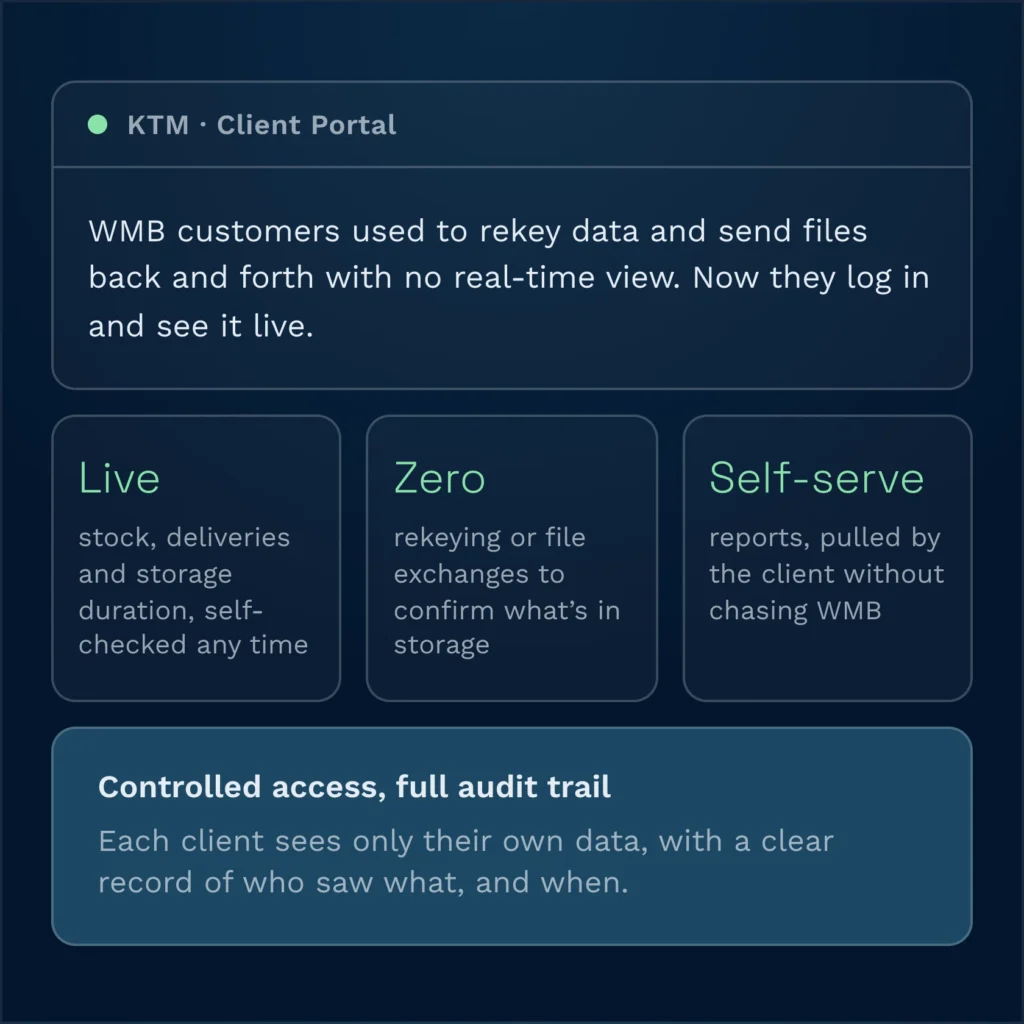
WMB’s customers were stuck using clunky, outdated processes just to work with them. KTM even had staff rekeying data and sending files back and forth because there was no real-time visibility.
With Clarus WMS, that disappears. Customers log in, see live stock, check deliveries, and pull their own reports, knowing exactly what they’re holding and how long each bike has been in storage with no chasing WMB for updates. Less manual work for customers, fewer admin loops for WMB, and the kind of client experience that has kept Clarus renewal rates above 95% since 2016.
The portal sits on top of Clarus WMS, which in turn integrates with your existing systems (ERP, order platforms, or transport systems) via APIs or secure file exchange. Orders flow into Clarus, warehouse activity updates stock and status, and the portal exposes that cleaned, consistent data to your clients. You control what’s visible and how it’s grouped. Integration patterns are agreed during scoping, not assumed, so the portal reflects the way you and your clients already work rather than forcing a new process for the sake of it.
Rolling out a portal is as much about communication as technology. The change is usually welcomed, but it still needs handling properly. Most businesses start with a small pilot group of clients, share simple “how to” guides, and run short walkthroughs with key contacts. The portal is designed to be intuitive, so you don’t need heavy training. Internally, account managers should be shown how to use the portal in their own conversations, so they present it as an upgrade in service, not “another system”. Over time, more clients are onboarded as they see the benefits others are enjoying.
The return comes in a few clear areas. First, you cut the volume of status emails and manual report requests, freeing your team to focus on value-adding work. Second, transparency strengthens relationships – clients trust what they can see, which supports retention and growth. Third, access to good data helps clients plan better, reducing last-minute panics and rush jobs that hurt your efficiency. Exact numbers depend on your client base and current ways of working, so any ROI figures discussed early should be treated as estimates until we’ve reviewed your operation.
The portal is browser-based, so most clients just need a modern web browser and internet connection. There’s no requirement for them to install local software or maintain special hardware. Many will access it from office desktops or laptops; some may use tablets on the move. You can configure roles so different teams within a client… for example, supply chain, finance, or sales – see the information that’s relevant to them. This keeps adoption simple and avoids IT friction on their side.
Yes. Clarus WMS is built to handle multi-client 3PLs and multi-site operations, and the portal respects that structure. Each client only sees their own data, even if you hold stock across several warehouses. You can standardise the portal experience while tailoring labels, fields, or reports where needed for key accounts. For more complex requirements for example, serial-level traceability or custom statuses – configuration options are discussed during scoping. The aim is to expose the complexity where it adds value, without overwhelming users.
Because the portal is part of the Clarus WMS platform, there’s no separate infrastructure project. Enabling WMS for your clients generally involves configuration, branding, access control set-up, and some light client onboarding support. Timelines are measured in weeks, not years, but will vary based on how many clients you want to launch with and how tailored their reporting needs are. Costs are usually included within your overall subscription and implementation structure. Any figures or dates discussed ahead of a formal proposal should be treated as planning estimates, not commitments, until a detailed scope is agreed.