

A paperless warehouse runs its daily floor work on scanners and digital records instead of printed pick lists, travel sheets and signed paper forms. It does not mean zero paper. Customs entries, dangerous goods documents and some tax records still need a formal trail, so the practical goal is to take paper out of daily work and keep only the documents the law, your customer or your carrier actually asks for.
The records side matters more than most teams expect. HM Revenue and Customs (HMRC) expects VAT records to be kept in a form it can check, and VAT Notice 700/21 sets out what to keep and how to keep it digitally. This guide covers the floor, the paperwork that stays and a rollout order that works for a warehouse already running on paper.
What does a paperless warehouse look like?
In a paperless warehouse, every receipt, putaway, pick, pack and despatch is recorded as a digital task with a user, a time and a location attached. Nothing depends on someone filling in a sheet at the end of the shift, and nothing gets lost in a clipboard.
Handheld task lists and scanning
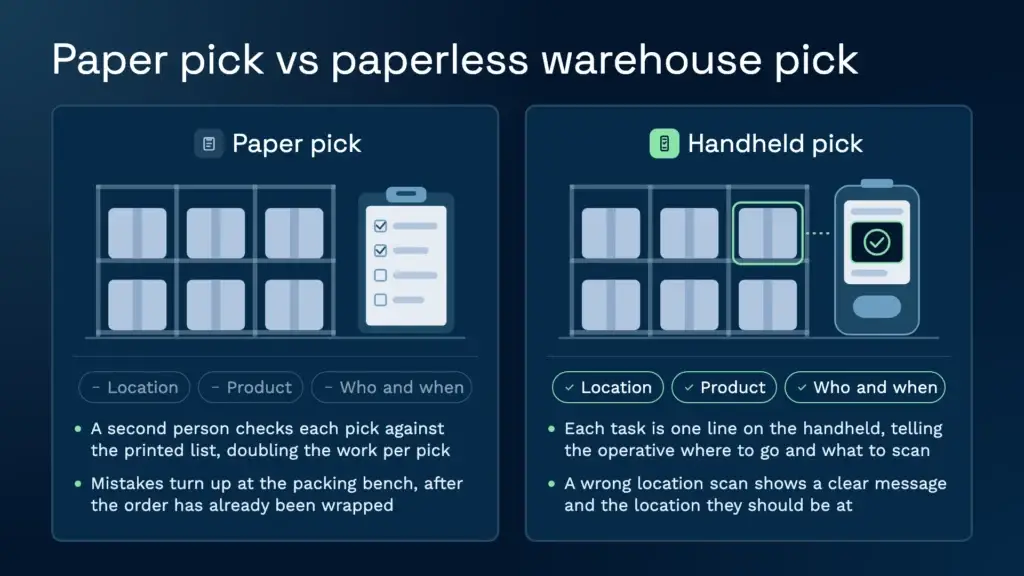
Operatives receive their tasks on a handheld, and each task is a single line. Clarus runs handheld workflows built around the scans a site needs, so a pick task tells the operative where to go and what to scan. If they scan the wrong location, the device shows a clear message and displays the location they should be standing at. That check happens at the shelf, before the item leaves the bay, rather than at the packing bench after the order is wrapped.
Electronic documents
Pick lists, packing lists and despatch notes can stay in the system and print only when a carrier or customer needs a copy. Packing can run as its own step at a verpakkingsbalie, with the order open on screen, so nobody has to retype it from a printed sheet. Dispatch paperwork is generated from the order data. For the delivery end of that chain, see our proof of delivery software page.
E-signatures and sign-off
A sign-off on a handheld or screen is stored with the user, the time and the task it belongs to. Under the Electronic Communications Act 2000, an electronic signature can be admitted as evidence in legal proceedings. That does not mean every counterparty will accept one for every document, so check the requirement for each document before you stop collecting signatures on paper. Also confirm that the WMS you are considering actually captures a signature, rather than assuming it does, and ask the vendor to show it working on a handheld.
Photo evidence
Operatives can photograph labels, pallet faces and damage during receipt, putaway, picking and dispatch. Each image is time-stamped and tied to the task, user, location or order it belongs to, so the photo of a crushed carton is attached to the right pallet without anyone writing a reference on the back of a form. Clarus beeldmateriaal bewijs vastleggen opens the camera straight from the task, and the number of images allowed per task is set by the business.
Which paper you still need
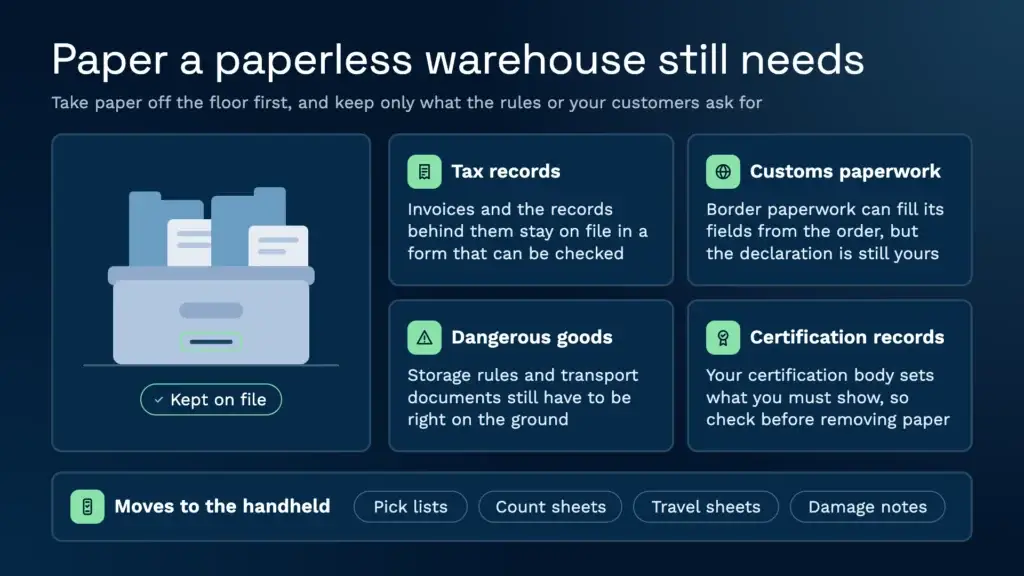
Going paperless works best when you know which paper has to stay. The list is shorter than most teams think, but it is not zero, and it depends on your customers and the goods you hold.
Tax and customs records
VAT invoices and the records behind them still have to be kept and produced for HMRC, and the VAT notice covers how digital records are kept. For goods that cross a border you need an EORI number on the paperwork. A WMS can hold the EORI against each customer and populate it on a commercial invoice or dispatch note, so customs paperwork is generated rather than typed. The system fills the fields, but it does not make the declaration for you, so check the rules with HMRC or your customs agent.
Dangerous goods
Storage of packaged dangerous substances is covered by HSE guidance, and the standard reference is HSG71, Chemical warehousing. Clarus holds hazardous fields against each product, controlled by master data, and can pass them on to the carrier. Segregation, storage rules and transport documents still have to be right on the ground. COSHH and LOLER are local processes outside the WMS, so treat the system as the place the data lives, not the thing that makes a site compliant.
Food traceability and customer paperwork
Food and drink sites often work to certification standards, and BRCGS is the common one in the UK. A paperless system helps because each batch movement is captured when it happens rather than written up later. Check the record requirement for your site with your certification body before you remove any paper, because the standard sets what you must show, not the software.
Verdict: take paper off the floor first, and keep it only for the records that tax, customs, dangerous goods rules or your customers still require.
Benefits, and where paperless falls short
The clearest gain is on the pick. Mathew Buttar, Head of Solutions at Clarus, has spent nearly 25 years in warehousing, and he is blunt about paper pick lists. Someone has to check each pick against the list, so a single correct pick takes two people’s worth of labour. A handheld task builds that check into the scan, and the plukken record shows who picked what and when, as it happens.
The difference shows up across the whole operation.
| Task | Paper process | Paperless process |
|---|---|---|
| Plukken | Printed pick list, checked by a second person | Handheld task per line, scan confirms location and product |
| Stock checks | Count sheets typed up later | Counts recorded against the stock record as they are made |
| Damage evidence | Written notes and a separate camera roll | Photo attached to the task, user, location or order |
| Dispatch paperwork | Typed out again from the order | Generated from the order data |
| Controlespoor | Depends on who filed the sheet | Every action and stock movement logged |
Where paperless falls short
Scanning reduces errors but does not stop them. A scan can confirm the location and the product, yet an operative can still take the wrong box from the pallet next to the one they scanned. Paperless also does not fix poor master data. If the product records are wrong, the handheld will confirm the wrong thing quickly and with a timestamp.
Some gaps are common across warehouse systems, so ask about them before you commit:
- Returns. Ask how returns are booked in, inspected and put back to stock, and whether that happens inside the system or alongside it.
- Near-expiry warnings. Ask whether the system flags stock close to its best-before date, or whether you need your own regular check.
- Temperature and HACCP checks. Ask whether readings are captured automatically, or typed into the handheld flow as fields.
- The back door. Ask what the records can show once a load leaves the vehicle. Most warehouse traceability stops there.
How to roll out a paperless warehouse
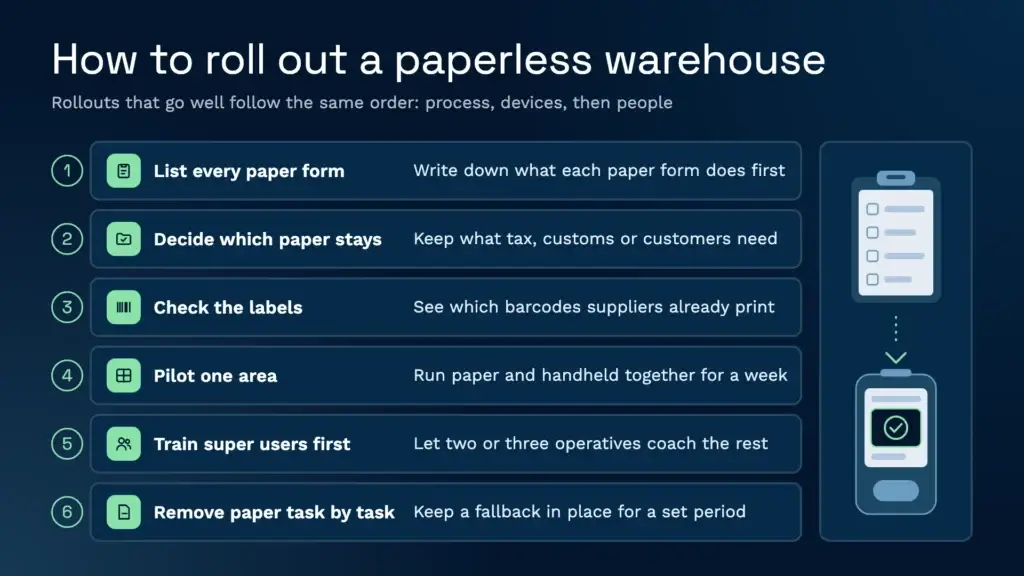
Rollouts that go well tend to follow the same order: process first, then devices, then people.
- List every paper form and what it does. Pick lists, count sheets, receipt notes, damage reports and dispatch paperwork each have a job. Write that down before you choose anything.
- Decide which paper stays. Use the section above to separate the records that tax, customs or your customers need from the paper that just repeats what the system already knows.
- Check the labels. Find out which barcodes your suppliers already print. GS1 labels that carry the article number, batch and pallet identifier can be read in one scan, which can save you designing a new label scheme.
- Pilot one area. Choose a receiving bay or a single pick zone, and run paper and handheld side by side for a week. Compare the exceptions, not just the averages.
- Train the super users first. Two or three operatives who are comfortable with a handheld can coach their colleagues, which works better than a trainer in a room. Expect resistance from people who have used paper for years. Letting them see the scan working on their own shift does more than any briefing.
- Remove paper one task at a time. Switch off each paper process in turn and keep a fallback in place for a set period, so a bad day on the floor does not stop dispatch.
Timing matters too. A standard Clarus implementation goes live in around 12 weeks when both sides have the right support, and complex, high-volume projects take longer. For a 3PL, the payoff often shows first in the office. St John’s Hall Storage cut its invoicing time by 90%, because the month-end re-keying of invoices from the WMS into the accounts package is gone. Read the St John’s Hall Storage story for the detail.
If you are thinking about the wider picture beyond paper, our guide to what a smart warehouse is sets out how the pieces fit together.
What to check on connectivity and devices
Paperless depends on the floor staying connected. Before you buy devices, test the building, not the brochure.
- Wi-Fi where people actually work. Walk the racking aisles, the back of the chiller, the dock doors and any mezzanine with a phone running a speed test. Every dead spot is a place where operatives go back to paper.
- The handheld itself. Clarus handheld workflows run on Android devices, and the warehouse scanning system is built around them. Confirm the model with your supplier before ordering, and test it on your own labels, including damaged, creased and low-contrast ones.
- What happens when Wi-Fi drops. Ask the vendor whether the handheld holds scans and syncs them later, or blocks the operative until the connection returns. Get the answer in writing before you rely on it.
- GS1 label reading. Barcodes scannen needs the device to read the labels your suppliers actually print. Test one pallet from each supplier before you agree a go-live date.
- Batteries, charging and mounts. A shift of constant scanning drains devices quickly. Plan charging points and spares, and check how batteries behave in cold stores before you commit to a model.
Plan connectivity for new sites too. A new warehouse can be set up in Clarus quickly, and orders can flow in as soon as the data is loaded. The scanner-based flows take longer, and they need Wi-Fi on site before they work.
Neem contact op met een magazijnexpert
If you’re evaluating your options and want to see how a purpose-built WMS works in practice, Clarus is worth a conversation. We work with 3PLs and distributors to implement warehouse management software that fits the way you operate, not the other way around.
Neem contact op met ons team om uw wensen te bespreken.