

Odoo Inventory is a real warehouse management module, and for single-brand operations running their own stock it can be the right answer. But if you’re a 3PL managing client inventory, handling per-client billing, or running multiple warehouse locations, Odoo becomes a configuration project rather than a native solution. This guide compares Odoo’s approach with open-source alternatives and purpose-built 3PL WMS platforms, so you can decide based on what your operation actually needs.
Quick comparison: Odoo vs alternatives
| Platform | Beste voor | 3PL / Multi-client | Automatisering van de facturering | Implementatie |
|---|---|---|---|---|
| Odoo Inventory | Single-brand operations, SMBs | Configuration required (Owner field) | Manual invoicing, not automated | In de cloud of op locatie |
| ERPNext | Manufacturers, full-stack ERP | Possible with development | Not built-in | Self-hosted or cloud |
| Dolibarr | Very small operations, spreadsheet replacement | Not recommended | Not automated | Self-hosted or cloud |
| OpenBoxes | Healthcare supply chains, non-profits | Multi-facility, not multi-client billing | Nee | Self-hosted |
| Clarus WMS | 3PLs, distributors, food & beverage | Native, each client isolated | Automated, every billable event captured | Cloud-native, serverless |
Can Odoo be used as a WMS?
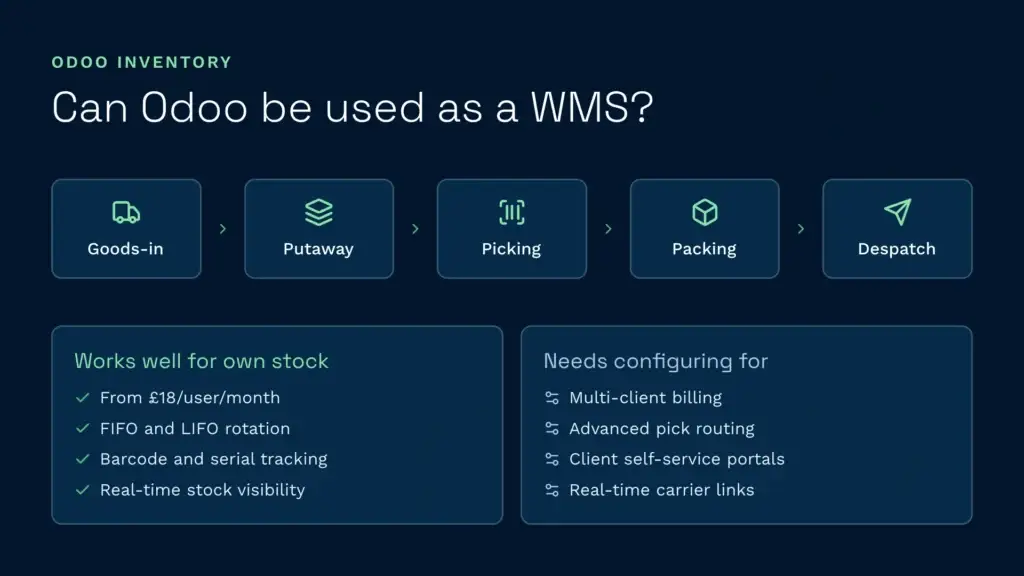
Ja. Odoo Inventory is a working warehouse management module and it handles the core workflows: goods-in, putaway, picking, packing and despatch. For a wholesaler or single-brand distributor managing their own stock, it works well. Odoo Inventory comes with Odoo’s paid plans, which are charged per user, and gives you FIFO/LIFO rotation, barcode scanning, serial number tracking and real-time stock visibility.
But “can it be used as a WMS” and “is it the right WMS for your operation” are two different questions. Odoo Inventory is an inventory management system retrofitted into a multi-purpose ERP platform. Once your operation gets more complex (multi-client billing, advanced pick routing, client self-service portals or real-time carrier integration), you’re no longer working with Odoo’s native capability. You’re configuring it, and that costs time and money.
Can Odoo handle 3PL and multi-client stock?
Technically, yes. Practically, it takes a lot of configuration.
SmartTek Solutions, an Odoo implementation partner, documents how to use Odoo for 3PL operations. The approach rests on four building blocks:
- Owner field assignment: Assigning an Owner to each product or stock move gives you client-level inventory visibility. Without it, all inventory looks the same in the system.
- Two-step workflows: Setting up receipt and putaway as separate tasks (rather than a single action) mirrors real warehouse operations and creates the audit trail you need for billing.
- Location-based fee rates: Defining storage zones and attaching pricing rules lets you multiply rates by package count or storage duration, turning operational activity into charges.
- Barcode-driven execution: Using Odoo’s Barcode app for goods-in, picking and despatch creates the scan audit trail 3PLs need for client disputes and regulatory proof.
Each of these needs configuring. You’re not buying a ready-made 3PL solution. You’re building one from Odoo’s generic components. A Clarus implementation for a comparable 3PL aims to go live within 12 weeks with the right project support on both sides, because multi-client billing, the klantenportaal and carrier integrations are already in the product. With Odoo you do that configuration yourself or pay a partner to do it, which adds to both the timeline and the cost. How much it adds depends on your scope, so get it quoted rather than estimated.
Odoo Inventory pricing and what’s included
Odoo’s pricing looks simple, but it works differently from a WMS licence. You don’t buy Odoo Inventory on its own. You choose a plan and get every app in it. Current rates are on Odoo’s pricing page.
- One App Free: One app of your choice, unlimited users, hosted on Odoo Online. Useful if all you need is CRM or invoicing, but limited for a warehouse operation, which will soon need more than one module.
- Standard: Every app, including Inventory, CRM, eCommerce, Accounting, HR and Project, charged per user per month, with Odoo Online hosting, maintenance and support included.
- Custom: Everything in Standard plus multi-company support (relevant for 3PLs), Odoo Studio for visual configuration, external API access, and on-premise or Odoo.sh hosting. Also charged per user per month, at a higher rate.
Two things are worth understanding about that model. It’s per user across the whole platform, not per warehouse user, so the same licence covers CRM, finance and HR for that person. And because it scales with headcount rather than throughput, the cost moves as you hire. That cuts both ways, depending on whether your growth comes from more people or more volume through the same team. Work it out on your own user count from Odoo’s published rates rather than relying on a worked example.
What’s not included: implementation support, partner configuration work or training. Those are separate costs when you set Odoo up for 3PL operations. Nor does the plan cover the development time needed to wire up billing automation, client portal customisations and integration work that a purpose-built system handles natively.
Odoo Community vs Odoo Enterprise for warehouse operations
Odoo still comes in two editions:
- Odoo Community: The open-source edition. Free to download and self-hosted, with community support only and no guarantee on uptime or response times.
- Odoo Enterprise: The licensed edition, sold through the One App Free, Standard and Custom plans above. It comes with vendor support and hosting options, plus apps Community doesn’t include, such as Studio and the Barcode app.
The distinction matters for 3PLs. If you run Community, you’re responsible for hosting, upgrades, security patches and backups, and you lose the Barcode app the 3PL setup above depends on. If a security issue emerges, you’re not first in line for a fix. For operations handling client data and financial records, that risk is too high. A paid Enterprise plan is the operational baseline.
Why open-source WMS platforms struggle in high-volume operations
Open-source WMS options exist: ERPNext, Dolibarr, OpenBoxes and OpenWMS are all available at no licence cost. But open source carries hidden costs that grow with scale.
- Technical overhead: You or your team own the infrastructure, hosting, database management, security patching and version upgrades. Small issues compound. A database query that’s slow at 500 orders a day becomes a bottleneck at 5,000.
- Support gaps: Community forums are free but slow. No vendor commits to a response time. When your warehouse grinds to a halt mid-shift, a forum post won’t fix it in minutes.
- Integratiekosten: Connecting to your carriers, ERP or ecommerce platform needs custom development. Open-source platforms don’t come with hundreds of pre-built integrations. You build them, or you pay a developer to.
- Feature gaps: Multi-client billing automation, client self-service portals, real-time inventory sync and automated invoicing aren’t built in. You have to configure or build them.
- Pijn bij het strekken: Performance degrades as order volume grows unless someone is actively optimising it, and small issues soon start to affect order processing, inventory accuracy and customer experience.
An open-source WMS costs less in licensing but more in totale eigendomskosten once you add hosting, maintenance, custom development and the staff time needed to keep it running. For a growing 3PL, that sum eventually flips.
Why Clarus WMS is built differently for 3PLs
Clarus is built for 3PL multi-client warehouses, and the difference shows in what’s there on day one.
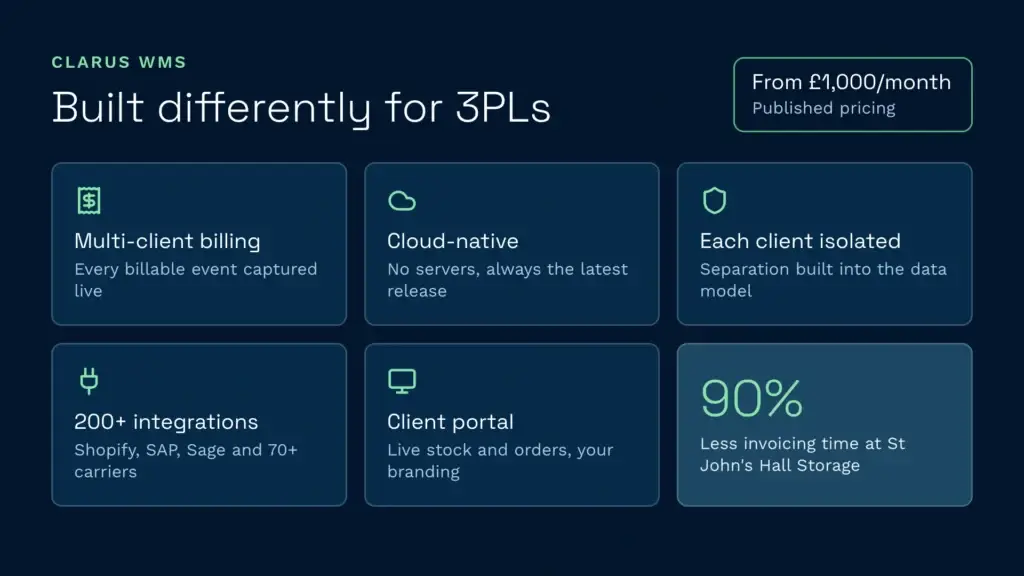
Native multi-client billing. Every billable event (putaway, storage, pick, pack, value-added services, returns) is captured as the work happens and charged to the right client. No manual month-end reconciliation. St John's Hall Opslag cut its invoicing time by 90%. Its managing director used to spend around four days at the end of every month checking invoices by hand before they went out. Once the Clarus data proved consistently accurate, he stopped.
Cloud-native. No servers to maintain, no version upgrade cycles, no database tuning. Clarus handles the infrastructure so you can concentrate on the operation.
Each client kept separate. Stock, reporting, billing and portal access are separated by client, so Client A never sees Client B’s data.
200+ integrations out of the box. Clarus kan worden gekoppeld aan meer dan 200 systemen, waaronder Shopify, WooCommerce, Sage 200, SAP Business One and Microsoft Dynamics, plus carriers such as DPD, Koninklijke Post, Evri en FedEx. They’re pre-built connectors, not development projects.
Client self-service portal. Clients log in to a branded portal and see their live stock, order milestones, shipment tracking and, if you choose to share them, their charges. They stop calling your team with inventory questions.
Prijzen starts from a £1,000 a month base, and it’s published, so you can do the sum before you speak to anyone. Implementation is a one-off fee on top, and user licensing is tiered, so your final quote depends on your setup. That isn’t cheaper than Odoo per user, and for a small team it won’t be. What you’re paying for is multi-client billing, the client portal and courier integrations already being in the product rather than configured on top. Whether it works out cheaper overall depends on how much of that retrofit you’d otherwise need.
Odoo, ERPNext and Dolibarr: when each makes sense
Odoo Inventory works well for: Single-brand distributors, wholesalers and manufacturers managing their own stock with simple billing (not multi-client). Organisations where the warehouse is one part of a larger business (finance, CRM, HR) and a single platform has real strategic value. Small to mid-market operations that don’t need 3PL features and can accept configuration as the cost of setup.
ERPNext works well for: Manufacturers needing full traceability and production planning alongside warehouse management. Open-source advocates with in-house development capability. Organisations already using Frappe’s ecosystem that want a cohesive stack. Small teams managing their own infrastructure who see technical work as an asset, not a cost.
Dolibarr works well for: Very small operations moving off spreadsheets for the first time. Organisations wanting to replace a legacy system at near-zero licence cost. Businesses where “good enough inventory” is the goal. Not recommended for 3PLs, high-volume operations or compliance-heavy environments.
OpenBoxes works well for: Healthcare supply chains and humanitarian logistics, where the domain vocabulary (lots, expiries, requisitions, multi-facility) is already built into the system. It isn’t a general WMS and is too specialised for retail 3PL operations.
When to choose a dedicated WMS instead
Choose a purpose-built 3PL WMS like Clarus when:
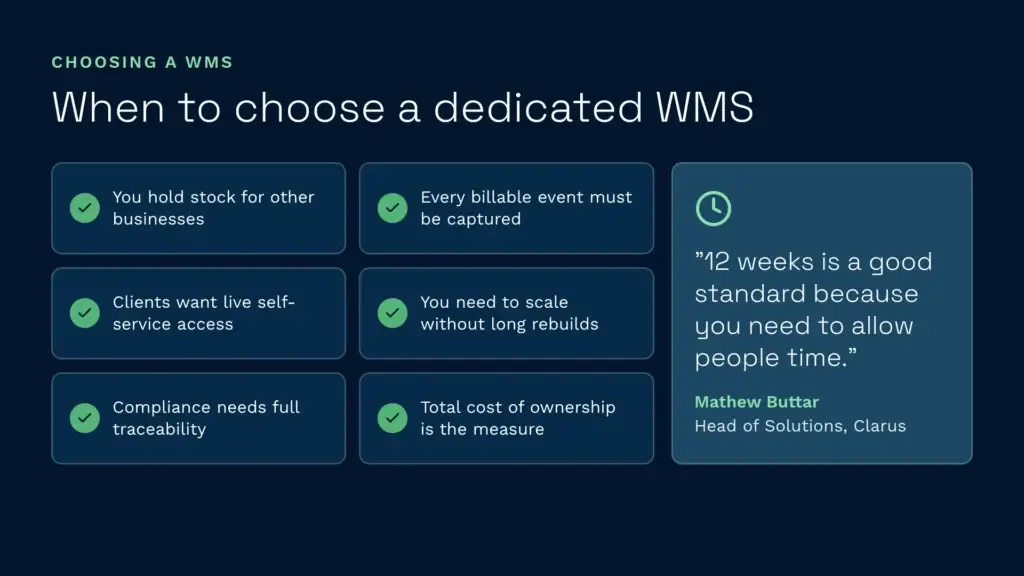
- You manage stock on behalf of other businesses (3PL, fulfilment centre, outsourced logistics)
- Multi-client billing is a significant revenue stream and you need every billable event captured automatically
- Clients want real-time visibility of their inventory and expect a self-service portal
- You need to scale quickly (new clients, new sites, new volumes) and can’t afford a months-long configuration cycle every time
- Your growth is limited by your current system (you’re turning down business because the system won’t support it)
- Compliance matters: BRCGS, HACCP or retailer codes of practice where audit trails and traceability are non-negotiable
- You want out of the infrastructure business. No servers, no upgrades, no “it went down during peak” conversations with your IT team.
- Total cost of ownership is the measure, not just per-user licensing
Mathew Buttar, Head of Solutions at Clarus, runs implementations and go-lives, and spent years as a warehouse and operations manager before that. He’s blunt about how long a warehouse project really needs: “12 weeks is a good standard because you need to allow people time.” That’s the figure he stands behind for a standard project with the right support on both sides. The point for anyone weighing up Odoo is that the configuration work sits on top of a schedule that already needs that much room for testing and training.
Neem contact op met een magazijnexpert
If you’re weighing up your options and want to see how a purpose-built WMS works in practice, Clarus is worth a conversation. We work with 3PLs and distributors across the UK to implement warehouse management software that fits the way you operate.
Neem contact op met ons team om uw wensen te bespreken.