

A warehouse management system with a built-in client portal changes how a 3PL handles the daily stream of client questions. Instead of fielding dozens of queries a day about stock levels and order status, you give each client a self-service view of their own stock and orders, updated live. The payoff shows up quickly: fewer calls and emails, faster answers on invoice queries, clients who stay longer, and room to grow without adding admin headcount.
In this guide, we’ll cover what a WMS client portal is, how it works in a 3PL warehouse, and why more 3PLs now treat it as a standard part of their service.
What is a WMS client portal?
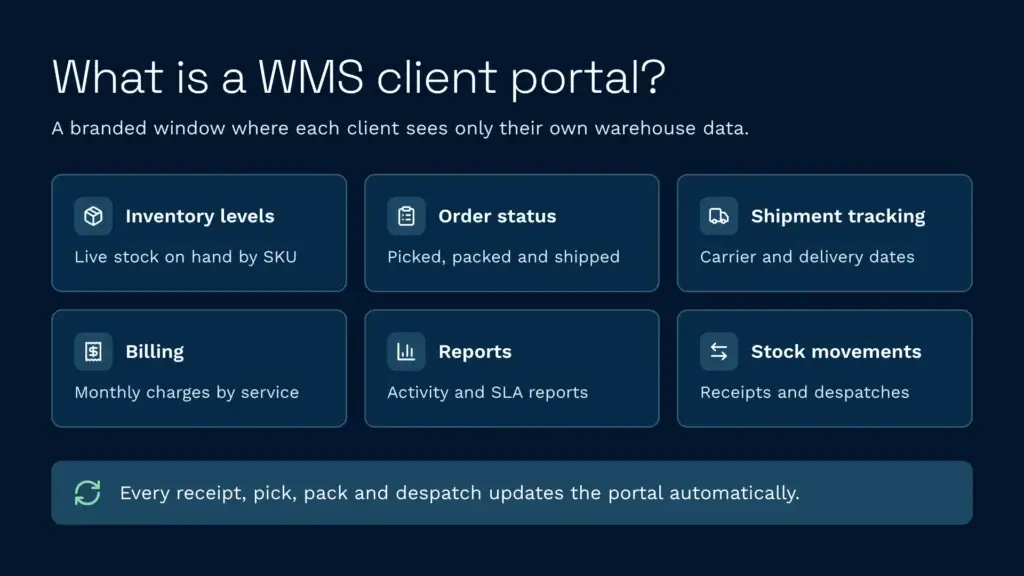
A client portal is a branded, web-based view that gives your customers direct access to their own warehouse data. Each client logs in and sees inventory by SKU, order status, shipment tracking and billing summaries. It’s their window into your warehouse, filtered so they only ever see their own stock and activity.
The portal sits on top of your warehouse management system. Every transaction the WMS records (a receipt, a pick, a pack, a despatch) shows up in the portal automatically. No re-keying, no waiting for someone to send an update, no two versions of the truth.
In practice, a 3PL client portal usually shows:
- Inventory levels: Stock on hand, available, reserved, damaged or on hold, by product and by location, updated live.
- Order status: From the moment an order lands, through picking and packing, to when it ships.
- Shipment tracking: Carrier, tracking numbers, delivery dates and any exceptions.
- Invoicing and billing: A summary of what the 3PL has charged that month, broken down by service (storage, picking, packing, despatch, value-added services).
- Reports: Monthly activity summaries, performance against SLAs and labour time breakdowns.
- Stock movements: A log of inbound receipts, outbound shipments and any adjustments.
With a self-service portal, a client can check stock at 7am without emailing you at 8am. Your team starts the day on planned work instead of clearing an inbox.
How does a client portal work in a 3PL WMS?
Your WMS is the source of truth. As warehouse staff scan barcodes, move stock and process shipments, the WMS records each event as it happens. The portal reads that live data and presents it securely to each client.
Authentication and data isolation matter most. When Client A logs in, they should only see Client A’s inventory. In a multi-tenant system, that separation needs to be enforced in the data layer, not just hidden in the interface. If you hold stock for 20 clients, no client should ever be able to see another client’s data.
White-labelling is the norm. A white-label portal shows your logo, your branding and your colours rather than the software vendor’s name. The portal feels like part of your operation because it is.
Most of the data flows one way, from the WMS out to the portal, so clients see the real record but can’t alter it. Some portals let clients do more than look, though. At St John’s Hall Storage, customers use the Clarus portal to submit orders, despatches and goods-in information directly, download reports to Excel and receive scheduled reports automatically.
Benefits of a self-service client portal for 3PLs
Look at where support time goes in a typical 3PL:
- Dozens of “what’s my stock level?” emails every day.
- Phone calls asking when an order will ship.
- Invoice queries, because the 3PL’s figures don’t match what the client expected to be charged.
- Manual reporting, with someone compiling CSVs and emailing weekly summaries.
A portal takes most of the first two off your team’s plate. The third becomes something clients can check themselves, because they can review charges as they build up. The fourth runs automatically, with reports on a schedule clients can access directly.
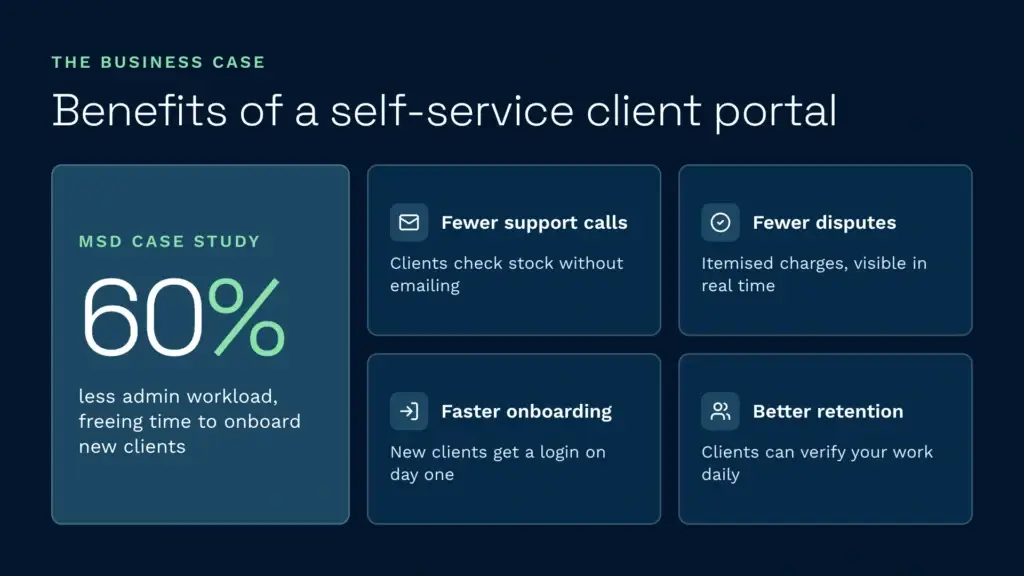
MSD (Mitchell Storage & Distribution) saw this after moving from a bespoke in-house system to Clarus. Their admin load dropped by 60%, and Senior Operations Manager Dean Stevens said emails and phone calls asking “how much stock have I got?” fell by about 60% once customers could check their stock and receipts in the client portal.
Fewer support calls: Clients with instant visibility don’t need to chase you for routine updates, so small questions stop turning into calls.
Fewer billing disputes: When clients can see invoices itemised by service (storage days, picks, packs, despatches) as charges build up, they stop questioning them. Clear charges stop disputes before they start.
Faster onboarding: New clients get a portal login on day one. They don’t depend on your team for every bit of visibility. They can explore their own data and raise questions early, before they turn into frustration.
Better client retention: Clients who can see their stock plan better. They’re less likely to run out unexpectedly because they can check levels whenever they need to, and they trust you more because they can check your numbers themselves.
How a portal reduces support calls and disputes
When a client asks “what’s in stock?” and there’s no portal, the process usually looks like this:
- The client sends an email or calls.
- Your team stops what they’re doing and checks the WMS.
- They interpret what they see and write a reply, often typing out the same information they sent last week.
- The client reads it and sometimes replies with a follow-up, because the first answer wasn’t quite what they needed.
- Your team answers again.
That back-and-forth, often four to six messages, eats into your team’s day and builds a backlog.
With a portal, the client logs in and has the answer in seconds. No email sent. If there’s a real issue, like a discrepancy or a damaged item, they still contact you, but the routine “where’s my stock?” questions mostly go away.
Billing works the same way. Without visibility, clients compare your invoice against what they expected to pay, and that expectation is often a rough guess. A client might think of storage as one flat monthly charge, without seeing the receipts, picks, packs, returns and other activity your WMS logged against their account that month. When they can see the itemised breakdown in the portal, the invoice makes sense. When they can’t, they query it.
A purpose-built 3PL WMS like Clarus captures billable events at source, including putaway, storage days, picking, packing, value-added services and returns processing, and prices them automatically through 3PL billing. The portal reflects that detail. Centralised 3PL billing removes the manual reconciliation that slows down spreadsheet-based operations. St John’s Hall Storage cut its invoicing time by 90% after replacing a 25-year-old legacy system with Clarus. Before the switch, their Managing Director spent around four days at the end of every month checking invoices.
Real-time visibility and client trust
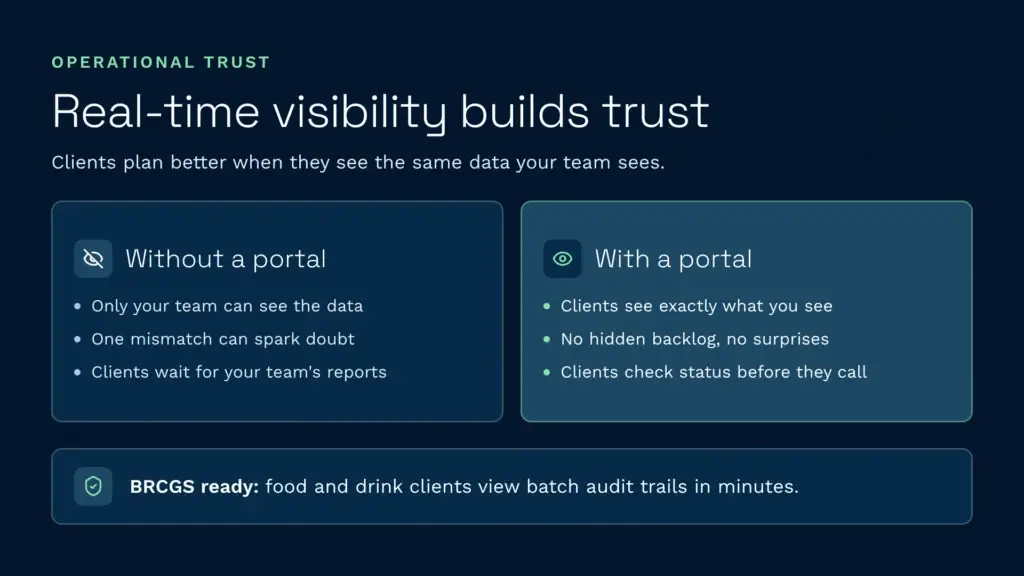
The bigger benefit goes beyond fewer emails. When clients have live visibility of their inventory, they plan better. They spot stock trends before they run out and make better-informed ordering decisions. They don’t ring you at 5pm asking where an urgent shipment is, because they’ve already checked the portal and know it’s with the carrier.
It changes the relationship too. Without a portal, the 3PL knows what’s in the warehouse and the client has to take its word for it. That trust is fragile. One discrepancy, whether it’s a missing item or an invoice that doesn’t match the client’s records, and suspicion creeps in.
A portal closes that gap. The client sees the same data your team sees, so there are no surprises. It’s harder to leave a 3PL you can check every day than one you have to trust blindly.
For clients with compliance requirements, this visibility matters even more. Food and drink operations, for example, are often audited against BRCGS standards, which expect full traceability of batch movements. A food and beverage WMS with a client portal gives those clients quick access to the records an auditor will ask for, without waiting for your team to pull a report. Campeys of Selby earned an AA BRCGS grade with Clarus, with the auditor describing its traceability as “exceptional for a first-time audit”.
White-labelling and brand control
A white-labelled client portal carries your branding, not the WMS vendor’s. Your logo sits in the corner, your colours run through the interface, and ideally the web address is yours too. Clients never see the name of the software underneath.
This matters for how clients see you. The portal feels like a service your 3PL provides, not borrowed software, which builds confidence in your operation and helps you justify premium pricing.
Some WMS platforms reserve white-labelling for their higher-priced tiers. Others include it as standard. When you’re evaluating a 3PL WMS, check whether branding is included from day one or sold as an add-on. Clarus’s client access portal lets you apply your own branding, either for your business as a whole or for individual clients.
What to look for in a WMS with a client portal
Client portals vary a lot. When you’re evaluating a WMS, these are the features that separate a strong portal from a weak one:
- Multi-client data isolation: Each client sees only their own inventory, enforced in the data layer, not just the interface. This is non-negotiable.
- Real-time updates: Portal data refreshes as transactions happen, not on a batch schedule. If a client logs in at 11am, they see 11am data.
- Customisable dashboards: Different clients care about different things. One wants stock levels and SLA performance, another wants invoicing. Each client should see what matters to them.
- Mobile access: Your clients aren’t always at a desk. The portal should work on phones and tablets, not just desktops.
- Automated alerts: Clients should be able to set rules, such as “email me if stock drops below this level” or “tell me if this order hasn’t shipped after 48 hours”, and the system acts on them automatically.
- Integration with client ERPs: An API-first WMS lets clients pull portal data into their own systems, so your WMS and their planning stay in sync.
- Full audit trail: Every action in the portal is logged. If a client questions a record, you can show exactly who accessed it and when.
- White-labelling throughout: The portal should carry your brand completely, with no “powered by” logos or references to the vendor.
Cloud WMS platforms built for multiple clients from the start tend to handle these well. Older systems with a portal added later can fall short on data isolation or live updates.
Choosing the right WMS with an integrated client portal
When you’re comparing options, ask these questions:
- How is client data isolated? Is it partitioned at database level, or filtered row by row in the application?
- How quickly does the portal update? Is it live, or does it batch-process every 15 minutes?
- Can the portal be white-labelled so it carries only your branding?
- Can clients access their data via API to connect it to their own ERP?
- Does the WMS capture every billable event automatically, or do you have to set up billing rules by hand?
- How many portal users are included, and at what price?
- Which carriers, ecommerce platforms and TMS systems does the WMS integrate with? The portal is only as useful as the order data flowing into the WMS from your clients’ channels.
3PL WMS platforms built for multi-client operations handle these requirements as standard. Generic WMS platforms and ERP add-ons often need heavy customisation, and custom integrations are slow to build and expensive to maintain.
When comparing 3PL software providers, always ask for a demo of the client portal, and read what existing users say on review sites. You can read Clarus WMS reviews on Capterra, for example. Check whether the portal is fast, whether the branding is fully yours, and whether the data makes sense at a glance. If clients log in and can’t understand what they’re looking at, they’ll go back to emailing you.
Speak to a warehouse expert
If you’re weighing up your options and want to see how a purpose-built WMS works in practice, Clarus is worth a conversation. We work with 3PLs and distributors across the UK to implement warehouse management software that fits the way you operate, not the other way around.
Get in touch with our team to talk through your requirements.