

Warehouse management software controls where stock sits, how orders are picked and what leaves the building, and the best warehouse management solution depends on how your operation is built. A 3PL running several clients needs separate stock, rules and billing for each one. A food or wholesale site needs traceability and fast picking. A small team that has outgrown spreadsheets needs something simple it can run without a specialist. Grand View Research puts the global WMS market at about USD 3.4 billion in 2025, growing 21.9% a year from 2026 to 2033, so there’s no shortage of options. This guide compares the main platforms by operation type, and shows what the software does on the floor, so you can match it to your operation rather than to a feature list.
What is warehouse management software, and what does it do on the floor?
Warehouse management software is a cloud or on-premise platform that controls stock flow, order fulfilment and labour across a warehouse operation. A WMS records every movement of stock from goods-in through to dispatch, shows you what you hold and where it is, and directs picking, packing and shipping to cut errors and labour cost.
A warehouse management system typically handles receiving and putaway (matching incoming goods to purchase orders), bin and location management (tracking exactly where stock sits), order picking and wave planning (grouping orders to cut walking time), stock accuracy (cycle counting and adjustments) and shipping (carrier labels and documents). More specialised operations need a purpose-built system rather than a generic add-on: 3PL warehouses managing several clients, food and beverage sites with traceability requirements, and manufacturers serialising components.
For small businesses and ecommerce operations, the choice is usually between basic inventory tools (such as Shopify’s built-in inventory or Zoho Inventory) and entry-level WMS platforms. For 3PLs and distributors, a purpose-built WMS handles the complexity that generic ERP systems struggle with: multi-client billing, client-specific service levels and client portals. If you’re weighing a WMS against the warehouse module in your ERP, ERP vs WMS sets out where each one stops.
How much does warehouse management software cost? It’s usually priced per month, and the cost grows with the number of sites, users and integrations you need. Clarus plans start from £1,000 a month base, with the final quote tailored to your sites and users. Our WMS cost guide covers what drives the price up or down.
WMS software for small and growing businesses
Smaller operations often start on spreadsheets or a basic inventory tool. They move to a WMS once picking errors and stock searches start costing more than the software would. Our guide to the best warehouse management software for small business covers where that point usually sits.
For a longer explainer, see what is a warehouse management system. If you’re buying for a UK operation, our best WMS for UK businesses guide narrows the field to platforms with UK carrier and marketplace integrations.
What the software does at the shelf
Most buying mistakes come from a gap between what a system claims and what happens at the shelf. Four mechanisms show the difference in practice.
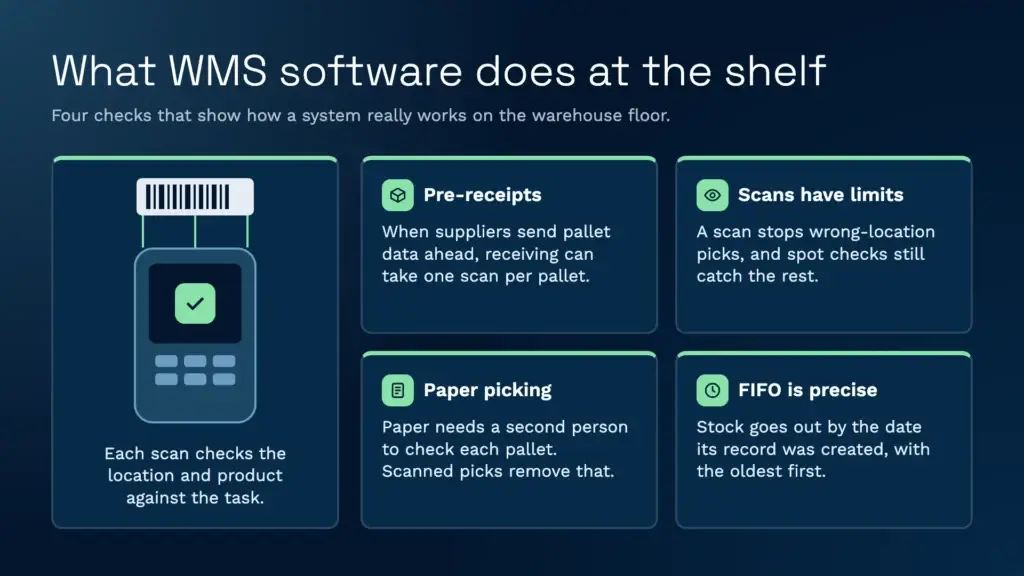
Blind receipts and pre-receipts. A blind receipt is goods-in without an advance notice. The system doesn’t know what’s arriving, so the operator has to find details such as the batch and best-before date on the pallet before the receipt can complete. Pre-receipt is the better option where you can get the data: when the supplier sends the pallet details ahead, using GS1 standards such as the shipping container code, receiving can come down to a single scan per pallet. Mat Buttar, Head of Solutions at Clarus, says the first question he asks on site is whether you can get that information from your suppliers.
Scan verification has a limit. Scanning the location, pallet and product stops most wrong-item picks, because the handheld rejects a location or product that doesn’t match the task. It doesn’t stop an operator who scans the right pallet and then takes a box from the one beside it. Mat’s view is that no warehouse is free of errors: software reduces them, it doesn’t remove them. Plan for the gap with spot checks and clear reason codes.
Paper pick lists cost two people. On a paper pick list, one person picks and a second checks the pallet against the list before it’s wrapped and labelled. Scanned picks remove that second check, because the scan does the verification as the item is taken. For a site still working on paper, this is often the biggest single saving, so measure it before go-live.
FIFO has a precise meaning. In Clarus, FIFO allocates stock by the creation date of the stock record, down to the millisecond, so the oldest received stock goes out first. First expiry, first out (FEFO) is a separate pick rule for products with sell-by dates. In a deep bulk stack the oldest pallet can sit at the back, so the system needs a way to switch to a pallet you can reach. Ask any vendor which rule it means when it says FIFO.
What is the best warehouse management software in 2026?
The best WMS depends on your operation type. For large enterprise networks, Manhattan Active WMS has been named a Leader in the Gartner Magic Quadrant for WMS for 17 years in a row (as of 2025). For 3PL operations, purpose-built platforms such as Clarus WMS and Extensiv focus on multi-client work. For small businesses and ecommerce, options range from fulfilment platforms such as Mintsoft to inventory tools such as Zoho Inventory. No single platform wins every category.
How do the top warehouse management solutions compare by operation type?
| Platform | Operation type | Deployment | What stands out |
|---|---|---|---|
| Manhattan Active WMS | Large enterprise | Cloud | Gartner Magic Quadrant Leader for 17 years in a row (as of 2025) |
| SAP Extended Warehouse Management | Enterprise (SAP ecosystem) | Cloud or on-premise | High-volume operations and complex supply chains |
| Oracle NetSuite WMS | Mid-market to enterprise | Cloud | WMS as an add-on module to NetSuite ERP |
| Clarus WMS | 3PL and multi-client warehouses | Cloud | Agentic AI-driven WMS built for 3PL billing and multi-client stock |
| Extensiv 3PL Warehouse Manager | 3PL providers | Cloud | Built for 3PLs, with a separate Billing Manager |
| Deposco | Ecommerce, 3PL, retail and wholesale | Cloud | Fulfilment platform covering several channels |
| Mintsoft (The Access Group) | 3PLs and ecommerce brands | Cloud | Broad integration library |
| Zoho Inventory | Small businesses | Cloud | Inventory management with warehouse features |
For user reviews and feature comparisons, directories such as Gartner Peer Insights, Capterra UK and Software Advice carry ratings from warehouse professionals.
What features should the best WMS software include?
A warehouse management system earns a “best” rating when it handles core warehouse work reliably and is flexible enough for your specific workflows. Feature checklists matter less than how well the system copes with your day-to-day reality.
Essential features across all WMS categories
- Receiving and putaway: barcode-driven goods-in with configurable putaway rules based on product type, velocity or client.
- Stock management: live stock visibility across locations, lot and batch tracking, expiry dates and cycle counting.
- Order picking: wave, batch, zone and cluster picking, with pick paths that cut travel time.
- Packing and dispatch: carrier label generation, shipping documents and proof of dispatch.
- Returns: ask how returns are received, checked and restocked, and whether that’s built in or a manual step.
- Reporting: live dashboards covering picks per hour, dock-to-stock time, order accuracy and labour use.
In Clarus, barcode scanning and structured stock checks are standard, not add-ons.
What separates enterprise WMS from mid-market platforms?
| Capability | Enterprise WMS | Mid-market WMS |
|---|---|---|
| Multi-site management | Global warehouse network with central control | Usually a handful of sites |
| Automation integration | Native links to robots, automated storage and conveyors | API-based or limited |
| Labour management | Engineered standards and incentive tracking | Basic productivity reporting |
| Configuration depth | Highly customisable workflows per site | Templates with some customisation |
| Implementation | Longer projects, especially with heavy customisation | Shorter, template-based projects |
Warehouse management solutions for 3PLs and multi-client sites
Third-party logistics providers need a WMS that handles multi-client work from the start, not as an afterthought bolted onto a single-client system. Grand View Research points to growing WMS adoption in ecommerce and third-party logistics, where multi-client work makes specialised software a necessity.
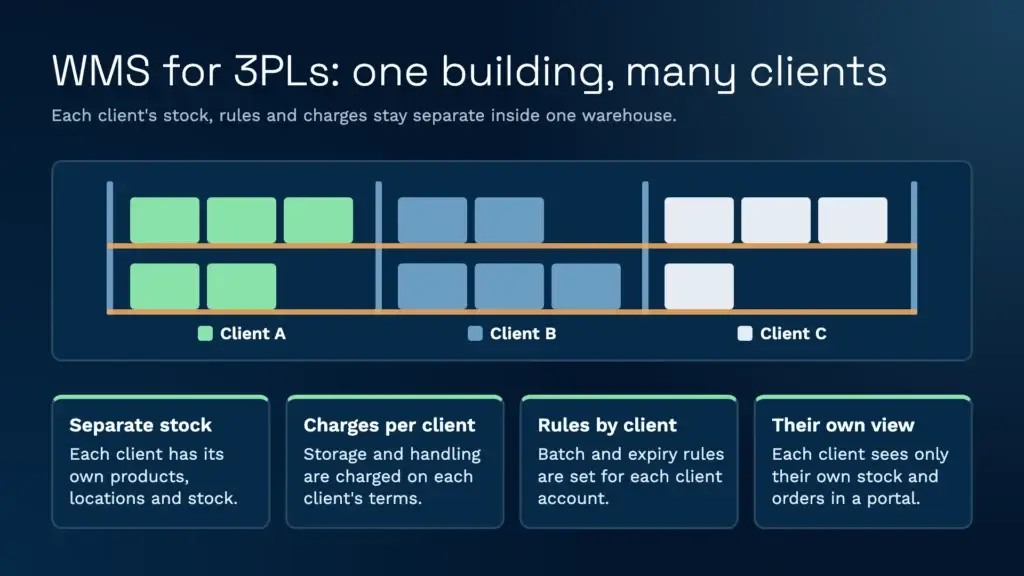
The capabilities that separate 3PL-grade WMS from general warehouse software include:
- Multi-client stock separation: each client’s stock managed independently within shared warehouse space, with separate product catalogues and location rules.
- Client billing: storage, handling and value-added services charged under each client’s own contract. Ask how each charge is captured, and how much is still checked by hand.
- Client self-service portals: secure views where your customers can see their stock levels, track orders and run reports without contacting your team.
- Batch and expiry rules by client: batch and best-before control can be switched on for a client’s account and turned off for products that don’t need it, such as packaging.
- Holds with a reason: when stock is put on hold, the reason is recorded, so the hold makes sense to the client who owns the goods and gives you evidence if there’s a dispute.
- Flexible service levels: different cut-off times and priority rules for each client.
Clarus WMS was designed from the ground up for 3PL operations: billing, reporting and workflow settings all work at client level. Our 3PL solution page sets out the multi-client structure, and the client portal gives your customers answers without a phone call. St John’s Hall Storage cut its invoicing time by 90% with Clarus, because invoice data no longer has to be re-keyed into its accounts package.
How do you evaluate WMS software before buying?
Test the system against your actual operations, not theoretical scenarios. Many WMS projects go wrong because the choice was based on feature checklists rather than operational fit.
A practical WMS evaluation framework
- Define your non-negotiables: list the 5 to 7 capabilities you can’t operate without (for example multi-client billing, carrier integration or lot tracking).
- Request scenario-based demos: ask vendors to show your specific workflows, not their standard demo script.
- Test integration: check how the WMS connects with your ERP, ecommerce channels and carriers before committing.
- Check reference clients: speak with existing customers in your industry and of a similar size.
- Compare total cost of ownership: include implementation, training, integration and support alongside licence fees.
- Assess the vendor’s roadmap: find out how often the platform is updated and whether updates need downtime.
Reviews on Gartner Peer Insights are useful during evaluation because they include implementation feedback alongside feature ratings, giving you a realistic picture of what to expect.
Where warehouse management software is not the right fit
Clarus is built for 3PL and warehouse operations that move stock through picking, packing and dispatch. It isn’t the right choice if your operation depends on the following, because Clarus doesn’t offer them today:
- Yard management: trailer and yard movements are outside the product.
- A dedicated returns module: returns are handled as a manual process.
- Temperature mapping and true temperature control: temperature checks can be recorded through configurable fields, but the system doesn’t control or map temperatures automatically.
If any of these is a must-have, a different platform will suit you better, and it’s worth finding out early in your evaluation. For reviews from warehouse users rather than vendors, Gartner Peer Insights carries detailed ratings that include implementation feedback.
How long does warehouse management software take to implement?
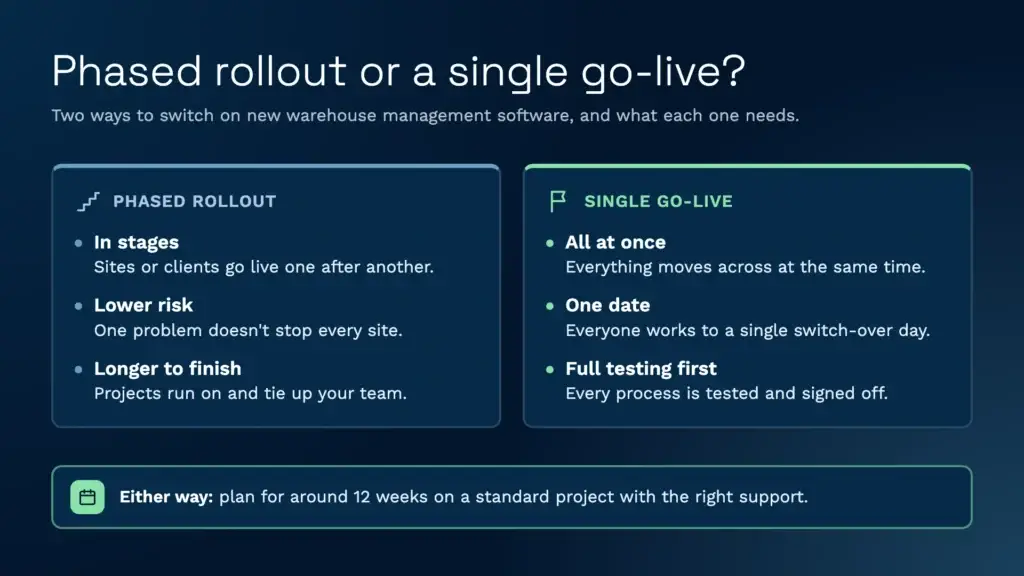
A standard Clarus project, with no custom development and the right support on both sides, aims to go live within around 12 weeks. Complex projects with high volumes and many features take considerably longer. The main reason is people, not software: a go-live needs time for the team to learn the system and test their own processes. As Mat Buttar, Head of Solutions at Clarus, puts it: “12 weeks is a good standard because you need to allow people time.”
Two choices shape the timeline. A phased rollout, where sites or clients go live in stages, reduces the risk of a single failure, but Mat is wary of them: “I hate phased rollouts… I think they’re capacity drainers.” Going live in one go works only when there’s time for full user acceptance testing (UAT). Testing at Clarus is manual: each process, including goods-in, stock control, goods-out and any file interfaces, is tested and signed off by everyone involved before the switch. Our WMS implementation guide covers each stage.
A typical cloud WMS implementation follows this sequence:
- Discovery and scoping: confirm the stakeholders, the workflows and what data you can supply before the project starts.
- System configuration: set up warehouses, locations, products, users and workflow rules.
- Integration build: connect the WMS to your ERP, ecommerce channels and carriers, using APIs or file interfaces.
- User acceptance testing: your own team tests each process against real scenarios and signs it off.
- Go-live and support: a supervised launch with vendor support on site or remotely.
How much does warehouse management software cost?
Clarus plans start from £1,000 a month base. The final price depends on the number of sites, users and integrations you need, so you receive a quote for your operation. The WMS cost guide covers what moves the total up or down.
Competitors are harder to compare. Several vendors in the table above don’t publish prices, so there’s no list price to quote. Ask each one for a written quote that covers the licence, implementation, integrations and support, then compare those quotes line by line. Do the same for implementation time: ask for a written go-live date and what it depends on.
Which WMS is best for a UK warehouse?
There isn’t one answer for every UK operation. The market splits into tiers, though, and knowing which one you’re shopping in narrows the list quickly.
- Enterprise platforms such as Manhattan Active WM, Blue Yonder and SAP EWM. They’re built for large distribution networks, with project timelines and budgets to match.
- Mid-market WMS built for 3PLs, distributors and ecommerce fulfilment, including Clarus. These handle multi-client stock, billing and carrier integrations without an enterprise-sized project.
- Order management tools that have added warehouse features. They suit one client in one building but tend to struggle once you add clients or sites.
Most UK warehouses starting a search now default to cloud. There are no servers to run, updates arrive automatically and adding a site doesn’t mean buying hardware. On-premise still makes sense if you have strict data residency rules or a legacy system that can’t connect to the cloud, but expect a longer project and an IT team to keep it running.
In a demo, check the things that are specific to running in the UK: integrations with the carriers you actually ship with, billing and invoicing that handles VAT for your 3PL clients, and support hours that cover your shifts.
What do users say in WMS reviews?
Read enough reviews on Gartner Peer Insights and Capterra UK and the same themes come up, whichever system is being reviewed.
What users praise: better stock accuracy once every movement is scanned, and directed picking that gets new starters productive faster.
What users complain about: implementations that overrun, workflow changes that need paid professional services, ERP and ecommerce integrations that take longer than promised, and older screens that need a lot of training.
Turn those complaints into your demo checklist. Ask each vendor how long their last few implementations took, what a workflow change costs, and to show a live integration with the systems you already run.
What WMS does Amazon use?
Amazon runs its own warehouse management software, built in-house and tied into its robotics and fulfilment network. It isn’t sold to other businesses. What you can buy is a WMS that applies the same ideas at your scale, such as directed tasks and a scan at every step, without Amazon’s engineering budget.
How we compared this
We compared the platforms in this guide on operation type, deployment model, 3PL and multi-client support, and whether each vendor publishes a price. Facts about each vendor come from the vendor’s own product pages and announcements, from the review directories named above, and from our own product documentation for Clarus. Checked November 2026. Several vendors don’t publish pricing, so the cost section gives Clarus’s published price and no figures for the others. Clarus is our own product, so read the Clarus rows as our description and check them against a demo before you decide.
Speak to a warehouse expert
If you’re evaluating warehouse management software and want to see how a purpose-built WMS works in practice, Clarus is worth a conversation. We work with 3PLs and distributors across the UK to implement warehouse management software that fits the way you operate.
Get in touch with our team to talk through your requirements.