

WMS training is the structured work of teaching warehouse staff to complete their daily tasks in a warehouse management system, from receiving and putaway through to picking and despatch. Good training is role-based, uses the real configuration rather than a demo, starts with a small group of super users, and finishes before go-live rather than during it. The software only pays off once the people on the floor use it correctly, so training is part of the project, not an afterthought.
TechTarget’s tutorial on getting started with WMS training makes the same core point: training has to cover how people use mobile devices and software, and the effort grows with how sophisticated the system is. Its advice on timing matters most for planning. Companies often underestimate the resources training needs, and starting it too close to go-live is a common mistake.
What is WMS training, and what should it cover?
WMS training covers the tasks each person does, the screens and scans they use to do them, and what the system does when something goes wrong. A receiving operative needs to know how a pallet is booked in and what a mismatch looks like. A picker needs to know how a pick list is released, how a location is scanned, and what a red warning means. A supervisor needs to know how to find a stuck task and how to check a stock adjustment.
The useful test is whether each operative can complete their own tasks end to end without help. That matches how the Health and Safety Executive describes competence: the combination of training, skills, experience and knowledge a person has, and their ability to apply them to do a task safely. The government’s supply chain warehouse operative apprenticeship standard takes the same task-based view of the role. Knowing where every menu sits matters much less. Training that tries to teach the whole system to everyone usually leaves people unsure of their own work.
How long does WMS training take?
There is no single duration that fits every warehouse, because it depends on how many roles the system touches, how many products need special handling such as batch or expiry control, and how many people need to learn it. The more useful planning question is how long the team has to practise before the system goes live.
On timing, Clarus’s standard implementation aims to go live in around 12 weeks, provided both sides of the project have the right support. Our implementation team describes 12 weeks as a good standard because people need time to learn the new way of working. That time is spent on training, testing and sorting out master data as well as on the technical build.
Once the basics are in place, the order of work matters. The approach starts with super user training, domain population and master data, then testing, before agreeing which customers or accounts go live first. Training for each go-live group should then follow the configuration that group will actually use.
Who needs WMS training first?
Start with the people who will understand the system best and who the floor already trusts. In practice that means your super users, then the supervisors who will deal with exceptions, then the operatives who do the highest-volume tasks. Staff who only handle occasional tasks, such as a stock check or a returns process, can be trained closer to when they need the skill.
Temporary and agency staff need the same clear, role-based training, and they need it in a shorter window. Give them a single task they must be able to do, such as putting away a pallet, rather than the full system. That keeps the session short and the instruction focused. Where the task involves handling equipment, the HSE’s guidance on training and competence for work equipment applies to temporary staff in the same way as permanent ones.
How do super users make training work?
A super user is a member of the warehouse team who understands the operation well enough to teach it to colleagues. They are usually the person who gets trusted with a problem at the end of a shift. Mathew Buttar, Head of Solutions at Clarus, says that the aim at the start of any project is to identify a super user, and that the person who signed off the contract is often not the right one. Instead, look for the operative who already looks switched on and ask them to take the role.
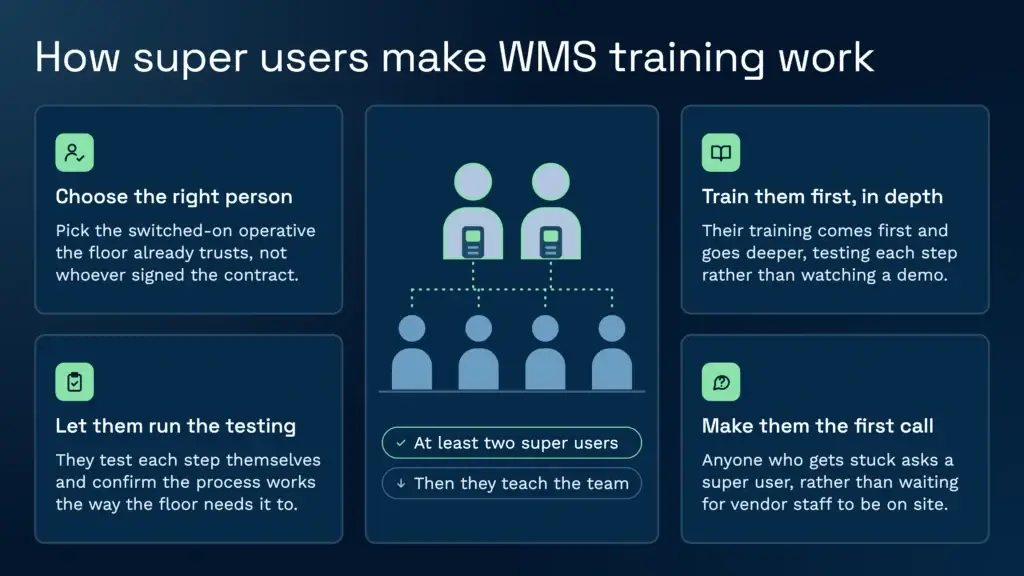
The purpose is to embed knowledge in at least two people on the team. Those people understand why the system was set up the way it was, so they can manage user acceptance testing and become the first call on site when someone is stuck. Training then spreads from them, rather than depending on the vendor’s staff being on site every day.
Plan the super user’s time. Their training needs to come first and be deeper than everyone else’s, and they should be involved in testing each step, not just watching a demo. Clarus’s user acceptance testing is manual. Users test each step themselves, so the super users are the ones who confirm the process works as the floor needs it to.
| Role | Core tasks to learn | How to train | Signed off when |
|---|---|---|---|
| Super user | The whole configured process, exception handling, and how to teach it | Early and in depth, with test transactions on each step | They can walk a colleague through each task unaided |
| Supervisor | Reviewing tasks, releasing work, correcting stock and handling holds | Hands-on with the exception screens and reason codes | They can find and clear a blocked task without help |
| Receiving operative | Booking in, scanning labels, recording quantities and flagging damage | Practice on a test pallet, then on live goods with a super user nearby | They complete a full receipt with no mismatches they cannot resolve |
| Picker or packer | Scanning location and product, confirming quantities, and reacting to warnings | Short hands-on sessions, then supervised shifts | They complete a full pick and dispatch on their own |
| Temporary or agency staff | One or two tasks that match the work they have been brought in to do | A short, single-task briefing on the first shift with a named contact | They complete their assigned task on the first shift |
How do you train operatives who have never used a scanner?
Start with what they already use. Our implementation team trains people who have worked on the floor for decades and have never held a handheld device. The trainer asks them what they have in their pocket. Most people carry a smartphone, and once they accept that they already know how to use a touchscreen, the scanner stops looking like a mystery. The point is that the barrier is usually belief rather than skill, and that a scanner is often easier to operate than people expect.
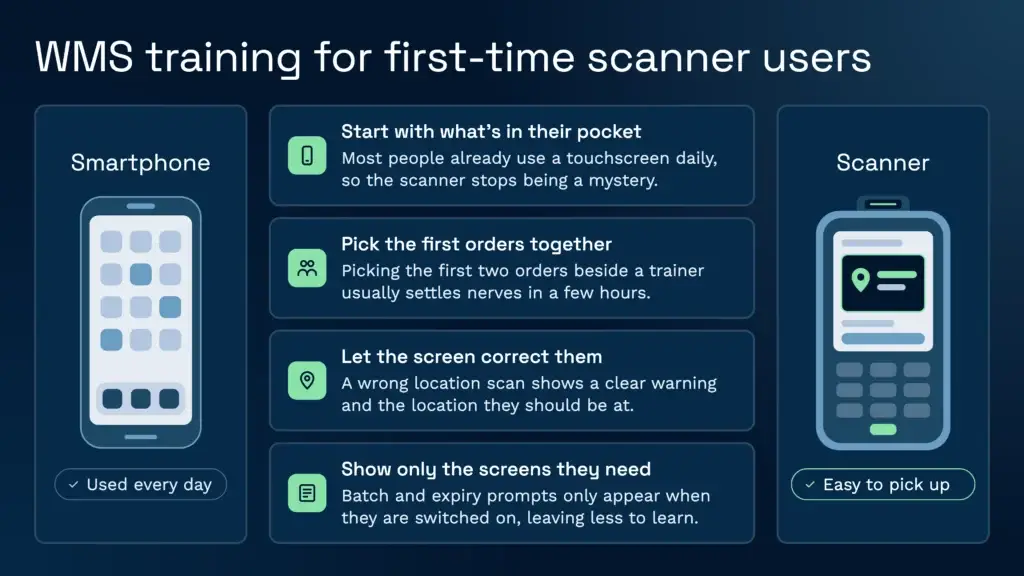
A common pattern at go-live is an operative who is nervous about their first orders. Picking the first two alongside a trainer usually settles it within a few hours. One supported task done in real time does more than a long classroom session.
Scanners also teach themselves in the right direction when they are set up well. In Clarus’s handheld flows, if an operative is on a pick task and scans the wrong location, the device shows a clear warning and displays the location they should be at. That feedback is part of training, because the operative learns from the screen rather than from a supervisor standing over them. Clarus’s scanning feature and our warehouse scanning system are built on the same principle: the scan checks the work, so errors are caught at the shelf.
Keep the scanner screens to what the role needs. In Clarus, batch and expiry prompts only appear on the handheld when they are switched on for that account, so a team handling stock without batches is not shown fields it will never use. Fewer screens per role means less to learn and fewer wrong turns on the first day.
When should WMS training happen relative to go-live?
Training should finish before the first live order, and it should follow the configuration the team will actually use. Training that happens after the system is configured but before the floor has tested each step tends to teach a process that then changes. Training that happens too early teaches people a version of the system that is not yet built.
Ask the project team where the biggest bottleneck in uptake is likely to be. The implementation team asks this question before go-live, and the answer often points to a particular role, shift or product group. That group then gets the extra time and the closer supervision.
For peak periods the timing gets tight. Suppose a site needs three weeks of training before a three-week peak. That leaves no room for a retraining cycle, so plan the training window early and treat the peak as the deadline, not the start date. This is an example of planning, not a benchmark for your business.
How do you keep training working after go-live?
Training does not end at go-live. New starters, returning staff and agency workers all arrive after the launch, and the system will change. Clarus delivers updates continuously, so any update the company makes is available to every customer once it is developed. That is useful for keeping the system current, but it means your refresher training needs a routine. Review the quick-reference guides after each release and tell the floor what changed.
Keep your documentation short and role-specific. A one-page task card for each role, showing the scan sequence and the warning messages the operative will see, is more useful on the floor than a manual nobody opens. Store the cards where the team already works, and update them when the configuration changes. For wider skills development beyond the system itself, the UK Warehousing Association und die Chartered Institute of Logistics and Transport both run training for warehouse and logistics staff.
How do you measure whether WMS training worked?
Measure what the training was meant to change. Stock accuracy, mispick rates, and the number of tasks a supervisor has to correct all show whether people are using the system correctly. Clarus keeps an audit trail of every action and stock movement, so you can see who received, picked or adjusted stock and when. Compare results by role, not just across the whole site. A problem with one role is much easier to fix than a vague drop in performance.
Cycle counting is a practical check. Count a sample of locations each week, record the error rate, and apply it to the wider warehouse as an estimate of accuracy. For more on structuring those checks, see Clarus’s guide to running structured warehouse stock checks.
Training that is working should also show up in fewer repeated errors. If the same mistake keeps appearing on the same screen, the fix is usually a clearer warning, a changed flow or a short refresher, not more classroom time. Our guide to reducing picking errors covers the scan-verification side in more depth.
Common WMS training mistakes to avoid
The most common mistake is training before the process is set. If the configuration changes after the session, the training has to be repeated. The second is training everyone at once. Super users need the deepest training, so give them the first slot and build the rest of the programme around them.
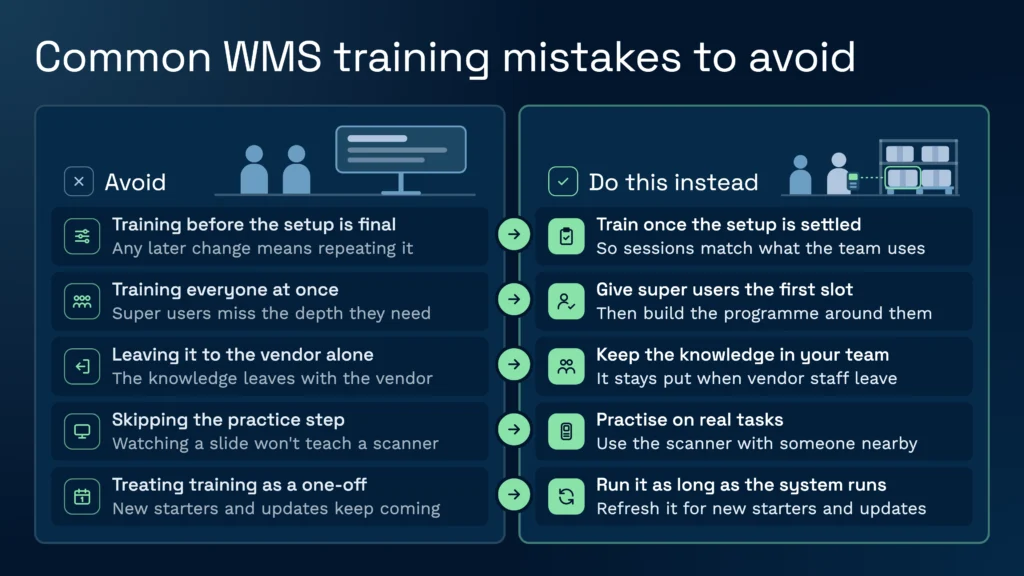
Third, leaving training to the vendor alone. Vendor staff can run the sessions, but the knowledge needs to stay with your team once they leave. Fourth, skipping the practice step. People learn a scanner by using it on real tasks with someone nearby, not by watching a slide. Finally, treating training as a one-off. Turnover, peak hiring and system updates mean the programme has to run for as long as the system does. LinkedIn’s community advice on making sure a team is trained on a new WMS lists the same stages: assess, prepare, deliver and follow up.
Training also depends on the warehouse’s underlying process. A system will not fix poor labelling or unclear stock rules. Clear processes make training easier, and training exposes the processes that were never clear in the first place. For the wider rollout, our guide to the WMS implementation process covers the project plan that training sits inside.
Training is also easier when the wider labour plan is sorted. If you are changing shift patterns or recruiting peak staff alongside the system, look at your warehouse labour management at the same time, so the people you train are the people you will have on shift. Paperless working tends to make the training question simpler too, because the same screens replace paper lists, as set out in our paperless warehouse guide.
Sprechen Sie mit einem Lagerfachmann
If you’re evaluating your options and want to see how a purpose-built WMS works in practice, Clarus is worth a conversation. We work with 3PLs and distributors to implement warehouse management software that fits the way you operate, not the other way around.
Kontaktieren Sie unser Team um Ihre Anforderungen zu besprechen.