

Warehouse management system (WMS) implementation is one of the biggest operational changes a warehouse or 3PL can make. Done well, a WMS implementation gives the business cleaner inventory control, faster order processing, clearer reporting and a more reliable way to scale. Done badly, it creates confusion, weak data, frustrated staff and a system that never quite earns the trust it needs on the floor. That’s why we believe the go-live plan matters as much as the software you choose. The system may be powerful, but the implementation plan decides whether it becomes useful quickly or turns into a long recovery exercise.
The timing matters more than ever. The Office for National Statistics found that the number of UK business premises classified as transport and storage was 88% var högre 2021 än 2011. More sites, more stock movement, more customer requirements and more complexity all raise the pressure on implementation quality. A warehouse management system can’t be dropped in like a simple software install. It has to be introduced in a way that matches the reality of shifts, peaks, layouts, customers and exceptions.
Labour pressure makes a structured approach even more important. Descartes reported that 76% of supply chain and logistics leaders were experiencing notable workforce shortages, with warehouse operations among the hardest-hit areas at 56%. Chris Jones, EVP, Industry at Descartes, said these organisations “continue to struggle getting the labor, knowledge workers and leaders they need to thrive.” For WMS implementation, that means the plan can’t assume endless spare time, unlimited training capacity or room for repeated mistakes. It has to be practical from day one.
Visibility is the other reason to take care. Zebra reported that 91% of warehouse decision-makers expect to use technology to increase supply chain visibility over the next five years. The WMS is no longer a standalone tool. Implementation now has to consider integrations, reporting, mobile workflows and the wider operating model, not only barcode scanning and stock locations.
In our experience, the warehouses that go live properly don’t rely on guesswork. They use a WMS implementation plan with owners, clear gates, realistic timelines and a shared understanding of what “ready” actually means. This WMS implementation guide is built to help with exactly that.
What is WMS implementation?
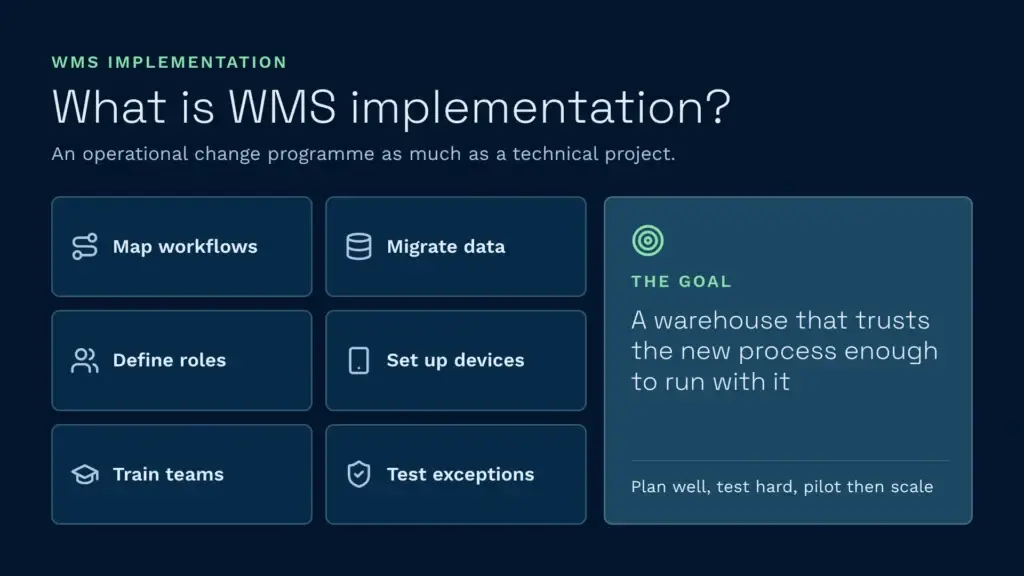
WMS implementation is the process of configuring, testing, integrating and introducing a warehouse management system into live warehouse operations. That includes mapping workflows, migrating data, defining roles, preparing devices and labels, training teams, testing exceptions and moving the warehouse from old processes to new ones without breaking service. It’s an operational change programme as much as a technical project.
A good WMS implementation connects system logic to the real warehouse. It has to reflect how receipts arrive, how stock is stored, how picking actually works, how shifts hand over, how clients are billed and where the messy edge cases live. We’ve found the fastest way to cause trouble is to implement against an idealised process map while ignoring how the operation behaves under pressure.
McKinsey makes a similar point in its warehouse automation research. It says “the decisions companies make during the initial strategy development, scoping, and planning phases are critical” to the outcome, and that testing must be rigorous and comprehensive under a pilot-then-scale approach. The article focuses on automation, but the lesson applies directly to WMS implementation: planning quality and test discipline shape the result long before go-live day.
So we encourage warehouse teams to treat implementation as a staged build-up to operational confidence. The goal isn’t merely to switch the system on. It’s to reach a point where the warehouse trusts the new process enough to run with it.
Why do WMS implementations succeed or fail?
Most WMS implementation problems aren’t caused by one dramatic mistake. They come from small gaps in planning. The data is incomplete. The labels aren’t ready. The test scripts cover normal orders but not awkward ones. Finance isn’t aligned on billing rules. Team leaders are trained, but night shift isn’t. The warehouse wants to go live in a peak week because the calendar looked convenient. Each issue looks manageable on its own. Together, they make the first days of a new system much harder than they need to be.
We also see failure patterns around ownership. A project with too few named owners usually drifts. A project with too many decision-makers usually slows down. The best projects have clear responsibilities for operations, IT, finance, data, testing, training and sign-off, with everyone knowing what they must deliver and when.
Frontline engagement matters just as much as project governance. McKinsey’s work on transformation communications says “the most successful transformations make goals tangible and actively engage people” in creating change. The same article says a transformation’s odds of success increase by 5.2 times when managers make it easy for their teams to understand the case for change. That matters hugely here, because warehouse teams don’t adopt a new workflow simply because it exists. They adopt it when they understand what it fixes and feel ready to use it.
In our view, a successful WMS implementation comes down to five things: a realistic view of the operation, clear ownership, usable data, disciplined testing and confident people. With all five in place, go-live becomes much more predictable. With two or three missing, even a strong system can look weak.
Our step-by-step WMS implementation checklist
Steg 1: Bedöm lagret ordentligt
Start by assessing current operations in enough detail to design the right future process. We recommend doing this on site wherever possible. Walk the operation from goods in to dispatch. Watch how receipts are handled, where stock ends up, how replenishment is triggered, how picking varies by customer and where teams already rely on workarounds. An implementation that begins with live observation will almost always produce a better configuration than one based on assumptions.
That’s why Clarus onboarding starts with a site visit, led by someone who understands warehouse reality: shifts, peaks and constraints. The messy reality of the warehouse often matters more than the neat version written in a process document.
Steg 2: Välj rätt implementeringspartner och projektstruktur
A system can be strong and still fail if the implementation support is weak or too generic. Choose a partner that understands peaks, shift patterns, multiple stakeholders, client-specific exceptions and the need to keep the business running while change happens. We’ve set out the questions to ask in the vendor evaluation section below, and our guides to the best WMS software for 2026 och den Det bästa WMS-systemet för 3PL-företag compare the main options.
McKinsey’s operations transformation approach pairs a coherent vision of the future operation with an employee-led implementation and early quick wins. That’s the right lens for a WMS implementation service too. The best partner doesn’t just configure screens. They help shape the path to a workable go-live.
Steg 3: Bygg det interna projektteamet tidigt
Include operations, IT, finance and at least one strong subject-matter expert from the floor. If one of those perspectives is missing, gaps usually emerge later in billing, integrations, process design or adoption. Consafe Logistics makes the same recommendation: a cross-department team with clear roles and regular contact with the vendor.
The team doesn’t need to be huge, but it does need to be credible. The people closest to the work should help shape how the work is done in future. That produces better configuration and builds trust when the system goes live.
Steg 4: Rensa och förbered dina data
We treat data preparation as one of the most important stages, because poor data can make a good system look unreliable very quickly. Item masters, customer rules, supplier details, location structures, units of measure, rate cards, lot logic and open orders all need reviewing and cleaning before migration.
Be ruthless here. Implementation isn’t the moment to preserve years of duplicate fields, half-used codes or inconsistent logic because “that’s how it’s always been.” Clean data gives the warehouse a better first impression of the system and cuts the number of false issues that appear after go-live.
Step 5: Configure the system and plan integrations around real workflows
This is where operational knowledge turns into live workflows. Receipt logic, putaway rules, stock statuses, picking methods, packing steps, reporting, fakturering av kunder, user permissions and integrations all need to reflect how the warehouse should work after go-live, not how the software looks in a demo. At Clarus, we configure the system to match your workflow and then lock in a repeatable process, so the warehouse isn’t forced into workarounds because the implementation was rushed.
Plan integrations at the same time, not after. Your WMS will usually need to talk to an ERP or accounting system, ecommerce channels and carriers, and each connection needs its own test scenarios. Check which integrationer are pre-built and which need development work. Clarus, for example, has a dedicated Brightpearl integration and can post accounting data into Sage and Xero. Campeys connected client billing to Sage 50 as part of its deployment. If you’re still weighing up where the ERP ends and the WMS begins, our ERP vs WMS guide explains the split.
Steg 6: Träna dina superanvändare och sedan resten av teamet
Train a small group of super-users first, then use them to support wider adoption. This gives the warehouse internal experts who understand both the system and the reality of the shift.
Training should be role-specific. Goods-in staff don’t need the same workflow detail as pickers, supervisors or finance users. The closer training matches live tasks, the stronger the first few weeks feel. McKinsey’s transformation work makes the same point: frontline communication and manager capability have a major effect on how well change lands.
Steg 7: Testa systemet ordentligt
Testing is where projects become either solid or risky. Cover standard flows and awkward cases: damaged stock, short receipts, lot-controlled items, client-specific picks, partial shipments, billing edge cases and user-permission mistakes. The point isn’t to prove the system is perfect. It’s to uncover problems while there’s still time to fix them calmly.
McKinsey says testing should be “rigorous and comprehensive, covering all SKU types and throughput requirements.” Granskning av leveranskedjehanteringen goes further and recommends rehearsing the data migration at least twice in an environment that mirrors production. If you only test “happy path” orders, go-live becomes the first real test, and that’s rarely the cheapest place to find surprises.
Steg 8: Aktivera med godkännandefaser och beredskapsplaner
By this stage, have explicit sign-off gates: data signed off, labels signed off, devices ready, integrations checked, teams trained, test scenarios passed and support contacts agreed. Go-live is much calmer when “ready” is defined before launch, not argued about on the morning of it.
Plan for contingencies too. McKinsey notes that a contingency plan minimises operational disruption during rollout. In warehouse terms, that means agreeing what happens if a printer fails, an interface lags, a process needs temporary manual support or a particular customer needs extra supervision in the first few days. A good WMS implementation doesn’t pretend nothing will wobble. It plans for wobble and contains it.
Choosing a WMS vendor: what to evaluate
The vendor you pick shapes your implementation as much as the software does, because success rests on their support, responsiveness and fit with your operation. These are the areas to compare.
| Evaluation area | What to ask | Why it matters |
|---|---|---|
| Implementeringshastighet | What is your standard go-live timeline for a single-site operation? For a multi-site 3PL? | Timelines range from days to well over a year. Find out whether the vendor has a repeatable onboarding process or treats every project as bespoke. |
| Stöd för flera klienter | Can you separate inventory, billing and reporting by customer in one warehouse? Is that native or a bolt-on? | 3PLs need multi-client handling built in. Workarounds tend to break as you add clients. |
| Billing | Does the system capture billable events automatically (receiving, storage, picks, packs, dispatch, returns, value-added services)? Does it support per-client rate cards? | Missed charges and manual invoicing are where many 3PLs lose money. Without automated 3PL billing, the hard work stays in your office. |
| Integrationer | Do you have pre-built connectors for our ERP, ecommerce platforms and carriers, or is every integration custom? | Pre-built integrations usually mean a faster go-live. Custom builds take longer and need ongoing maintenance. |
| Deployment model | Is the system cloud-based or on-premise? What are the contract terms? | Cloud systems remove server maintenance and upgrade projects from your team. On-premise shifts that work to you. |
| Customer access | Can our clients see their own stock and orders without emailing us? | A customer self-service portal cuts the “where’s my order?” emails your team handles every day. |
| Support model | What are support response times? How are urgent issues handled? Does the implementation team stay involved after go-live? | Support quality after go-live decides whether early issues become firefighting or quick fixes. |
| Prisöppenhet | Is pricing published? Are there extra charges for modules, support or users? | Clear pricing makes it easier to compare vendors fairly and budget with confidence. |
When comparing vendors, prioritise fit over feature lists. A simpler WMS that matches your operation is worth more than a feature-heavy system you’ll never fully use.
WMS implementation costs and what drives them
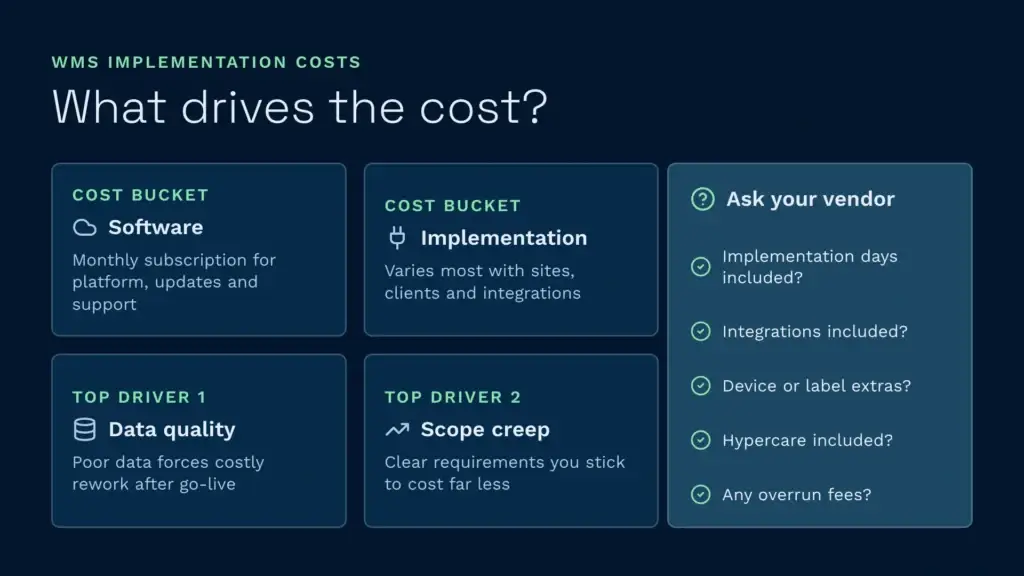
WMS implementation cost varies a lot by vendor, warehouse complexity and scope, so there’s no single typical figure. Extenda Retail points out that cost depends on system complexity, customisation and business size, and covers software, hardware, integration, training and ongoing support. Understanding the drivers helps you budget and compare options fairly. Our WMS cost guide goes into more detail.
The two main cost buckets
- Software subscription or licence. Cloud WMS is usually priced as a monthly subscription covering the platform, updates and support. Legacy on-premise systems may charge annual licences, per-user seats or module add-ons on top. Clarus publishes its prissättning: each plan has a monthly base price plus a tiered per-user fee that falls as you scale.
- Implementation and integration. This is where costs vary most. A single-site operation with clean data and standard integrations needs far less professional services time than a multi-site 3PL with dozens of clients, bespoke billing rules and complex integrations. At Clarus, a one-off implementation fee covers layout configuration, SKU cleaning and custom courier logic, and a specialist confirms the figures for your setup.
The biggest cost driver is data quality. Poor data forces rework after go-live. The second is scope creep: starting with clear requirements and sticking to them costs far less than discovering halfway through that “we also need X, Y and Z.”
Cost factors to clarify with your vendor
- Are implementation days included in the subscription, or charged separately?
- Are standard integrations included, or is each integration build charged?
- Are there extra charges for handheld device setup, label design or advanced reporting?
- Is post-go-live support (often called hypercare) included in the implementation fee?
- If the project runs over, are there overrun fees?
Many vendors don’t publish implementation costs because so much depends on your warehouse and the state of your data. Ask for a written estimate after a scoping visit, and keep a budget line for the unexpected issues that tend to surface during data migration.
How long does WMS implementation take?
Timing depends on warehouse size, number of sites, integration complexity, data quality, customisation and team readiness. Basic implementations move much faster than multi-site or heavily integrated projects, but timeline discipline matters more than optimism. A short plan with weak preparation usually ends up slower overall than a realistic plan with good structure.
The Barcode Warehouse puts a basic WMS implementation at anywhere from around three months to over a year, depending on warehouse size, integrations and training. That’s a broad range, and it reflects reality. A simple single-site operation isn’t solving the same problem as a busy multi-client 3PL.
Fast implementations are possible when the scope is clear and the warehouse is ready. Campeys was operational after one day of setup at its Wakefield depot. Harry Campey, Commercial & Operations Director, said: “Setup only took one day we were live with locations mapped and pallets moving.” Welch’s Transport was using live data within hours. We don’t present these as a promise for every project. They show that when data, scope and site readiness line up, WMS implementation can move far faster than many teams expect.
What are the 5 core steps of WMS implementation?
WMS implementations vary by size and complexity, but most follow five core phases:
- Assessment and planning. Understand your current operation, define scope, build the project team and select the right WMS vendor and implementation partner.
- Data preparation and configuration. Clean your data (item masters, customer rules, location structures) and configure the WMS around how your warehouse actually works.
- Integration and training. Connect the WMS to your ERP, carriers and other systems, then train super-users first and the wider team after, with hands-on practice in a test environment.
- Testing and readiness. Run test scenarios covering standard orders and edge cases, confirm integrations, devices, labels and support contacts are ready, and get formal sign-off before go-live.
- Go-live, handover and optimisation. Launch with agreed go-live gates, contingency plans and post-go-live support, monitor the first 30 days closely and refine processes based on real feedback.
These five phases group the eight steps in the checklist above. The most successful implementations keep discipline within each phase rather than rushing to go-live.
Hur du kommer igång ordentligt med Clarus WMS
When we talk about implementation at Clarus, we don’t mean “press the button and hope.” We mean a structured go-live plan with named owners, clear stages and sign-off gates. We get on site early, walk the operation properly and build the process around how your warehouse really works, including shifts, peaks, client edge cases, data reality and the physical layout from goods in to dispatch.
It’s a partnership with a clear split of responsibilities. Clarus brings the product, the project team and the operational expertise. Your side brings operations, IT and finance input, access to the warehouse, subject-matter experts, your existing data and honest conversations about edge cases. In return, you get a clear path to go-live, a repeatable process and fewer surprises when the system starts carrying live activity.
We’ve seen how much this matters on customer projects. Campeys was live after one day of setup and passed its first BRC audit with Clarus in place, with the auditor praising its traceability. Welch’s Transport was using live data within hours. At Mitchell Storage & Distribution, our implementation specialist stayed close throughout. As Luke Bodycot put it: “Every stage of the way he was there, telling us how to do things and how to adapt them.” Within a week, a new starter at MSD was booking receipts without errors. Fast where it can be fast, detailed where it must be, and always focused on live operational confidence.
Post-implementation: the first 30 days and beyond
Go-live isn’t the end of implementation. It’s the start of the phase that tells you whether the system works under real pressure, where training gaps sit and how responsive your vendor’s support really is. The Access Group treats post-launch hypercare as a phase in its own right, and so should you.
The hypercare period (first two weeks)
Your team is learning the system while live customer orders run through it. The vendor’s implementation team should be on hand, on site or on standby, to resolve issues quickly. During this period:
- Log every workaround and every time someone falls back to manual steps because the system didn’t handle a scenario.
- Track system response times, integration failures and device issues as they happen, not after a busy shift.
- Hold a short daily stand-up with the team to surface problems before they compound.
- Prioritise fixes by severity: blockers first, minor improvements later.
The aim isn’t a perfect system in week one. It’s confidence that the team can operate with it, that support responds and that problems have known workarounds while fixes are built.
Weeks two to four: stabilisation and early optimisation
As the team gets familiar and the most urgent issues are fixed, shift from firefighting to optimisation:
- Review process speed and pick routes against the benchmarks you set before go-live.
- Decide which workarounds should become permanent and which should be configured away.
- Start cycle counting and stock reconciliation to catch data issues early.
- Run refresher training for roles that are still struggling.
- Check billing output against what was agreed before go-live.
Weeks four to twelve: moving to normal support
By now your team should be running the warehouse without daily vendor presence, and support moves to standard response times. This is also when teams can slip back into old habits because they still feel faster. To prevent that:
- Set clear measures of success at 30, 60 and 90 days (pick rate, invoicing accuracy, stock count variance).
- Hold regular reviews with the vendor to track progress against them.
- Treat any workaround that beats the configured process as a sign the configuration needs refining, not as a permanent fix.
- Give one person ownership of post-implementation optimisation, usually in operations or IT.
Measuring long-term success
At around six months, measure the outcomes the implementation was meant to deliver. For 3PLs, that usually means invoicing accuracy (charges captured against work done), billing cycle time (month-end to invoices sent) and stock accuracy. For wholesale and distribution, it means inventory turnover, picking accuracy and order cycle time. If the WMS has delivered, these numbers move visibly. If they haven’t, configuration work may still be needed, adoption may be incomplete or the system may not fit the operation as well as expected.
Common WMS implementation pitfalls and how to avoid them
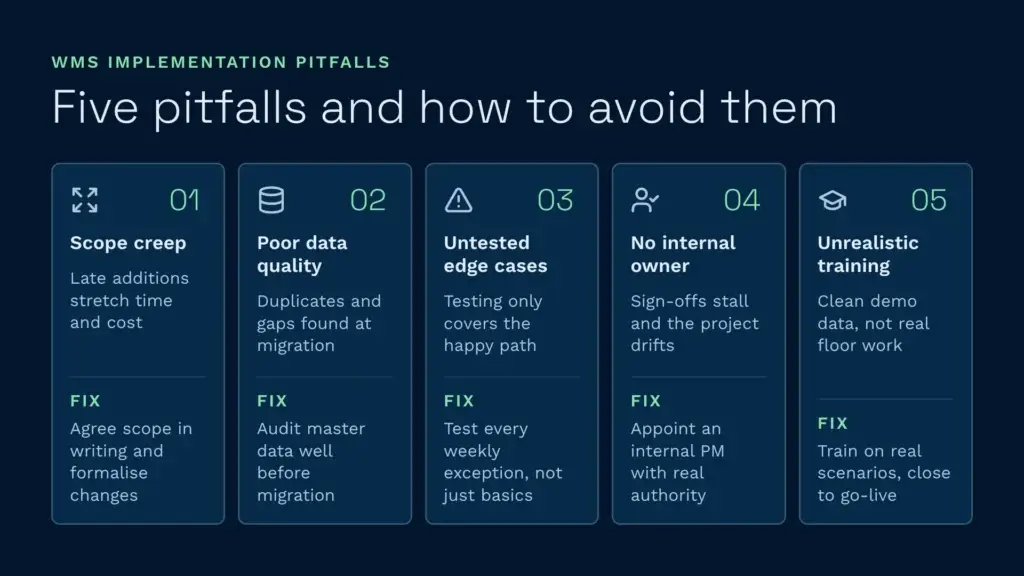
Most problems start as small early decisions that compound later. These are the patterns we see most often.
Pitfall 1: Unclear scope and creeping requirements
The problem: The project starts with a clear scope, say a single site, five customer accounts, basic picking and billing. Halfway through, someone asks to add bonded stock or a newly won customer. Each addition stretches timelines, costs and testing.
How to avoid it: Agree requirements in writing before vendor selection. Changes are allowed, but go through a formal change request with the timeline and cost impact visible to leadership. That forces a real conversation about priority versus nice-to-have.
Pitfall 2: Poor data quality found during migration
The problem: Item masters have duplicate records, missing units of measure and customer names spelled five different ways. During migration you find the data is unusable, so you either delay go-live or go live with bad data and spend months fixing it.
How to avoid it: Audit your data early, well before migration. Pull your master data and have the vendor or a data specialist check it against what the WMS needs. It’s painful upfront, but far cheaper than finding out on day one of live trading.
Pitfall 3: Testing that skips the edge cases
The problem: Testing covers the happy path: receive a standard order, pick it, dispatch it. Partial receipts, short deliveries, lot-controlled items and client-specific billing rules never get tested, so go-live uncovers them under pressure.
How to avoid it: If something happens in your operation every week, it belongs in your test pack. Damaged stock, disputed deliveries, multi-customer picks, special billing rules and serial-numbered items all count. It takes time, and it prevents surprises.
Pitfall 4: Weak internal project ownership
The problem: The vendor is clearly accountable, but nobody internally owns timelines, stakeholder alignment or decisions. Sign-offs take weeks to chase and the project drifts.
How to avoid it: Appoint an internal project manager who understands your warehouse and isn’t overloaded with day-to-day operations. Give them authority to make or escalate decisions, and make them the vendor’s single point of contact.
Pitfall 5: Training that doesn’t match real work
The problem: Training happens in a test environment with clean data and standard orders. On go-live day, the team meets damaged goods, customer-specific picking rules and the reality of the floor. Training didn’t cover any of it, so people fall back on the old process.
How to avoid it: Make training scenarios realistic. Pickers should practise on the picks your biggest customer actually sends. Goods-in staff should rehearse short receipts and customer-specific rules. Train as close to go-live as possible so it’s fresh, and keep it role-specific.
Ready to get your WMS implementation right?
WMS implementation doesn’t need to feel like a leap into the unknown. The strongest projects replace assumption with structure: clear owners, clean data, realistic testing, confident training and defined sign-off gates. With those in place, go-live is less about firefighting and more about controlled momentum.
Start by looking at where your implementation risk is highest today: process ambiguity, data quality, shift coverage, client-specific rules and how much internal ownership is already in place. Those areas usually decide whether a WMS implementation feels smooth or unnecessarily stressful.
At Clarus, we believe the right implementation gets you live properly, not just quickly. When the process matches warehouse reality and the team is ready for day one, the system starts adding value much sooner. Boka ett samtal to talk through your operation.