

If your 3PL is looking at warehouse management systems, you’ve probably come across NetSuite WMS. It’s an easy choice to consider. NetSuite is an established platform, and if your finance team already uses it, adding the warehouse module feels like the natural next step. But NetSuite WMS and Clarus WMS are built for different jobs. NetSuite WMS is a module inside an ERP suite, designed for product businesses that need standard warehouse workflows. Clarus WMS is purpose-built for 3PLs running multiple clients from the same warehouse. Before you commit to either, it’s worth understanding the structural differences that will shape your operation for years.
Quick verdict
Choose NetSuite WMS if you’re a single-client manufacturer or distributor already invested in NetSuite’s ERP, with standard warehousing needs (putaway, picking, cycle counting) and no need for multi-client billing or customer portals. It keeps everything on one platform.
Choose Clarus WMS if you’re a 3PL managing stock for multiple clients, need billing that captures every chargeable task automatically, want branded client portals, or want to go live without taking on a full ERP project. Clarus is built around the multi-client model from the start.
Side-by-side comparison
| Fähigkeit | Clarus WMS | NetSuite WMS |
|---|---|---|
| Architektur | Purpose-built 3PL WMS, cloud-based on ISO-certified AWS infrastructure | Module of NetSuite ERP; requires the wider NetSuite platform |
| Unterstützung mehrerer Mandanten | Native: per-client stock, billing, reporting and portals | No native multi-client design; usually needs customisation |
| Automatisierte Rechnungsstellung | Every task recorded at source and priced automatically, then turned into invoice lines | Activity-based 3PL billing usually needs extra modules or custom logic |
| Client portals | Branded portal with live stock, order milestones and shipment tracking (Scale and Enterprise plans) | Not native; needs custom development or a third-party add-on |
| Mobile scanning | Paperless RF and mobile picking with configurable handheld workflows | NetSuite WMS mobile app; third-party apps such as RF-SMART also available |
| Auswahl | Cluster and batch picking (Scale plan and above) | Wave release, multi-order picking |
| Stock rotation | FEFO, batch/lot and expiry control | Expiry dates set at receiving; expired lots can be hidden at picking |
| Integrationen | Over 200 systems, including marketplaces, ERPs, accounting packages and carriers | NetSuite ecosystem; non-native systems need development or middleware |
| Umsetzung | A few weeks to a few months, depending on scope | WMS module alone if ERP is in place; full ERP adoption if not |
| Contract | No tie-ins, paid monthly | Tied to wider NetSuite subscription |
| Unterstützung | Response in under 5 minutes | Varies by support tier |
What NetSuite WMS is and how it works
NetSuite WMS is a module of NetSuite, the cloud ERP platform Oracle acquired in 2016. It sits inside NetSuite alongside financials, inventory, order management and other business modules. The WMS module handles the warehouse floor: receiving, putaway, picking, packing, cycle counting and mobile scanning. Warehouse transactions update NetSuite’s inventory record in real time, and that same record feeds finance, planning and accounting.
That set-up works well for manufacturers and distributors who already run their business on NetSuite and don’t want a separate warehouse system. If your finance team already reconciles stock against NetSuite’s general ledger, adding the WMS module keeps that link tight. (If you’re weighing up the two types of system more broadly, our guide to ERP vs WMS covers the differences.)
NetSuite WMS features: what’s included
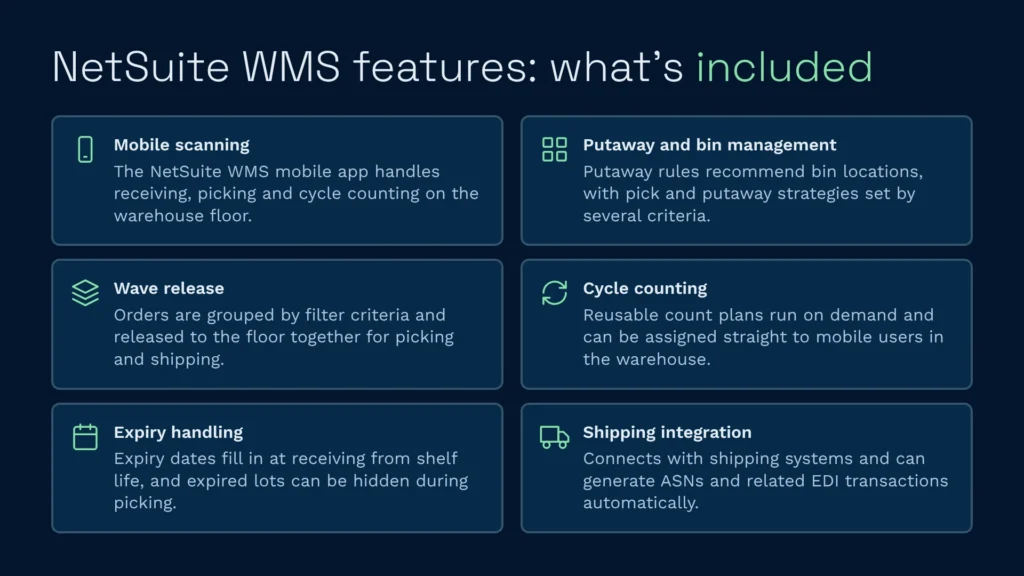
Laut NetSuite’s own WMS datasheet, the module covers the standard warehouse toolkit:
- Mobile scanning: The NetSuite WMS mobile app supports receiving, picking and cycle counting. Some businesses add third-party apps such as RF-SMART for extra workflows
- Putaway and bin management: Putaway rules recommend bin locations, and pick and putaway strategies can be set using several criteria
- Wave release: Orders are grouped by filter criteria and released to the floor for picking and shipping
- Stichprobeninventur: Reusable count plans can be run on demand and assigned to mobile users
- Expiry handling: Expiry dates can be filled in at receiving based on shelf life, and expired lots can be hidden during picking
- Shipping integration: Connects with shipping systems and can generate ASNs and related EDI transactions
For a single-client warehouse already on NetSuite, this is enough. Warehouse transactions are captured and fed straight into inventory and accounting on the same platform.
NetSuite WMS limitations for 3PLs
This is where the gaps show. NetSuite WMS wasn’t designed for multi-client 3PL operations, and the limitations come from that design rather than from missing features.
No native multi-client architecture
A 3PL holding stock for five clients needs five separate stock records, five billing streams, five sets of reports and five branded portals, all kept apart. NetSuite WMS doesn’t have this built in. You can split clients in NetSuite using subsidiaries or other structures, but the WMS module isn’t designed around client separation. Getting proper multi-client isolation usually means customisation, often in SuiteScript, which adds time to implementation and work to ongoing maintenance.
Billing isn’t built for 3PL activity
A 3PL invoice is complicated. You charge for storage (per pallet, per period), handling (per item received, picked and packed), value-added services (labelling, kitting, returns) and sometimes carriage. NetSuite has billing tools, but they aren’t designed to capture the individual warehouse tasks that drive 3PL invoicing. Without a 3PL billing engine, warehouse activity often has to be pulled together manually each month before invoices go out. That’s the kind of process that cost St John's Hall Lagerung four hours per invoicing run before they moved to automated activity tracking.
Implementation is a bigger project
If your 3PL doesn’t already use NetSuite for finance and operations, adopting it for warehousing means adopting the whole platform. That’s a business-wide project, because finance, purchasing and order management all move at the same time as the warehouse. If you already use NetSuite, the WMS module is a smaller job, but it still needs configuring and testing, and more so if you need custom workflows or links to your clients’ own systems.
Who NetSuite WMS is best for
NetSuite WMS fits a fairly narrow set of businesses:
- Single-client manufacturers or distributors already committed to NetSuite who need standard warehouse floor management (receiving, putaway, picking, packing) and value the tight link with finance and planning
- Larger organisations with the IT resource to build and maintain SuiteScript customisations
- Businesses already standardised on NetSuite for finance, supply chain and order management, who see the WMS as an extension of the ERP
It’s a weaker fit for growing 3PLs, multi-client fulfilment, or anyone who needs to go live quickly without a large project.
What Clarus WMS is and how it works
Clarus WMS is a cloud-based warehouse management system designed for 3PLs and multi-client operations. It runs warehouse operations (receiving, putaway, picking, packing, despatch, returns) with each client’s stock, billing, reporting and portal kept separate inside the same warehouse.
Every task is recorded at source and priced automatically, so 3PL billing doesn’t depend on someone reconciling spreadsheets at month end. Warehouse staff scan barcodes on mobile devices, and the system checks each scan and directs the next task.
Clarus runs on ISO-certified AWS infrastructure, so there’s nothing to install, patch or upgrade. Your team logs in through the browser, your clients log into their own branded portal, and everything updates in real time. More than 800 warehouses across Europe, North America, the Middle East and Asia-Pacific run on it.
Clarus WMS features: what’s included
Clarus is built for the way 3PLs actually work:
- Multi-client stock separation: Each client’s stock, billing, reporting and visibility are kept apart, with no custom development
- Automatisierte 3PL-Abrechnung Every task is recorded at source and priced automatically, then converted into invoice lines without re-keying. Our guide on how to automate 3PL billing explains how it works
- Kunden-Self-Service-Portal: A branded portal where clients see live stock, order milestones and shipment tracking
- Cluster and batch picking: Group orders to cut the number of trips round the warehouse
- Scan verification: Each pick is checked by barcode, helping cut mis-picks to under 1%
- Stock rotation and expiry control: FEFO, batch and lot control und Verfolgung von Verfallsdaten
- Configurable handheld workflows: Paperless RF and mobile picking on Android handhelds
- Over 200 integrations: Including Shopify, WooCommerce, Amazon, eBay, Sage 200, QuickBooks and direct links to all major parcel and pallet carriers. See the full list on our integrations page
- Prüfpfad: Every stock movement, user action and billing event is logged, for compliance and dispute resolution
Clarus pricing is published openly, with three plans billed monthly and no tie-ins. All plans include unlimited orders, SKUs, zones, carriers and ecommerce connectors.
Wo Clarus punktet
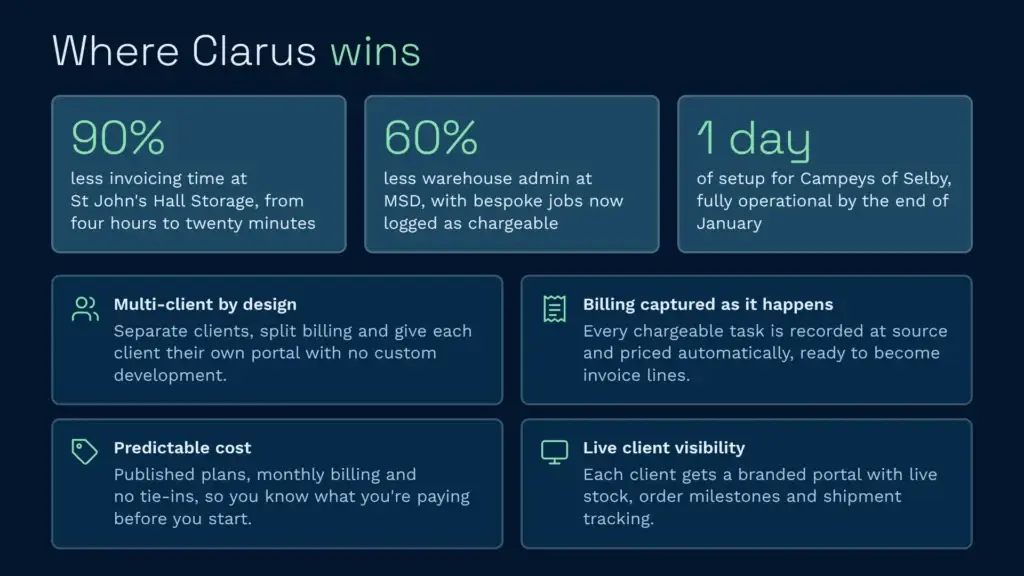
Multi-client architecture: Clarus is built for 3PLs. You don’t need custom development to separate clients, split billing or give each client their own portal.
Automatisierte Rechnungsstellung: Clarus captures every chargeable task as it happens. St John's Hall Lagerung cut invoicing from four hours to twenty minutes, a 90% reduction. MSD cut warehouse admin by 60%, and bespoke jobs like re-boxing, kitting and pallet wrapping are now logged as chargeable actions instead of slipping through unbilled.
Faster implementation: Clarus go-lives typically take a few weeks to a few months, depending on scope. Die Campeys aus Selby got in touch in early December and were fully operational by the end of January. Adopting NetSuite WMS without NetSuite already in place means an ERP project first.
Predictable cost: Clarus has published plans, monthly billing and no tie-ins. With NetSuite WMS, the cost comes bundled with the wider ERP subscription, implementation and any customisation you need.
Kundensichtbarkeit Clarus gives every client their own live view of stock, orders and shipments through the portal. NetSuite has no native client portal, so you’d need custom development or an add-on to match it.
Where NetSuite WMS wins
ERP-Integration: If your business already runs on NetSuite for finance, supply chain and operations, the WMS module sits on the same platform. There’s no second system to connect. That has real value if you’re already committed to NetSuite. (It’s worth knowing Clarus can also connect to NetSuite through Patchworks, so using NetSuite for finance doesn’t rule out a specialist WMS.)
Established vendor: NetSuite is owned by Oracle and has a large customer base and partner ecosystem. If vendor size matters most to your organisation, NetSuite’s scale may feel safer than a specialist WMS provider.
Single-client simplicity: If you’re a manufacturer or distributor running your own warehouse rather than a multi-client 3PL, NetSuite WMS gives you enough warehouse functionality without 3PL features you won’t use.
Who should choose which
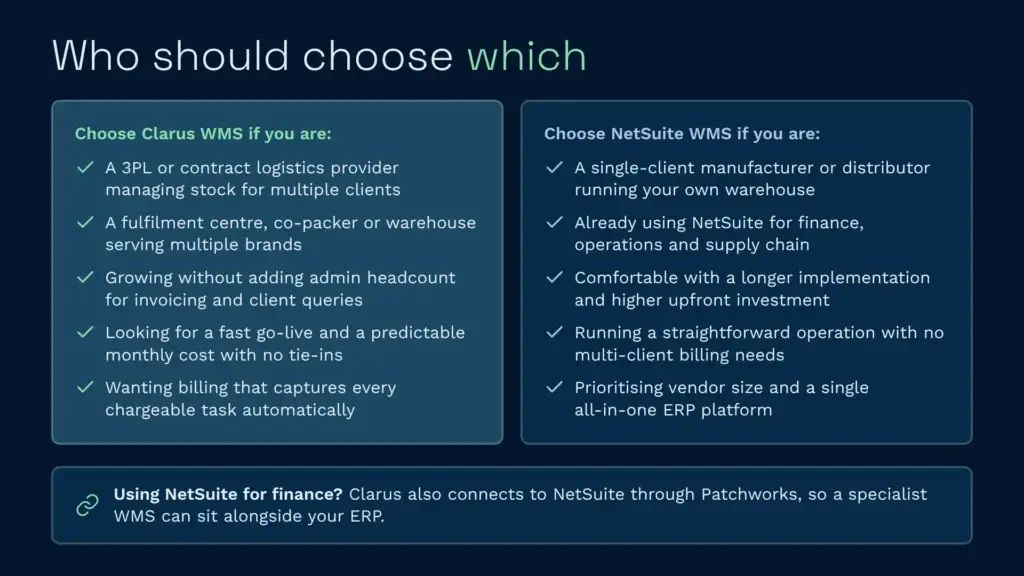
Choose Clarus if you are:
- A 3PL or contract logistics provider managing stock for multiple clients
- A fulfilment centre, co-packer or warehouse serving multiple brands
- Growing, and want to scale without adding admin headcount for invoicing, reporting and client queries
- Looking for a fast go-live and predictable monthly cost
- Wanting billing that captures every chargeable task without manual reconciliation
Choose NetSuite WMS if you are:
- A single-client manufacturer or distributor running your own warehouse
- Already using NetSuite for finance, operations and supply chain
- Comfortable with a longer implementation and higher upfront investment
- Running a straightforward operation (receiving, putaway, picking, packing) with no multi-client billing requirements
- Prioritising vendor size and a single all-in-one ERP platform
If you’re still comparing options, our guides to the Das beste WMS für 3PL-Anbieter und die best NetSuite WMS alternatives go into more detail.
NetSuite WMS integration and implementation effort
If you don’t already use NetSuite, implementing NetSuite WMS means adopting the whole platform. That’s a major commitment:
- Scope: Finance, purchasing, order management and warehousing all move to NetSuite, so the timeline depends on your existing systems, how much data you’re migrating and how much customisation you need
- Connecting client systems: If your clients use different ERPs or ecommerce platforms, you’ll need SuiteScript development or middleware to connect them to NetSuite
- Internal resource: You’ll need people dedicated to running the project, attending training and testing. It’s a business-wide project, not just a warehouse one
If you already use NetSuite, adding the WMS module is quicker but still involves work:
- Configuration and testing: Warehouse layout, putaway and picking rules, and mobile workflows all need setting up and testing
- Custom workflows: If you need 3PL billing logic or multi-client handling, expect custom SuiteScript development
By contrast, most Clarus go-lives take a few weeks to a few months, with no organisation-wide migration. Campeys had six days of implementation support available and used one of them for setup.
Sprechen Sie mit einem Lagerfachmann
If you’re weighing up your options and want to see how a purpose-built WMS works in practice, Clarus is worth a conversation. We work with 3PLs and distributors to implement warehouse management software that fits the way you operate, not the other way round.
Kontaktieren Sie unser Team um Ihre Anforderungen zu besprechen.