

If you run a warehouse in 2026, cloud warehouse management software has stopped being the “modern” option and started being the default. Operators who once worried about uptime, security and data control now ask different questions: how fast can we go live, how much does it cost per month, and will it actually fit a 3PL that runs ten clients on one floor? This guide answers those questions plainly, with a focus on what matters when you actually have to pick the system.
We’ll cover what a cloud WMS really is, how it differs from on-premise software, how secure it is in practice, what it costs, and how long it takes to roll out. Along the way we’ll show how Clarus WMS is built for 3PL operators rather than retrofitted from a retail or manufacturing tool.
What is cloud warehouse management software?
Cloud warehouse management software is a WMS hosted by the vendor and delivered to you over the internet, usually on a monthly subscription. You log in through a browser or a handheld app, your data sits in the vendor’s data centre, and updates are pushed automatically. The core job of a WMS stays the same: receive stock, put it away, pick orders, pack, ship and report. What changes is the plumbing underneath.
The shift is about more than where the server lives. A well-built cloud WMS uses multi-tenant architecture, modern APIs and event-driven integrations. That means it talks to Shopify, your couriers, your ERP and your client portals without bespoke middleware. For a deeper look at the fundamentals, see our overview of what a warehouse management system actually does.
How a cloud based WMS system differs from a hosted server
Be careful with vendor language. A “hosted” WMS often means an on-premise product running on a virtual machine somewhere, with one customer per server, slow upgrades and limited room to scale. A true cloud based WMS system is built to scale, share infrastructure safely between tenants, and release new features every few weeks. If the vendor talks about “their server” rather than “the platform”, treat that as a warning sign.
Cloud vs on-premise WMS: an honest comparison
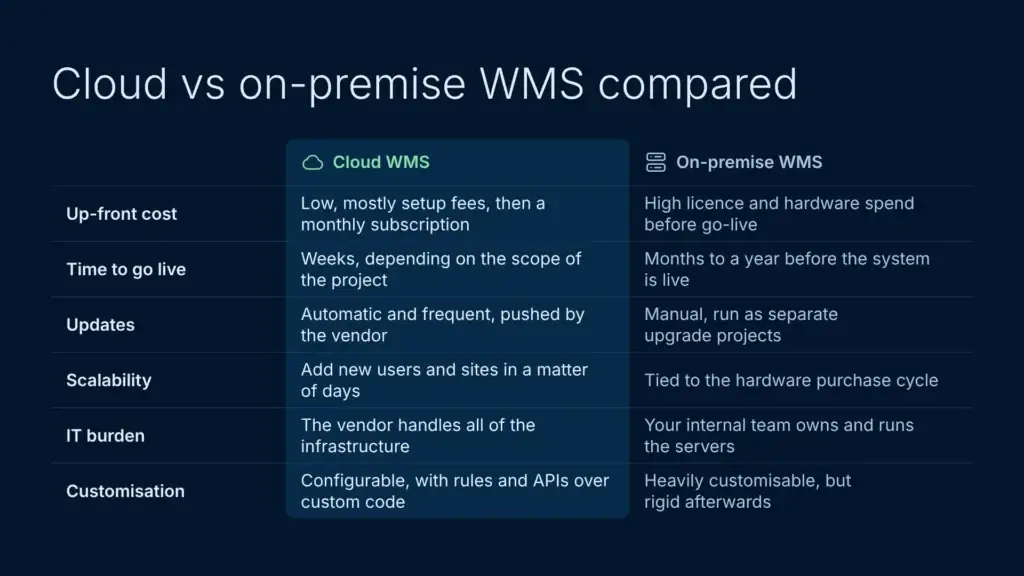
On-premise WMS deployments still exist, especially in older manufacturing plants and some large retailers. But cloud is now the default for most new WMS projects, because buyers want speed, predictable costs and a lower up-front spend.
| Faktor | Skybasert WMS | Lokalt installert WMS |
|---|---|---|
| Up-front cost | Low, mostly setup fees | High licence and hardware spend |
| Time to go live | Uker | Months to a year |
| Oppdateringer | Automatic, frequent | Manual, project-based |
| Skalerbarhet | Add users and sites in days | Hardware purchase cycle |
| IT burden | Vendor handles infrastructure | Internal team owns servers |
| Customisation depth | Configurable, less custom code | Heavily customisable, but rigid afterwards |
The trade-off used to be customisation versus convenience. That gap has narrowed. Modern cloud platforms have configuration options that cover most of what a 3PL needs out of the box, and the rest is usually handled through workflow rules or an API-først-arkitektur.
How secure is cloud WMS?
Security is the question that stops most boards from approving a cloud move. It’s a fair concern, but the answer often surprises people: a serious cloud WMS is usually more secure than the on-premise alternative.
Established cloud vendors run on infrastructure certified to standards such as ISO/IEC 27001, patch their systems regularly, encrypt data in transit and at rest, and have dedicated security teams. Plenty of on-premise systems, by contrast, sit on a server in a back office, with patching and backups left to whoever has time that week. If you want an independent starting point, the National Cyber Security Centre’s cloud security guidance is worth reading before you speak to vendors.
What to ask your vendor about security
- Certifications: Ask for ISO 27001 or SOC 2 Type II reports, not marketing claims.
- Data location: Confirm which region your data sits in. For UK operators, UK or EU regions keep GDPR simple.
- Backups and recovery: What are the recovery point and recovery time objectives if a region goes down? A good answer is minutes, not days.
- Access controls: Role-based permissions, single sign-on and audit logs as standard.
- Tenant isolation: In a multi-tenant cloud, how is your data separated from other customers’ data?
How much does cloud WMS cost?
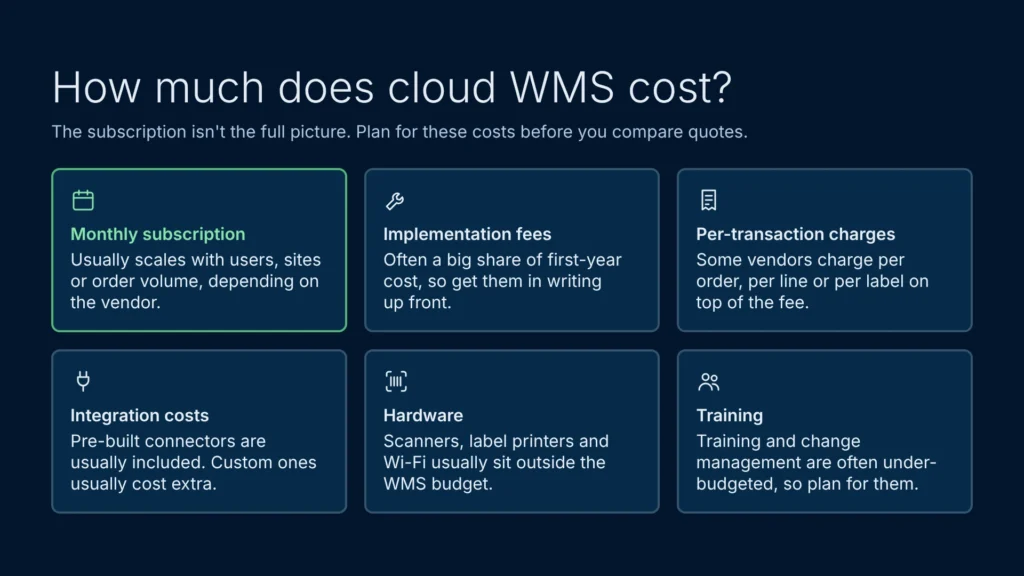
Most cloud warehouse management software is priced as a monthly subscription, with the fee scaling by users, sites or order volume depending on the vendor. Entry-level tools aimed at small single-site operations sit at the bottom of the market. Mid-market platforms built for 3PLs and growing operators sit in the middle. Enterprise platforms such as Manhattan, Blue Yonder eller SAP EWM sit at the top, usually with a substantial implementation project attached.
The headline figure isn’t the full picture. Watch for:
- Implementation fees: These can be a big share of first-year cost, so get them in writing before you compare quotes.
- Per-transaction charges: Some vendors charge per order, per line or per shipping label.
- Integrasjonskostnader: Pre-built connectors are usually included; custom connectors usually aren’t.
- Hardware: Scanners, label printers and Wi-Fi infrastructure usually sit outside the WMS budget.
- Training and change management: Often under-budgeted, so give it its own line in the project plan.
For a clear view of what Clarus charges, see our prisside. We publish a base monthly price for each package rather than hiding behind “contact sales”, because 3PLs need to model unit economics before they pick a platform. There’s no volumetric pricing either: orders, SKUs and integrations are unlimited, and your quote scales with sites and users. Whichever vendor you look at, build a five-year total cost of ownership model before signing. Cloud usually comes out ahead, but the gap is smallest in year one.
Implementation timeline for a cloud WMS
Traditional on-premise WMS rollouts could run for a year or more. A modern cloud based warehouse management software project takes anywhere from a few weeks to a few months, depending on complexity. Here’s an illustrative timeline for a single-site 3PL going live on a cloud platform. Treat it as a guide: your client count, integrations and data quality will shift it either way.
- Discovery (week 1): Map your existing process. Which clients, SKUs, carriers and integrations are in scope?
- Configuration (weeks 2 to 4): Set up locations, users, clients, billing rules, integrations and label templates.
- Data migration (weeks 3 to 5): Import master data, opening stock and historical orders if needed.
- User acceptance testing (weeks 4 to 6): Pickers, packers and admins run through real scenarios.
- Training (weeks 5 to 6): Floor training, admin training and client onboarding.
- Go-live (weeks 6 to 8): Cut over, with vendor support on site or on call.
- Hypercare (weeks 9 to 12): Daily check-ins, quick fixes and refinement.
To see how Clarus structures this, take a look at our onboarding process. For 3PLs running multiple clients on one floor, our guide to multi-client WMS covers how multi-client billing, separate client logins and per-client SLAs work in practice.
Why 3PLs benefit most from cloud WMS
3PL operators have specific needs that legacy on-premise WMS systems struggle with. They onboard new clients every month. They need per-client billing that ties to received pallets, picks and storage days. They need client portals so brand owners can see their stock in real time. They need to scale up and down without buying servers.
Cloud suits all of this better. Onboarding speed in particular is one of the strongest commercial reasons 3PLs move to the cloud. A platform that takes weeks instead of months to absorb a new client is a competitive advantage you can quote in your sales process.
Where Clarus is built differently
Clarus WMS is built around how 3PLs actually work. Fakturering for flere kunder, a customer self-service portal and client-specific controls are part of the core product. It’s a cloud-native platform running on ISO-certified AWS infrastructure, and our offentlig veikart shows what’s coming next. Most 3PL go-lives take somewhere between a few weeks and a few months depending on scope, and multi-site rollouts can be phased. For more on the UK market specifically, see our UK WMS guide.
Integrations, reporting and the scanner app
A modern cloud WMS is judged on three things beyond the core warehouse workflow: integration depth, reporting, and the quality of the mobile app on the warehouse floor. A cloud based warehouse management software platform with weak integrations leaves you typing tracking numbers by hand. Weak rapportering leaves you exporting CSVs to Excel every Monday. A clunky scanner app slows every pick.
When you evaluate a cloud based WMS system, run three tests:
- Plug your top carrier in: If it’s not a standard connector, ask how long a custom integration takes.
- Pull a real report: Ask the vendor to show client-level profitability for a week of demo data.
- Walk a pick on the device: Use the actual scanner, not a tablet demo. Latency and arbeidsflyt for håndholdte enheter design matter.
If you’re comparing shortlists, independent review sites such as Capterra are a useful cross-check on what live users say about each platform.
Common pitfalls when picking cloud WMS
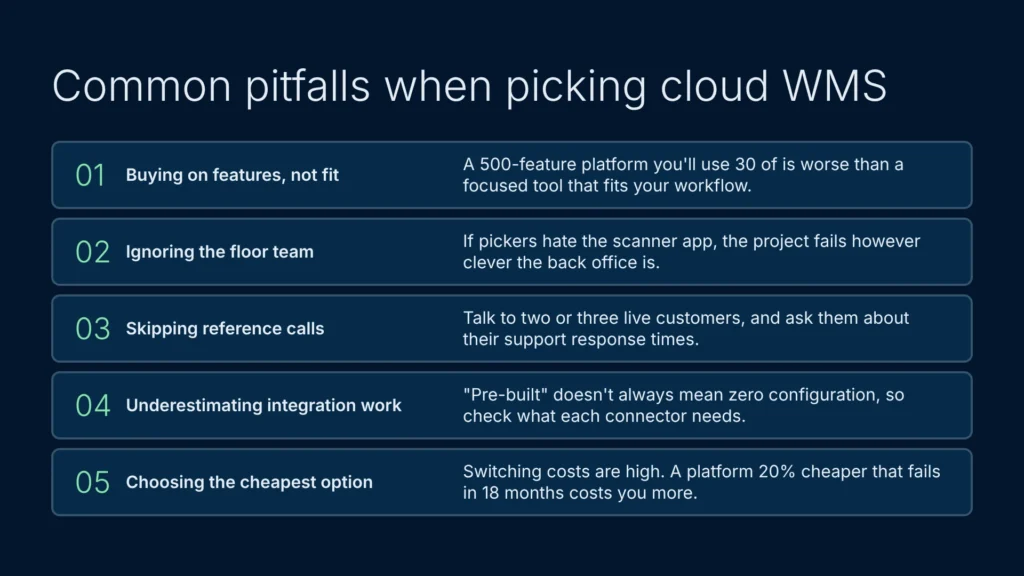
The mistakes we see most often:
- Buying on features, not fit: A 500-feature platform you’ll use 30 of is worse than a focused tool that fits your workflow.
- Ignoring the floor team: If pickers hate the scanner app, the project fails however clever the back office is.
- Skipping reference calls: Talk to two or three live customers. Ask about support response times.
- Underestimating integration work: “Pre-built” doesn’t always mean zero configuration.
- Choosing the cheapest option: Switching costs are high. A platform that’s 20% cheaper but fails you in 18 months costs more than the right one.
For a wider comparison of the options, see our guide to the det beste WMS-systemet for 3PL-leverandører.
See how Clarus fits your warehouse
Evaluating WMS software on paper is only half the job. The real test is whether a platform handles your specific floor layout, carrier integrations and 3PL billing quirks.
If you’re planning a system move, skip the generic slide decks and high-pressure sales pitches. When you get in touch with our team, we’ll review your current operations, talk through your exact requirements and walk you through how Clarus would handle scenarios from your own warehouse floor.
Book a call with the Clarus team for a practical, no-nonsense conversation about moving your warehouse onto a cloud platform built for 3PLs.