

A smart warehouse is one where a warehouse management system (WMS) keeps a live, accurate record of every stock movement, and scanners, automation and AI all work from that same record. When the stock picture is right and shared, handheld devices, conveyors and AI tools make routine decisions faster and with fewer mistakes. When it is wrong, they simply make the mistakes faster.
The phrase gets used loosely. Some vendors apply it to a single robot pilot, others to a full software platform. Scanning only works well when labels follow a standard, and GS1 UK sets the GS1 barcode standards used in supply chains worldwide. New equipment also changes how people work around racking and vehicles, so the Health and Safety Executive warehousing and storage guidance (HSG76) is worth reading before any change. Logistics UK, the sector’s trade body, is a sensible place for industry context.
In this guide we use the term the way operators experience it: a warehouse where live data, rather than paperwork or memory, decides what happens next.
The four layers of a smart warehouse
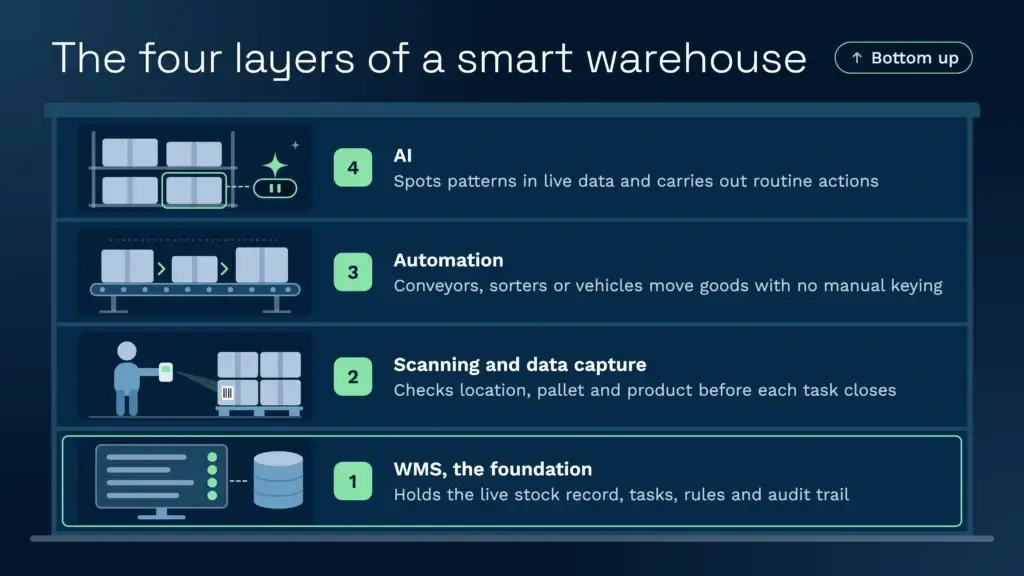
Smart warehouse technology is a stack of four layers rather than one product. The layers build on each other, and skipping the bottom one is the most common reason projects disappoint.
| Layer | What it does | What it looks like on the floor | What goes wrong without it |
|---|---|---|---|
| WMS (the brain) | Holds the live stock record, tasks, rules and audit trail | Every receipt, move and pick is a task in one system | Stock lives in spreadsheets and in people’s heads |
| Scanning and data capture | Records what physically moves | A handheld confirms location, pallet and product before the task closes | Errors surface at the customer, not at the shelf |
| Automation | Moves goods or triggers steps without manual keying | Conveyors, sorters or automated vehicles | Automation runs on bad data and moves mistakes faster |
| AI | Spots patterns and carries out routine actions from live data | Flags a missed charge or holds stock that is nearing expiry | Insights sit in a report that nobody has time to read |
The WMS sits at the centre because every other layer needs its answers. A scanner is only useful if it writes to the correct stock record, and a conveyor only helps if the system knows where the goods should go.
Clarus WMS is built around that central record. Its handheld workflows let a team design the scan steps its operation needs, so the floor and the system agree on every movement.
What smart is not: robots on their own
A warehouse with robots and a weak WMS is not a smart warehouse. It is an expensive one. Automation speeds up whatever process it is given. If the stock record is wrong, the robot moves the wrong pallet more quickly, and the error reaches the customer sooner.
Mathew Buttar, Head of Solutions at Clarus, has spent nearly 25 years in warehouse operations. Lightly tidied from a recorded conversation, he puts the principle plainly: “Everything from the WMS you’ve always got to think about. It doesn’t necessarily have to do the function. It should complement the function and process of the business that needs it.” That applies to robots as much as to software. The equipment should fit the way the business runs, not the other way round.
The Material Handling Institute covers the equipment side of this in depth, and it is a useful reference when you compare automation options. For a practical view of where robots earn their place, read our guide to robots in warehouse logistics. Any change to racking or vehicle routes also needs checking against HSE guidance on workplace transport.
Where AI fits, and where it does not
AI is the newest layer, and the one most often oversold. The useful test for any AI claim in a warehouse is simple: does it advise, or does it act? A report that suggests a better slot is advice. A system that carries out the task is action. Our guide to AI in warehouse management covers the wider picture.
The Clarus AI Assistant is built to act. On the warehouse floor it can assign work to a zone, place short-dated lots on hold, book dock slots from the booking diary and turn PDF or email orders into live orders. Fed with ABC data, it can create the transfer tasks to re-rank pick faces. On the commercial side, it can find storage and handling activity that has not been charged and check invoices against previous months before they go out.
Its scope follows the product. It works inside the user’s roles and permissions, so it can only do what that user could do in Clarus WMS. It cannot act on work the system does not do, so ask about the specific task you need. The fastest test is to name a task you carry out every week and ask for it to be completed end to end in a demo.
AI works best on top of good event rules. When a stock receipt lands, the system can place it on hold; when an order completes, it can send a file to a partner. The event triggers feature handles that kind of rule. Warehouse maps help people see where stock should be. Clarus uses its warehouse mapping to show where stock sits by location. It is a visual aid rather than a digital twin, so treat it as a guide, not a live physical model. Teams that want outside AI tools to query their warehouse data can use the MCP and AI integrations.
Smart warehouse examples at a modest scale
You do not need a large automated distribution centre to run a smart warehouse. Two Clarus customers show what the shift looks like for smaller operators.
JODA Freight stores and distributes goods, including commercial refrigeration units. It ran stock control in Excel, where a full stock take took weeks. After moving to Clarus WMS, stock accuracy reached 99%, and stock takes now take a day.
St John’s Hall Storage is a UK third-party warehouse provider. Before Clarus, invoice data was re-keyed into the accounts package by hand. Clarus cut invoicing time by 90% and ended the re-keying.
Labelling detail matters at any scale. GS1 application identifiers let one scan carry several pieces of data, such as product, batch and sell-by date, so the handheld fills in the receipt instead of someone typing each field.
The real benefits, and what they depend on
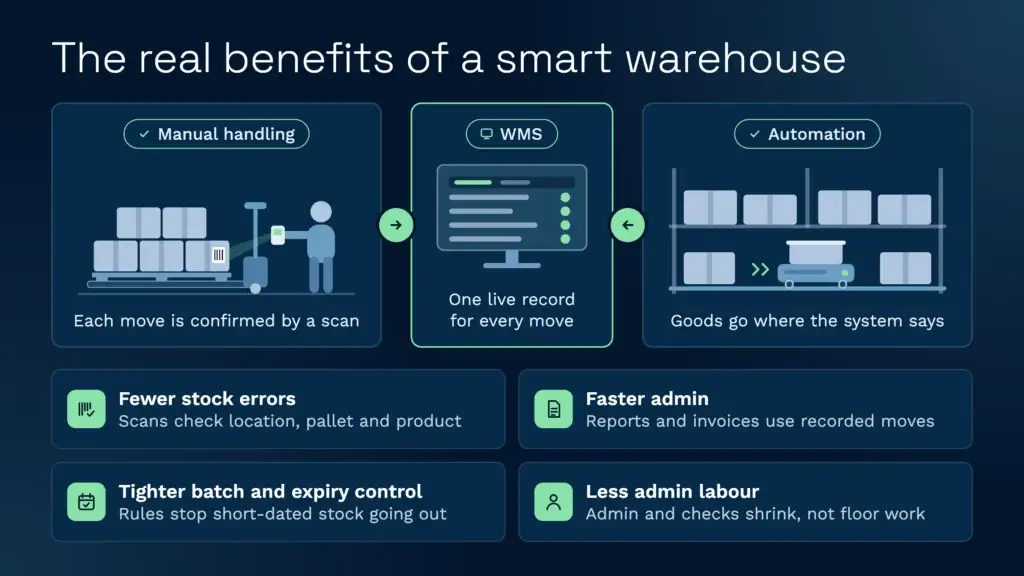
The benefits are real, but each one rests on something the operation must already do well.
- Fewer stock errors. A barcode scan checks location, pallet and product before a task closes, and it can stop a pick when the barcode does not match the order line. Scanning catches most mistakes at the shelf, but not all. A picker can scan the right location and pallet, then take the wrong product from the box beside it.
- Faster admin. Reporting and invoicing start from transactions the system has recorded, rather than from a clerk re-keying a warehouse sheet. The St John’s Hall example above shows the scale of that saving.
- Tighter batch and expiry control. Rules applied per product or per customer stop short-dated stock going out by mistake. Batch and lot control only works, though, if the stock records underneath are accurate. Rotation logic also depends on layout. In bulk stacks the oldest pallet can sit at the back, so FIFO fails in practice unless every pallet is reachable.
- Less admin labour, not less physical work. Most of the labour saving comes from removing admin and checking. People still walk the floor, move stock and put pallets away, so build the labour case around that.
A maturity path for a small or mid-sized warehouse
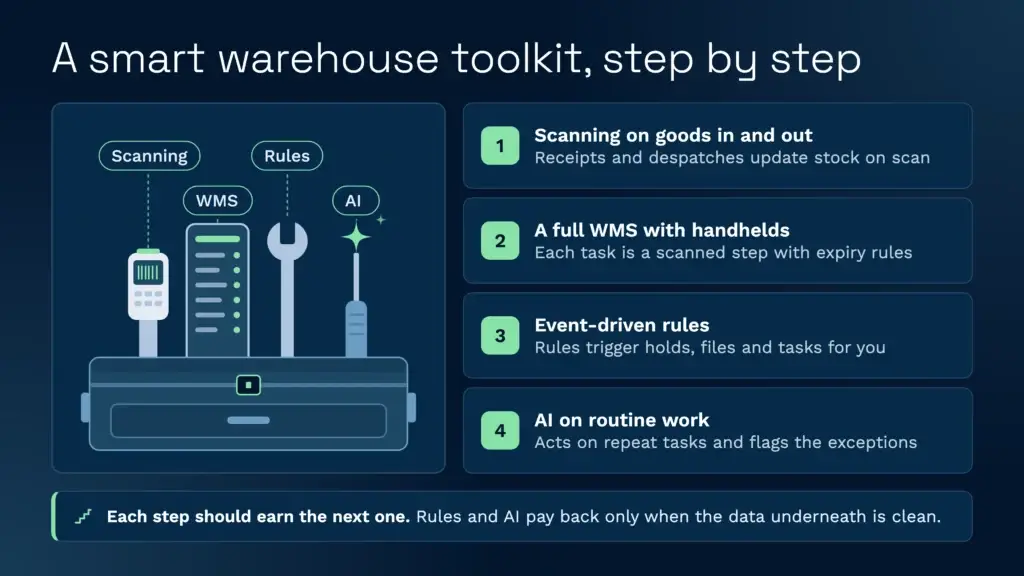
Most small and mid-sized operators do not need to jump from spreadsheets to full automation. A realistic path runs in five stages, and each stage should earn the next one.
| Stage | What changes | What to measure |
|---|---|---|
| 1. Spreadsheets and paper | Stock record and pick lists live on paper or in Excel | Time for a full stock take; errors found at dispatch |
| 2. Scanning on goods in and out | Receipts and despatches update the stock record on scan | Receiving time; stock take variance |
| 3. Full WMS with handhelds | Every task becomes a scanned step, with batch and expiry rules applied | Pick accuracy; share of picks scan-verified |
| 4. Event-driven processes | Rules trigger holds, files and tasks without manual steps | Manual steps removed each week |
| 5. AI on routine work and exceptions | The assistant acts on repeatable tasks and flags exceptions | Time from exception to action |
Stage 3 is where most of the value sits for most operators. Stages 4 and 5 pay back only when the data underneath is clean. The UK Warehouse Association (UKWA) is the trade body for the sector, and a good place to compare notes with operators at a similar stage.
What it costs, and what to think about
Many WMS vendors do not publish a price list, and the total cost depends on users, sites, modules and support. Ask for a written quote that lists each of those, and treat any unsourced figure you find online with caution. Clarus publishes its platform fee, from £1,000 a month, with users and implementation quoted on top. The pricing page sets out the detail.
Beyond the licence, think about:
- Devices and coverage. Handheld scanners, label printers and Wi-Fi that reaches every bay. The system is only as good as the signal on the floor.
- Master data. Product dimensions, barcodes, locations and customer rules need to be right before go-live. Expect this to take longer than the software set-up.
- Integrations. Carriers, marketplaces and accounts packages each need a route in. Where a system has an API, integration is usually quicker. Where it does not, file-based interfaces can do the job. Carriers and hauliers have their own standards, and the Road Haulage Association represents the road haulage side of the sector.
- Training and super users. Name at least two people on site who understand why the system is set up the way it is. They run user acceptance testing and become the first point of contact after go-live.
- Time to go live. A standard Clarus project goes live in around 12 weeks with the right support on both sides. Complex projects with high volumes and many features take longer.
If you are comparing options, our guide to the best warehouse management system software for 2026 sets out what to look for.
Common mistakes to avoid
- Buying robots before the stock record is right. Automation on top of inaccurate data moves errors faster. Fix the record first.
- Assuming software fixes weak labelling. A WMS amplifies the process it is given. If labels are inconsistent, scanning will be inconsistent too.
- Treating a scan as proof of everything. A scan confirms what was scanned. If the product is not checked as well as the location and pallet, the wrong item can still leave the building.
- Keeping the know-how in one person or one bespoke system. When that person leaves, the logic often goes with them. Document the rules and train at least two people.
- Expecting AI to clean up bad data. AI can only act on the records it has. Clean up locations, product data and batch records first.
- Using one FIFO rule for every layout. FIFO works well in racking. In bulk stacks the oldest pallet sits at the back, so you need a switch rule or a layout where every pallet can be reached.
- Skipping full user testing. Whether you go live in phases or all at once, a big bang only works with a complete schedule of user acceptance testing that every party signs off.
Speak to a warehouse expert
If you’re evaluating your options and want to see how a purpose-built WMS works in practice, Clarus is worth a conversation. We work with 3PLs and distributors to implement warehouse management software that fits the way you operate, not the other way around.
Get in touch with our team to talk through your requirements.