

Kitting is picking several component products and packing them together into one product that has its own stock record. In a warehouse, that work is either done on a separate kitting bench before orders arrive, or the picker builds the kit as part of the order pick. Which of the two makes sense depends on space, labour and how often the kit is built.
You will also hear kit building and co-packing used for the same work. This guide covers what kitting means in a warehouse, how it differs from assembly and bundling, the steps in a kitting process, the stock problems it causes when it is not controlled, and how a warehouse management system (WMS) and a 3PL charging model fit around it. It is written for warehouse and 3PL operations managers rather than for manufacturing lines or ecommerce marketers.
What is kitting in a warehouse?
In a warehouse, kitting means building a set of items into a single parent product so that the set can be stored, picked or despatched as one item. A kit is a set of items that together make up another product. A flat-pack cupboard kit, for example, might be two doors, ten screws, two hinges and four panels, handled as one thing once it is packed.
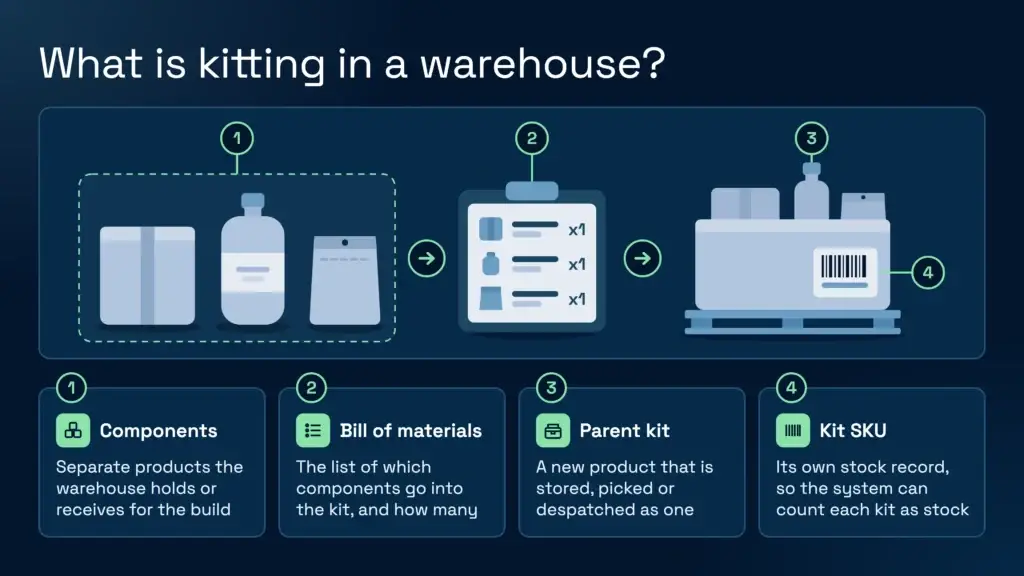
Kitting is the warehouse work of putting that set together. The warehouse holds or receives the components, a person or a process gathers them, and the result is a new parent product. Kitting is different from bundling, which groups products for sale and does not always create a new stock item. Kitting also relies on a bill of materials, the list that records which components go into a parent item and in what quantity. That list is the rule the warehouse follows when it builds a kit.
Kitting, assembly and bundling compared
Three terms get mixed up, so it helps to separate them. Kitting builds a set of components into a parent product that is stored and handled as one stock item. Assembly changes the components themselves, for example by joining parts into a sub-assembly or a finished machine. Bundling sells several products together, often under one price, and the items can stay as separate stock lines.
The difference matters on the warehouse floor. A bundle may be two separate items shipped in one box with no new stock record. A kit has a parent product, which needs its own stock keeping unit (SKU), and the components are used up when the kit is built. The SKU on the kit is what lets the system count the kit as stock.
For accounting, the warehouse meaning is simple. The kit becomes its own stock item, and the component stock goes into it as the kit is built. How that is treated in the accounts is a question for the client’s finance team, so agree the approach with them before you set up a client’s kits.
Kitting and assembly also differ in where the work sits. Assembly usually belongs to a production process. Kitting sits in the warehouse, and it is often a service that a 3PL sells to a client, rather than a step in the client’s own factory.
Two ways to run kitting: build ahead or assemble on pick
There are two common shapes of kitting work, and the choice between them is an operational decision more than a software one. Mathew Buttar, Head of Solutions at Clarus, has spent nearly 25 years in warehousing, including running warehouse operations, and he describes the two shapes in those terms.
The first is a value-added or co-pack operation. Operatives collect components and build kits in a separate area, with tables and dedicated people, before the kits go into stock. The second is assemble on pick. The picker receives a pick list for the components, gathers them and builds the kit on the pallet or in the order as part of the pick, so the finished kit only exists once the order has been picked.
| Question | Build ahead (value-added or co-pack) | Assemble on pick |
|---|---|---|
| Where the work happens | A separate kitting area with tables and dedicated staff | The picking area, as part of the order pick |
| Stock position | Kit stock exists before orders arrive | The kit exists only after the order is picked |
| Suits | Regular, higher volume kit builds and a dedicated service | Occasional builds where a bench would sit idle |
| Main stock risk | Built kits that are never booked in | Component lines picked without the kit being recorded |
| Labour model | Bench labour and kitting space | Pick labour, with the build done alongside the pick |
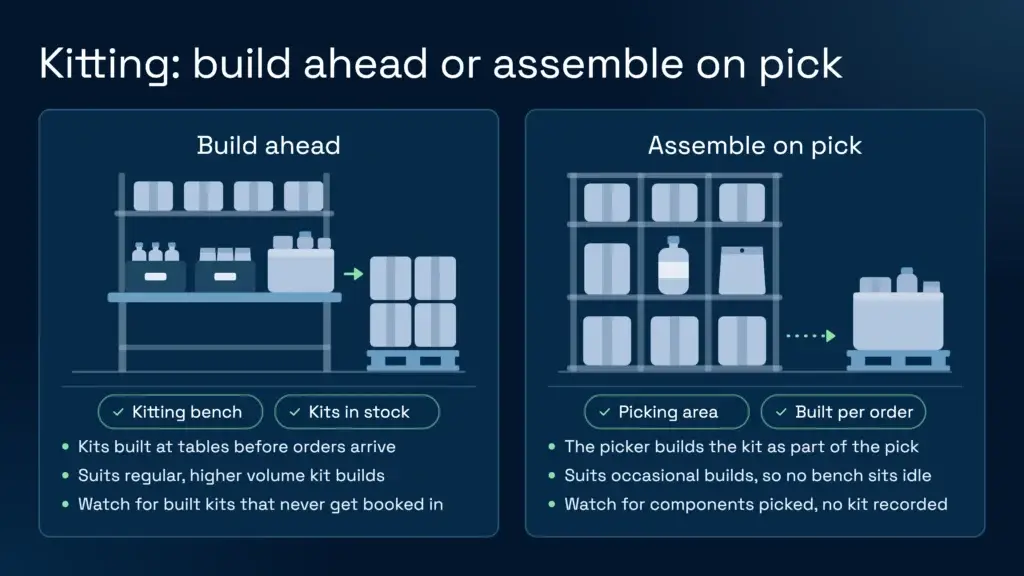
On choosing between them, Mathew puts it this way: the decision is based on operational space, labour, and how much of a service you offer for co-packing. He adds that if you are kitting on the pick, it is probably because you do not do much of it. That is a useful rule of thumb. A dedicated area suits a regular, higher volume service. Assembly on the pick suits occasional builds, where a bench would otherwise stand empty between orders.
The kitting process, step by step
Whichever method you use, the same steps sit underneath it. Each one is a point where stock can go wrong, so write them into the procedure rather than leaving them to memory.
- Define the kit. Agree the contents, quantities and any variants with the client, and record the kit as a parent product with its components.
- Assign the kit SKU and barcode. The kit needs its own SKU so the system can count it. If the kit will be sold to retailers or marketplaces, check whether it needs its own barcode. The GS1 standards body sets the rules for when a product or pack configuration needs its own Global Trade Item Number (GTIN).
- Stage the components. Gather the right components in the right place, and check batch and expiry where the client needs them. The component pick follows the same logic as any other pick, and the lagerordreplukkeveiledning covers the basics.
- Build the kit. Assemble at the bench or on the pick, following the agreed specification. Set up the workstation so the work is repetitive but not strained, as covered later in this guide.
- Book the kit in. Record the finished kit into stock, and record the components used. If either step is skipped, the stock figures drift.
- Despatch or store. The kit moves through the normal putaway or goods-out flow as a single item.
Stock accuracy problems kitting creates
Kitting is where stock accuracy tends to break, because it changes what the system is counting. Three failures come up repeatedly.
- Components consumed but not reduced. The kit is built, but the components stay on the system at their old quantity. Stock appears available when it is not, and the next order short-picks.
- Kits built but never booked in. The finished kits sit on a bench or pallet with no stock record, so they cannot be allocated to orders.
- Part-built kits. A kit started on one shift and finished on another, or left half done after a busy day, holds components that the system may show as either on a kit or still on a shelf.
The fix starts with process discipline. Every build needs a record of the components used and the kit produced, made at the time of the build rather than at the end of the shift. A regular stock count helps catch drift early. Our guide to improving inventory accuracy covers the counting methods that work on a busy floor, and the same discipline applies to kit stock.
How a WMS handles kits
A WMS treats a kit as a parent product with a list of components, much as the bill of materials describes it on paper. When the kit is built ahead, it is a stock item that exists once the build is booked in. When the kit is assembled on the pick, the system generates the component pick for each kit line, so the picker collects everything before the build starts. A sound WMS should support both shapes from the same product set-up and keep component and kit stock consistent at each step.
Clarus handles kitting through what it calls conversions, where a parent product is made of component products. Mathew’s example is a beach kit. A bucket, a spade and a rake are three products, and the beach kit is the parent. He describes both the value-added and the assemble on pick shapes in the context of that set-up. Stock for the kit and its components stays in step as kits are built and sold, and the system records which components went into which kit. You can read more on the Clarus kitting and assembly page.
When you evaluate any WMS for kitting, ask how it handles a component that is also sold on its own, how it reports part-built kits, and whether the build is recorded at the moment it happens. Those questions expose the stock problems described above far more quickly than a feature list does.
What to check before you start kitting for a client
Most kitting problems can be avoided with a short set of checks made before the first build. Work through these with the client.
- Who owns the specification. Name the person who signs off the kit contents, and say what happens when the client changes a component.
- Shared components. Confirm whether any component is also sold on its own, because that affects how stock is reserved and counted.
- Batch and expiry. Confirm which components need batch or expiry control, and whether the kit inherits that control for the client. Check how your WMS handles this before you promise it.
- Labelling. Agree who prints the kit label, what it carries, and whether a GTIN is needed.
- Build volume and timing. Agree how many builds are expected each week and whether they need to be ready by a set time, since that decides between a bench and pick-stage kitting.
Charging for kitting as a 3PL service
Kitting is one of the value-added services a 3PL can offer, and clients often ask for it when they outsource part of their packing or production. The work is usually called co-packing in the contract packaging sector, and in warehousing it often appears as a value-added service on the rate card. Clients usually want a clear price for each build, a clear record of what was built, and visibility of the work as it happens.
Pricing models vary. Some 3PLs charge per kit built, some per component handled, some by the bench hour, and some add materials at cost plus a margin. Our guide to 3PL pricing models sets out how these structures work, and the 3PL rate card guide shows where a kitting line sits alongside storage and handling charges. Whichever model you choose, write the kit specification and the charge into the client agreement before the first build.
Clarus WMS is a purpose-built 3PL system, with each client’s stock and billing kept separate within one warehouse. If you run kitting for several clients from one site, that separation is what keeps one client’s components out of another client’s builds. Our WMS for 3PL page covers the multi-client side in more detail.
Bench layout, labour and safety
Kitting is repetitive, bench-based work, and the layout decides how much of that work is comfortable. Put the components in the order they are used, keep the heaviest items at waist height, and avoid reaching across the bench for the last part of each build. The HSE guidance on manual handling sets out the general principles for lifting and repetitive tasks, and those principles apply to bench work as much as to any other task in the building.
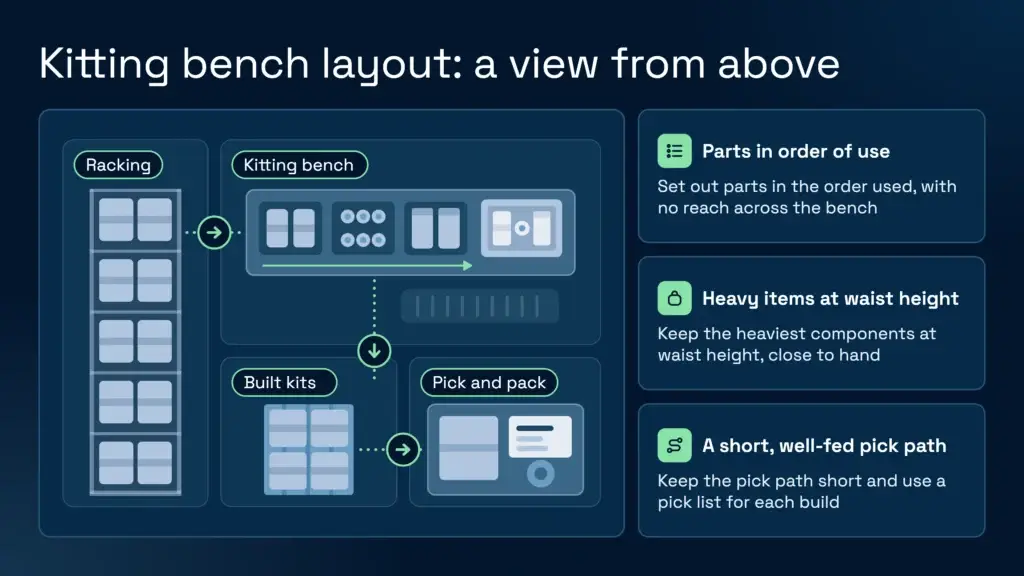
Labour matters too. A kitting bench that is badly fed with components loses time to searching, and a pick that builds kits without a clear list loses it to checking. Keep the pick path short, use a pick list for each build, and keep each station’s components close to hand. The pick and pack process runs either side of the build, so the two should be designed together. For the warehouse as a whole, the HSE warehousing guidance covers the wider safety duties on the floor.
Snakk med en lageransvarlig
If you’re evaluating your options and want to see how a purpose-built WMS works in practice, Clarus is worth a conversation. We work with 3PLs and distributors to implement warehouse management software that fits the way you operate, not the other way around.
Ta kontakt med teamet vårt å snakke gjennom dine krav.