

Finding the best WMS for manufacturing isn’t about picking the platform with the longest feature list. It’s about finding warehouse management software that understands the difference between a pallet of raw material, a half-built sub-assembly sitting in work-in-progress, and a finished unit ready to ship. Manufacturing warehouses move all three at once, often in the same building, and a system designed only for picking parcels will buckle under that complexity. This guide walks through what actually separates a manufacturing-ready WMS from a generic one, the requirements that matter, and how to choose.
Manufacturing is one of the harder environments to run a warehouse in. The stock isn’t static. Materials arrive, get consumed by production, change form, and reappear as something else further down the line. Getting that flow right is the difference between a production line that never stops and one that’s forever waiting on a part nobody can find.
What makes a WMS suited to manufacturing environments
A consumer fulfilment WMS has one job: get the right item out of the door to the right customer. A manufacturing warehouse management system has a harder one. It has to feed a production line, track inventory as it physically transforms, and stay accurate while stock changes state several times a day.
The first thing that sets a manufacturing-ready system apart is how it treats inventory. In distribution, a unit is a unit until it ships. In manufacturing, the same physical stock might be a raw component this morning, part of a sub-assembly by lunch, and a packed finished good by close of play. A warehouse management system for manufacturing has to follow that journey without losing the thread, and without forcing your team to re-key the stock into a new record every time it changes hands.
The second is Integration. A manufacturing WMS rarely works alone. It sits between your production planning and your shop floor, which means it has to talk fluently to the systems either side of it. We’ll come back to that. But if you remember one thing from this guide, make it this: in manufacturing, the WMS is judged less on what it does in isolation and more on how cleanly it connects the warehouse to production. If you want the broader context on what these systems do, our explainer on what a warehouse management system is covers the fundamentals before we go deep on the manufacturing angle.
What is the best WMS for manufacturing?
The best WMS for manufacturing is one that handles raw materials, work-in-progress and finished goods as a single connected flow, integrates cleanly with your ERP or MRP system, and gives you full lot and batch traceability for recalls and compliance. Purpose-built platforms like Clarus WMS are built for distribution and manufacturing operations that need that depth without enterprise-level cost or complexity.
Managing raw materials, work-in-progress and finished goods
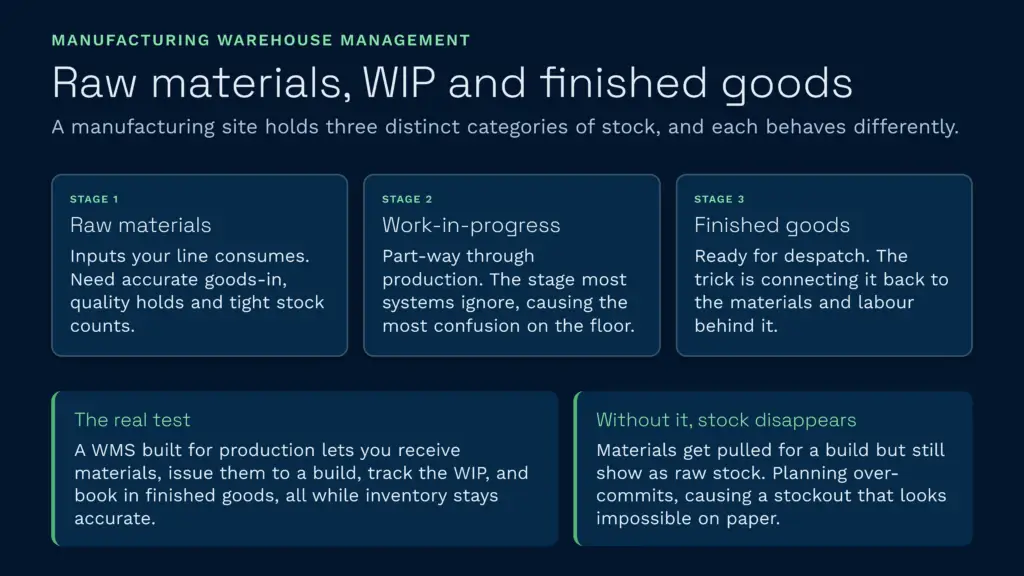
This is the heart of manufacturing warehouse management software, and it’s where generic systems fall down first. A single manufacturing site holds at least three distinct categories of stock, and each behaves differently.
- Raw materials: The inputs your production line consumes. These need accurate goods-in, quality holds, and tight stock counts so planning knows exactly what’s available to build with.
- Work-in-progress (WIP): Stock that’s part-way through production. It’s no longer a raw material and not yet a finished good. WIP is the category most systems ignore, and the one that causes the most confusion on the floor.
- Finished goods: Completed product ready for despatch. This is the part a standard WMS handles well. The trick is connecting it back to the materials and labour that produced it.
Can a WMS handle raw materials, WIP and finished goods? A good one can, and that’s the core test of whether a system is genuinely built for production warehouse management. The system should let you receive raw materials, reserve and issue them to a production order, track the resulting WIP, and book in the finished goods, all while keeping inventory accurate at every stage. Clarus WMS handles multi-state stock through directed putaway, configurable locations, and real-time task tracking, so the warehouse always reflects what’s actually happening on the floor rather than what someone wrote on a clipboard two hours ago.
The failure mode here is specific. When WIP isn’t tracked properly, stock effectively disappears. Materials get pulled for a build, the system still shows them as available raw stock, and planning over-commits against inventory that’s already on the line. The result is a stockout that looks impossible on paper. Real-time consumption tracking closes that gap.
Integration with manufacturing ERP, MRP and MES systems
Here’s where the question of what tool does what gets confusing, so let’s be precise.
What’s the difference between a WMS and an MES or ERP in manufacturing?
An ERP plans and manages the whole business, including finance, procurement and production scheduling. An MES (manufacturing execution system) controls and monitors what happens on the shop floor during production. A WMS manages the physical movement and storage of stock in the warehouse: receiving, putaway, picking, and despatch. They overlap at the edges, but each is best at a different job, and the best manufacturing operations run them together rather than forcing one to do all three.
In practice, the data flows in a loop. Your ERP issues a production plan and a bill of materials. The WMS picks and issues the required components from the warehouse. The MES runs the build on the line. Finished goods come back into the WMS for storage and despatch, and the whole cycle reports back up to the ERP for costing and planning. Industry analysts increasingly describe this as a connected digital loop, and the systems that integrate cleanly are the ones that make it work.
How does a WMS integrate with manufacturing ERP systems?
A modern WMS integrates with manufacturing ERP systems through APIs, EDI, or file-based exchange (XML, CSV), syncing stock levels, production orders, bills of materials, and goods movements in near real time. The cleaner the integration, the less double-keying your team does between systems. Clarus WMS is API-first and connects to ERPs including Sage 200, Microsoft Dynamics, SAP, and inventory platforms like Unleashed Software, alongside more than 200 out-of-the-box integrations. Welch Group eliminated duplicate data entry between their warehouse and transport systems entirely after switching, recovering the time their team used to lose re-keying the same order twice.
The deeper point: an integration that needs constant manual reconciliation isn’t an integration, it’s a liability. The whole reason to connect a WMS to an ERP is to stop people typing the same data into two systems. If the connection breaks or drifts, you’ve added complexity without removing work.
Traceability, serialisation and lot or batch control
Traceability is non-negotiable in most manufacturing sectors, and in regulated ones like food, pharmaceuticals, aerospace, and automotive it’s a legal and contractual requirement. When something goes wrong, you need to know exactly which units contain the affected component, where they are, and where they’ve already gone.
How does a manufacturing WMS support traceability and lot or batch control?
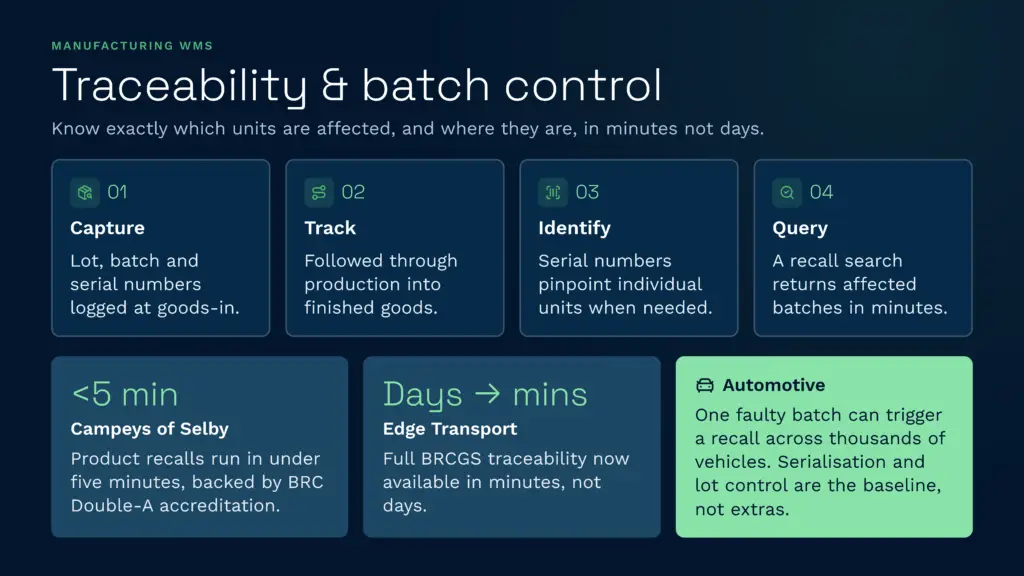
A manufacturing WMS supports traceability by capturing lot and batch numbers at goods-in, tracking them through production and into finished goods, and recording serial numbers where individual units need to be identified. When a recall hits, you query the system and it tells you exactly which batches are affected and where they sit, in minutes rather than days. Clarus WMS captures Seriennummern, batch and lot data, and expiry, best-before, and sell-by dates, with a full audit trail of every stock movement.
The proof is in how fast a recall runs. Die Campeys aus Selby, a food and beverage operation, brought their product recalls down to under five minutes and secured BRC Double-A accreditation using batch traceability in Clarus. Edge Transport made full BRCGS traceability available in minutes rather than the days it used to take. The same logic applies to die beste Lagerverwaltungssoftware for any traceability-heavy sector: the system has to make the recall query trivial, because when you need it, you need it now.
Warehouse management in the automotive industry leans especially hard on this. A single faulty component batch can trigger a recall across thousands of vehicles, and manufacturers are expected to trace any part back to its source. Serialisation and lot control aren’t optional extras there, they’re the baseline.
Kitting, bills of materials and component picking
Manufacturing introduces a workflow that pure distribution doesn’t: building one thing out of several others. That’s where kitting and bill of materials (BOM) handling come in.
A bill of materials is the recipe. It lists every component that goes into a finished product and in what quantity. When a production order drops, the WMS needs to read that BOM and tell the warehouse exactly what to pick, in what quantity, and where it lives. Get the picking right and the line never waits. Get it wrong and you’ve got operators standing idle while someone hunts for a missing washer.
Kitting is the assembly step: gathering the components of a BOM into a single kit ready for production or despatch. Clarus WMS includes kitting and assembly workflows, so you can pick components against a BOM, assemble them into a kit, and track the kit as its own stock item. Combined with smart wave picking, which batches orders and optimises walking routes, component picking gets faster and the travel time across the warehouse drops. If you want to go deeper on the picking side specifically, our Leitfaden zur Lagerkommissionierung covers the methods in detail.
Goods-in and receiving for production inputs
Receiving is where manufacturing warehouses quietly lose time. A production line waiting on materials that are physically on site but stuck in an unprocessed goods-in queue is a self-inflicted stoppage, and it’s more common than most operations admit.
The fix is a structured, scanned receiving process. When materials arrive, they get booked in against the expected purchase order, scanned, quality-checked where needed, and putaway to a known location, all in one flow. The moment that’s done, the stock is visible to planning and available to issue. A manufacturing WMS should also handle quality holds, so materials that need inspection are quarantined automatically and can’t be issued to a build until they’re released.
Dock scheduling matters here too. A booking-in diary lets you stagger inbound deliveries so goods-in isn’t overwhelmed at 7am and idle by 10. Clarus WMS includes dock scheduling and cross-docking, plus a fully customisable handheld scanning workflow builder, so the receiving process matches how your team actually works rather than forcing a generic template on them.
Real-time inventory accuracy for production planning
Everything above depends on one thing: the stock figure being right. Production planning is only as good as the inventory data underneath it. If the system says you have 400 units of a component and you actually have 380, you’ll schedule a build you can’t complete.
How does a WMS support manufacturing and production workflows? Primarily by keeping inventory accurate in real time, so planning, purchasing and the production line all work from the same trusted number. Scan verification at every touchpoint, where the barcode has to match the order before the system lets the task complete, is what drives that accuracy. JODA Fracht lifted stock accuracy from the low 90s to 99% after moving to Clarus, and cut stocktakes from weeks to days. Edge-Transport reached 99% accuracy on the same basis.
The honest caveat: a WMS amplifies the quality of your underlying process. It won’t fix sloppy labelling or bad master data on its own. If components arrive unlabelled and locations aren’t disciplined, the software can’t invent accuracy from nothing. The best results come when the system and the floor discipline reinforce each other.
Stock rotation for materials with shelf life
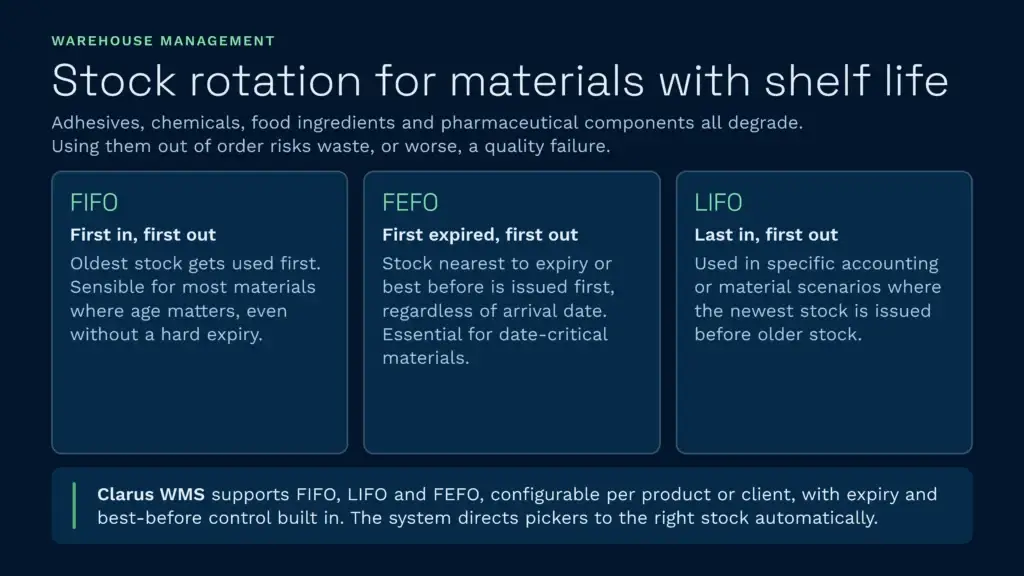
Plenty of manufacturing inputs have a shelf life. Adhesives, chemicals, food ingredients, and pharmaceutical components all degrade, and using them out of order means waste or, worse, a quality failure. This is where rotation logic earns its keep.
- FIFO (first in, first out): Oldest stock gets used first. Sensible for most materials where age matters but there’s no hard expiry.
- FEFO (first expired, first out): Stock with the nearest expiry or best-before date gets issued first, regardless of when it arrived. Essential for anything date-critical.
- LIFO (last in, first out): Used in specific accounting or material scenarios.
Clarus WMS supports FIFO, LIFO and FEFO rotation, configurable per product or per client, with expiry and best-before date control built in. The system directs the picker to the right stock automatically, so rotation discipline doesn’t depend on someone remembering to check dates manually. That manual approach, dates managed on clipboards, is exactly how short-dated stock gets missed and written off.
Pricing and how to choose a manufacturing WMS
WMS pricing varies enormously. Enterprise platforms aimed at large automated distribution centres can run into six figures a year with long implementation projects measured in months or years. At the other end, lightweight tools may be cheap but lack the production warehouse management depth to handle WIP, BOMs, or proper traceability.
For most mid-market manufacturers, the sweet spot is a cloud-native system with genuine manufacturing functionality and a sensible cost of entry. Clarus WMS starts from £1,000 per month on monthly rolling contracts, with no long-term lock-in, which removes the risk of committing to a multi-year licence before you’ve seen the system perform. You can see the full breakdown on the Preise für Clarus WMS page, and our cost of warehousing UK guide sets that figure in the wider context of what running a warehouse actually costs.
When you’re choosing, weigh these factors:
- Multi-state stock handling: Can it genuinely track raw materials, WIP and finished goods, not just finished-goods picking?
- ERP and MRP integration: Does it connect cleanly to your existing planning systems, or will you be re-keying data forever?
- Traceability depth: Lot, batch, serial, and expiry control, with a recall query that runs in minutes.
- Umsetzungsgeschwindigkeit: A system that takes 18 months to go live has already cost more than the licence. Cloud-native platforms deploy far faster.
- Gesamtbetriebskosten: Servers, upgrades, support tiers, and add-ons all add up. Serverless platforms remove the maintenance burden entirely.
For a wider shortlist, independent directories like Gartner Peer Insights und Capterra are reasonable starting points, though most rank enterprise distribution platforms first rather than manufacturing-fit mid-market systems. Use them to build a longlist, then test each against the manufacturing-specific criteria above.
Sprechen Sie mit einem Lagerfachmann
If you’re evaluating your options and want to see how a purpose-built WMS works in practice, Clarus is worth a conversation. We work with manufacturers and distributors across the UK to implement warehouse management software that fits the way you operate, not the other way around.
Kontaktieren Sie unser Team um Ihre Anforderungen zu besprechen.