

Picking a warehouse management system means choosing the operational backbone of your business, so it’s worth getting right. A poor choice locks you into years of workarounds, manual billing reconciliation and frustrated clients who can’t see their own stock levels. A good one changes the numbers: St John’s Hall Storage cut its invoicing time by 90% after moving to Clarus, and JODA Frakt reached 99% stock accuracy.
This guide covers how to compare warehouse management systems fairly, which criteria matter most, and how to build a shortlist that fits the way you operate. Whether you run a 3PL, a mat og drikke distribution business or a wholesale operation, the framework is the same. Only the weighting of each criterion changes.
What is a warehouse management system and why does the comparison matter?
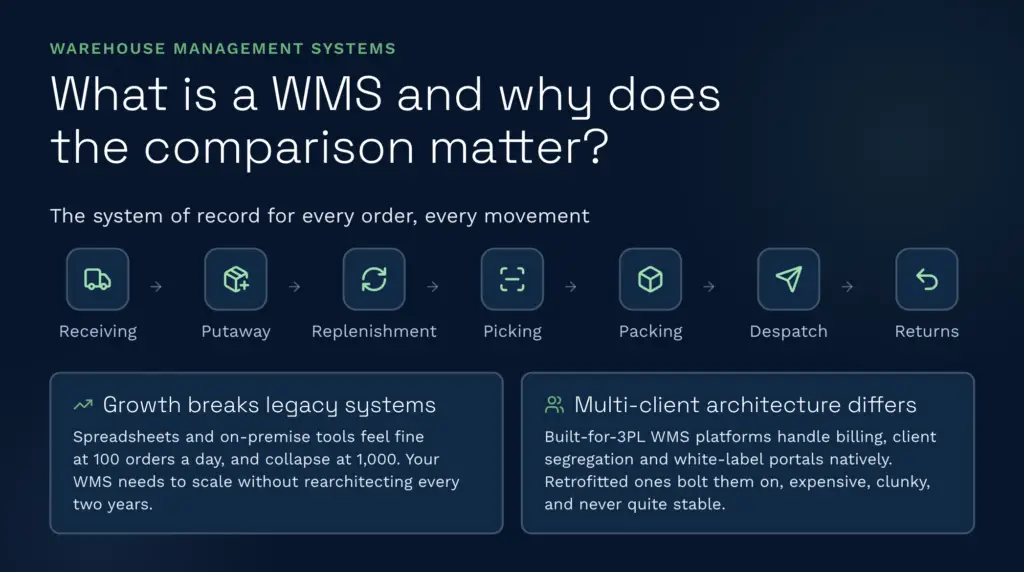
A warehouse system management solution handles everything that moves through your warehouse: receiving, putaway, replenishment, picking, packing, despatch and returns. A lagerstyringssystem is the system of record for where your stock is, how much of it there is and how it moves.
Comparison matters for two reasons. First, legacy setups, whether that’s an on-premise WMS, a custom-built platform or spreadsheets, create bottlenecks that only show up under load. At 100 orders a day a manual process feels fine. At 1,000 a day it falls over. The WMS you choose today has to grow with you without a rebuild every couple of years.
Second, vendors differ a lot in how they handle multi-client operations. A best-of-breed WMS built for 3PLs treats billing automation, client segregation and client portals as native features. A WMS retrofitted from a single-client design treats them as add-ons, which tend to be expensive, clunky and harder to keep stable. That difference shapes your implementation timeline, your ongoing admin and whether you can scale profitably.
Cloud vs on-premise: the architecture question
This is the first decision point, and it matters more than most people think.
Cloud-native WMS: Your data lives in the cloud, you access it through a browser, and the vendor handles updates, patches and infrastructure. There are no version upgrades to plan and no servers to maintain, and you’re always on the latest release. Pricing is usually a monthly subscription, often with a set-up fee and tiers based on users or volume.
Advantages: faster deployment (weeks to months rather than a year or more, and Clarus aims to go live in around 12 weeks for a standard set-up), lower upfront spend, automatic backups, built-in redundancy and no servers to look after. Clients can check their stock through a live portal without VPN access, and new features reach you as they’re released, without you having to plan an upgrade.
Disadvantages: less room for deep customisation (you generally adapt to the software rather than the other way round), an ongoing subscription cost, and a dependency on your internet connection, though most operators run a backup line.
On-premise WMS: The software runs on hardware you own or lease, either in your warehouse or in a data centre. You control every update, configuration and backup, and you carry all the overhead that comes with that. Older and custom-built systems often fall into this camp.
Advantages: full control, scope for very specific customisation, usually no per-transaction fees, and it can look cheaper in the long run if you already have the IT infrastructure.
Disadvantages: implementations commonly run from months to a year or more, you need dedicated IT support (and lose knowledge when that person leaves), and you carry all the patch and upgrade risk. Clients can’t access the system directly, so they email and wait for a reply. New features mean version upgrades and downtime windows, and every new site needs new servers.
For 3PLs and growing distributors, cloud is usually the better fit. The speed, simpler day-to-day running and live client access are worth more than the control that comes with owning your own servers. Our guide to cloud warehouse management software går nærmere inn på dette.
Best-of-breed vs ERP module: fit and flexibility
Some businesses try to run their warehouse through an ERP module added to an existing Salvie, Microsoft Dynamics or SAP licence. One vendor, one database and unified reporting sounds sensible. In practice it rarely works well for anything beyond a simple operation.
ERP WMS modules: Warehouse functionality sits as a feature inside a general accounting and operations system. That’s fine for a very simple, linear warehouse with few products, one location and stock going in and out. It struggles with anything more complex.
Reality check: ERP vendors build for ledger posting, not efficient pick paths, so putaway logic tends to be basic. Multi-client segregation usually doesn’t exist, so you end up faking it with cost centres or locations, which gets messy fast. Billing becomes a two-step process: the warehouse side sends data to the ERP, the ERP raises the invoice, and every hand-off is a chance for reconciliation errors. Giving clients visibility would mean letting them into your ERP, which is a security and usability problem. Connecting to carriers, ecommerce platforms or automated picking equipment often needs costly custom development.
Plenty of businesses that start this way end up shopping for a dedicated WMS anyway, after spending heavily on implementation and customisation.
Best-of-breed WMS: Dedicated platforms such as Clarus, Mintsoft og Snapfulfil are built to solve warehouse problems. Multi-client handling, billing automation, carrier integrations and client portals come as standard rather than being bolted on. If you’re weighing up specific vendors, see how Clarus compares with Mintsoft og Clarus compares with Snapfulfil.
Trade-off: You connect the WMS to your ERP or accounting package (Sage, Xero, QuickBooks) through an API or data sync rather than sharing one database. That’s less of a compromise than it sounds. The WMS is the source of truth for inventory and warehouse operations, and data flows to the ERP per transaction or on a schedule. It’s cleaner and more reliable than forcing warehouse logic into an accounting system.
For 3PLs, a dedicated WMS is a requirement. An ERP module can’t manage a multi-client warehouse, scale picking and packing intelligently, automate client billing or give clients live visibility. If you’re looking for the den beste programvaren for lagerstyring for a 3PL, a purpose-built system is the only sensible starting point.
Core vs common features: what matters most
Every WMS promises real-time inventory, pick routing and barcode scanning. The differences are in the detail.
Core features (non-negotiable for 3PLs)
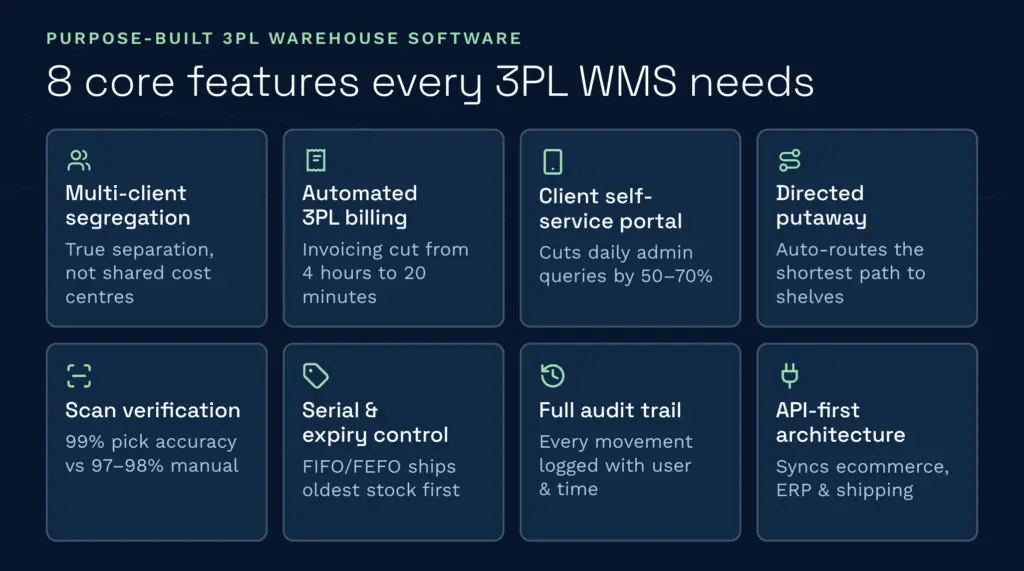
Adskillelse av aksjer mellom flere kunder: Each client’s inventory, reporting and billing is kept separate within one warehouse. This is where retrofitted systems often fall down, using cost centres or locations as a workaround. A purpose-built 3PL WMS like Clarus keeps each client’s stock, rules and billing logic separate by design.
Automatisert 3PL-faktureringsmodul: The system captures billable events as they happen (receiving, storage, picking, packing, despatch, returns and value-added services) without manual counting or month-end reconciliation. St John’s Hall Storage, a UK 3PL, cut its invoicing time by 90% with Clarus’s automated client billing, and its managing director says the system saves the equivalent of about two on-site staff.
Selvbetjeningsportal for kunder: Clients check their own stock levels, order status and shipment tracking instead of emailing your team. Look for one that can carry your branding. Clarus’s customer self-service portal can, and it cuts down the emails and calls your admin team has to deal with.
Directed putaway and replenishment: The system tells each operative where to put stock when it arrives and triggers replenishment before pick faces run empty. Busy warehouses without lagringsassistanse quickly lose track of what’s where.
Verifisering av skanning i sanntid: The barcode on the item has to match the order, or the system stops the packer. Skanningsbekreftelse blocks mis-picks before they leave the building, and every mis-pick you stop is a refund, a chargeback or an unhappy client you avoid.
Batch, serial number and expiry date control: For food, pharma and hazardous goods, you need to know which batch or lot each item came from, its serial number where relevant, and when it expires. FIFO and FEFO rotation logic makes sure the oldest or shortest-dated stock ships first.
Full audit trail: Every stock movement, user action and system change is logged with a timestamp and user ID. You’ll need it for compliance, recalls and disputes. Campeys fra Selby runs recall tests in under five minutes with Clarus. Spreadsheets have no audit trail at all, which turns a surprise inspection into a scramble.
API-først arkitektur: The WMS connects to your ERP, ecommerce platforms and carriers through an API, not manual data entry. EDI, XML and CSV imports should be standard, not paid extras.
Common features (important but not unique)
Wave picking: Groups orders into waves to cut travel time around the aisles. Most modern WMS platforms offer it, so compare the quality of the picking logic rather than just whether it’s there. How much time it saves depends heavily on your layout.
Mobile scanning: Handheld devices running the WMS app for receiving, putaway and replenishment. This is standard now. Rugged devices cost more than entry-level ones, so check which hardware the WMS supports before you budget. Clarus’s håndholdte arbeidsflyter run on handhelds, scanners and tablets without special hardware.
Multi-location and multi-site: Manage several warehouses from one system with multi-warehouse support. Watch for slow performance across sites or weak inter-site replenishment.
Integration marketplace: Pre-built connectors to ecommerce platforms such as Shopify, WooCommerce and Amazon, plus carriers and ERPs. A wide library cuts the custom development you’d otherwise pay for. You can browse the full list of Clarus-integrasjoner.
Reporting dashboard: KPIs such as pick accuracy, throughput, stock turns and labour cost per unit. Most systems offer this now. The difference is whether you can see rapporter live or only after a batch run.
Mobile-friendly client portal: Clients can check their stock on their phone. It’s useful, though it rarely decides a shortlist.
Differentiation features (where best-of-breed pulls ahead)
AI warehouse assistant: Some systems now read your operational data (picks, receipts, errors, dwell times) and point out bottlenecks. Clarus’s agentic AI goes a step further and takes action in the system, under guardrails. For example, it can check expiring stock and quarantine expired units, find available dock slots and draft customer confirmations, or recover missed billing charges.
Kitting and assembly workflows: Build bundles or kits from component stock and manage the sub-items. This is common in ecommerce and 3PL value-added services. Clarus supports pakking og montering, but not every WMS does, so check.
Bonded and hazardous goods: Specialised logic for lagerbeholdning med sikkerhetsstillelse, excisable goods or dangerous materials. It’s essential if you handle these and irrelevant if you don’t.
Task-based system: Every action is tracked as a task with live status, not logged after the fact. That makes operator activity tracking far more useful for labour planning and spotting bottlenecks.
Planlegging av lastekaier og krysslaste: A booking-in diary for inbound deliveries through planlegging av dokking, plus cross-docking workflows for goods that arrive and ship the same day without going onto the main warehouse shelves. Useful for high-throughput 3PLs and distribution centres.
MCP integration: The WMS runs an MCP (Model Context Protocol) server, so AI tools such as Claude and ChatGPT, along with finance, ERP and BI systems, can query live warehouse data and trigger actions within your existing user permissions. Clarus offers an MCP server, and it’s worth asking other vendors whether they do too.
HHow to shortlist and compare WMS vendors
You’ve now got a framework for what to look for. Here’s how to turn it into a shortlist and judge each option fairly.
Step 1: Define your operating model
- Are you a 3PL (multi-client), a single-client distributor, a manufacturer or a food and beverage business? Each has different priorities.
- How many order lines do you pick per day, and how complex are your orders? Do you handle hazardous goods or temperature-controlled stock?
- Do you need to integrate with ecommerce, ERP, TMS or all three?
- How many warehouse locations do you run today, and how many will you run in three years?
- How easily can you recruit and train warehouse staff, and how much staff turnover do you plan for?
This shapes everything that follows. A 3PL that picks a single-client WMS will regret it within a year. A manufacturer that picks a system built mainly for ecommerce will feel it wasn’t designed for them, because it wasn’t.
Step 2: Research independently first
Before talking to any vendor, read real user reviews on sites such as Capterra, GetApp og Gartner Peer Insights. Look for:
- Whether users felt the system matched its description or felt oversold.
- Implementation timelines: did it go live on schedule or months late?
- Whether the vendor supports the integrations you need, not just the ones it lists.
- Productivity gains: did users see the pick time or error rate improvements they expected?
- Value: do users feel they got their money’s worth from the contract?
- Support quality: was help quick and knowledgeable?
Patterns across reviews tell you more than any single review. If dozens of users praise a system’s ease of use but complain about late go-lives, that’s useful. If they rave about integration depth but warn that customisation costs spiral, that’s useful too. Patterns in user reviews are usually more honest than vendor claims.
Step 3: Test it with your own data, not just a demo
Sales demos show the vendor’s best-case workflow on clean test data. Where you can, ask to test the system against your own operation:
- Load your actual data, or a realistic sample, into their system.
- Run a real picking operation, even if it’s just one shift.
- Connect it to your ERP or ecommerce platform (not a demo one) to see if the API works as promised.
- Walk through their implementation timeline and ask to speak to a recent customer about whether they hit it.
- Show their client portal to one of your actual clients and get their feedback.
St John’s Hall Storage ran a one-month demo environment before choosing Clarus. A vendor that’s reluctant to let you test properly is telling you something.
Step 4: Talk to reference customers
Ask for three references: one that went live on time, one that went live late, and one in your sector. The late one matters most, because you’ll learn how the vendor handles problems and how its promises compare with what it delivers.
Ask them:
- How long did go-live actually take, and why?
- Did your historical data land cleanly, or did you spend months fixing it?
- Did your team embrace the system or fight it?
- Did your costs match the contract, or did add-ons push them up?
- When you hit a problem, how quick and helpful was support?
- What would you do differently if you were choosing again?
These questions cut through the sales pitch and get to what happened in practice.
Step 5: Build a fair comparison matrix
Create a simple spreadsheet with your top three (or five) candidates and score them against your criteria. For example:
| Criterion | Weight | Vendor A | Vendor B | Vendor C |
|---|---|---|---|---|
| Multi-client capability (3PL) | 25% | 9/10 | 6/10 | 8/10 |
| Automatisk fakturering | 20% | 9/10 | 5/10 | 7/10 |
| Cloud deployment (no servers) | 15% | 10/10 | 4/10 | 9/10 |
| Integration breadth (carriers, ERPs, ecommerce) | 20% | 8/10 | 7/10 | 8/10 |
| Gjennomføringshastighet | 10% | 9/10 | 6/10 | 7/10 |
| Selvbetjeningsportal for kunder | 10% | 9/10 | 5/10 | 8/10 |
| Weighted total | 100% | 8.95 | 5.60 | 7.85 |
Weight each criterion by what matters to your business. A food and beverage operation will weight FEFO and recall capability higher. A high-volume 3PL will weight billing automation and labour productivity higher. The weighting is yours, and scoring every vendor the same way forces clarity.
Recent trends and what’s changing in warehouse technology
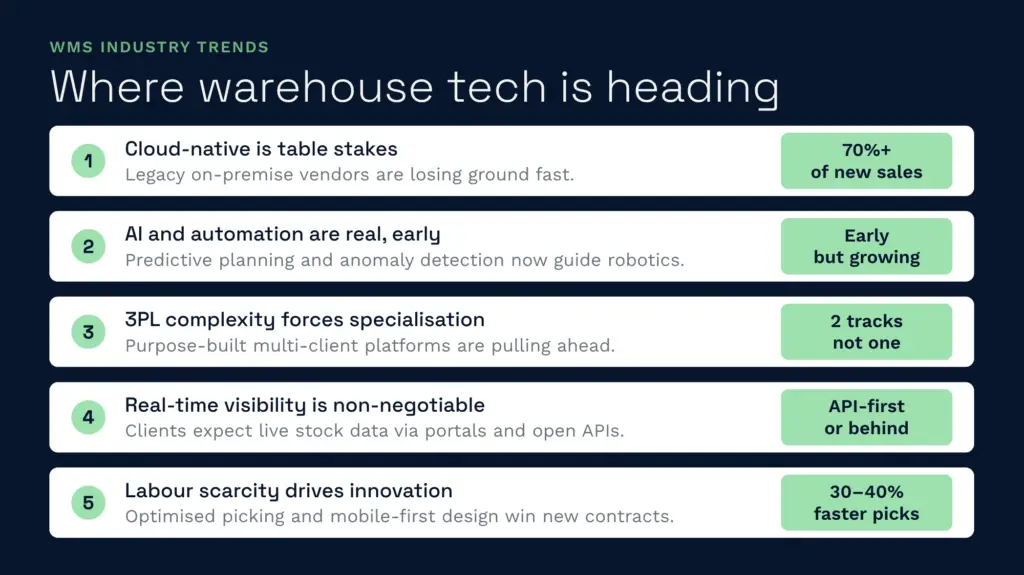
The WMS market is shifting in five directions at once.
Cloud-native is now table stakes
Cloud-based platforms accounted for 55.21% of the warehouse management system market in 2025, according to Mordor Intelligence, making cloud the largest deployment model. Vendors still selling only server-based systems are relying on maintenance contracts rather than new development.
AI and automation are early-stage but real
Warehouse automation (goods-to-person systems, autonomous mobile robots, automated sortation) is growing, and WMS vendors are adding AI to run it: demand prediction, better wave planning and spotting anomalies in picking. Few 3PLs are fully automated yet, but your WMS choice should account for your automation plans.
3PL complexity is forcing specialisation
General-purpose WMS platforms struggle with multi-client operations at scale. Vendors are splitting into two camps: general-purpose systems (built for single-client use, with 3PL features added later) and purpose-built 3PL platforms designed for multi-client billing and client segregation from the start. In the 3PL segment, the purpose-built systems are pulling ahead.
Real-time visibility and API-first architecture are non-negotiable
Buyers now expect their clients to see live stock levels, not email and wait. That needs a client portal and an always-on API. Systems that don’t offer these as standard are at a disadvantage, and the vendors doing well are building out native integrations, open APIs and client visibility as standard.
Labour is driving innovation
With warehouse labour hard to find and expensive in the UK, WMS vendors are competing on productivity: better pick paths, task-based workflows, mobile-first design and links to labour management systems. Pick time per order has become a headline metric when buyers compare systems.
Common WMS challenges and how to avoid them
With the decision framework in place, here are the pitfalls businesses actually run into after implementation.
Data migration chaos
Getting historical stock data into a new system correctly almost always takes longer than planned. If your current system or spreadsheet has data quality problems (duplicate SKUs, incomplete location codes, missing cost data), you’ll find them mid-migration, when fixing them becomes urgent and expensive. Run a data audit well before go-live, ideally three months out. A structured onboarding process with clear owners and sign-off gates makes a big difference here.
Underestimating implementation effort
Go-live dates slip when integration work, data cleansing and testing are squeezed into the final weeks. Agree a realistic plan with the vendor, phase the rollout where you can, and build in contingency so your team isn’t exhausted by launch day.
Poor adoption by warehouse staff
The best WMS fails if your team resists it. Resistance usually comes from a slow system, a mobile app that crashes mid-pick, or extra steps compared with the old process. Train people properly before go-live, expect a dip in efficiency in the first couple of weeks, and give people a month to settle in before you judge the system.
Retrofitting multi-client into a single-client system
If you buy a general-purpose WMS and later realise you need multi-client capability, expect a reckoning. The vendor may say it can be done with custom development, but it’s costly and the result is rarely as clean as a system built for multi-client from the start. Choose the right architecture up front.
Billing automation that doesn’t match your client contracts
You might bill some clients on storage (per pallet per day), others on activity (per pick, pack or despatch) and others on a retainer. An inflexible billing system forces you to adjust invoices by hand afterwards, which defeats the point of automating. Check the vendor can handle your billing model, including tiered rental billing, before you buy. If you’re not sure how much you’re missing today, a 3PL billing audit is a good place to start.
Snakk med en lageransvarlig
If you’re weighing up your options and want to see how a purpose-built WMS works in practice, Clarus is worth a conversation. We work with 3PLs and distributors to implement warehouse management software that fits the way you operate, not the other way around.
Ta kontakt med teamet vårt å snakke gjennom dine krav.