

If you’re choosing a warehouse management system in 2026, the question usually isn’t whether to go cloud. It’s which cloud system to pick, and whether it’ll fit the way your operation runs. Operators who once worried about uptime, security and data control now ask different questions: how fast can we go live, what does it cost, and will it fit a 3PL that runs ten clients on one floor? This guide answers those questions in plain language, for anyone comparing cloud or online warehouse management software.
We’ll cover what a cloud WMS is, what “web-based” means, how it differs from on-premise software, how to check security, what it costs and how long it takes to roll out. Along the way we’ll show how Clarus WMS features handle the needs of Operadores 3PL.
¿Qué es un software de gestión de almacenes en la nube?
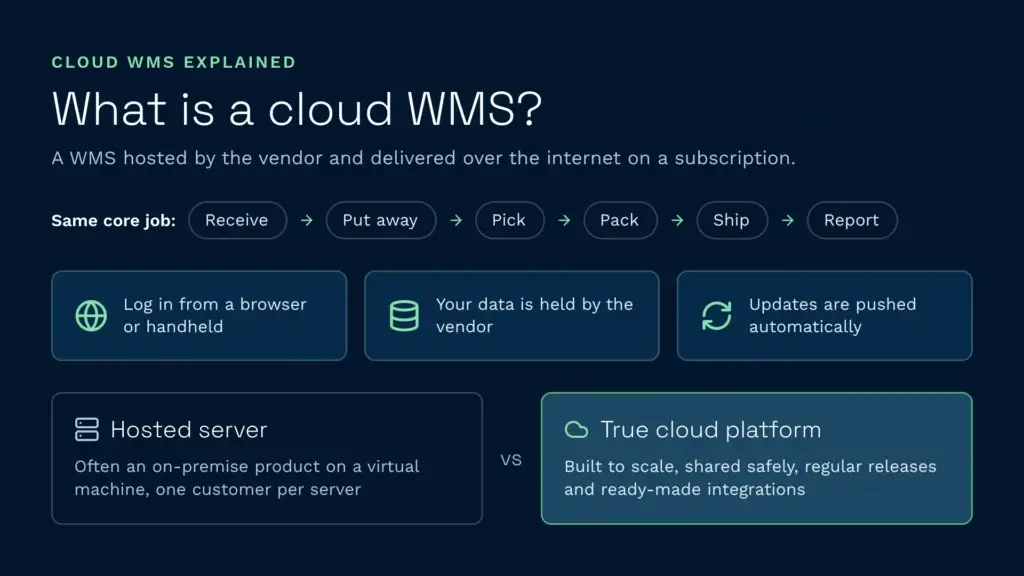
Cloud warehouse management software is a WMS hosted by the vendor and delivered over the internet, usually on a subscription. You log in through a browser or a handheld app, your data sits with the vendor, and updates are pushed automatically. The función principal de un WMS stays the same: receive stock, put it away, pick orders, pack, ship and report. What changes is the plumbing underneath.
The shift is more than where the server lives. A well-built cloud WMS has modern APIs and ready-made integrations, so it talks to Tienda virtual, tus empresas de mensajería, tu ERP y tus portales de clientes sin necesidad de utilizar middleware a medida. Para conocer más a fondo los aspectos básicos, consulta nuestra descripción general de qué hace realmente un sistema de gestión de almacenes. For the business case, including where the savings come from and what they cost, read cloud WMS benefits for modern warehouse operations.
En qué se diferencia un sistema WMS basado en la nube de un servidor alojado
Be careful with vendor language. A “hosted” WMS often means an on-premise product running on a virtual machine somewhere, with one customer per server, slow upgrades and limited room to scale. A true cloud based WMS system is built to scale, share infrastructure safely between customers and release new features regularly. If the vendor talks about “their server” rather than “the platform”, that’s a signal.
What does web-based warehouse management software mean?
Web-based warehouse management software is a WMS you open in a browser, but the browser tells you nothing about how the software is hosted or shared. Three models sit behind the phrase, and the difference matters for updates, data separation and cost. In other words, warehouse management software that’s web based can still be very different underneath.
A WMS “can either be hosted locally or installed on the cloud, allowing the WMS to be accessed from anywhere online” (Wikipedia, Warehouse management system). Multi-tenant software is one in which “a single instance of software runs on a server” and serves several customers (Wikipedia, Multitenancy). That shared model is what most people mean by software as a service, or SaaS WMS.
| Model | What it means | What to ask the vendor |
|---|---|---|
| Browser access to on-premise | Software installed on a server you own or rent, reached through a browser | Who applies updates, and how long do they take to go live? |
| Hosted single-tenant | The vendor runs a separate instance for each customer | Who controls upgrade timing, and what backup and recovery apply? |
| Multi-tenant SaaS WMS | One platform serves many customers, and releases reach all of them | How is your data separated from other customers’ data, and how are releases tested? |
Is web-based WMS the same as cloud WMS?
Not quite. Web-based describes how you reach the software, and cloud describes where it runs. A web-based WMS can be hosted in either style, so ask whether the vendor runs one shared platform for all customers, which is what most people mean by cloud WMS, or a separate instance for you.
Can I run a browser based WMS on handheld scanners?
Plan for a dedicated handheld app rather than a desktop browser on the floor. Clarus runs its flujos de trabajo portátiles on Android devices such as Zebra and Honeywell units. Whatever you choose, ask the vendor to run a pick on the actual scanner you plan to buy, because screen design and scan speed only show up on the device.
Is a web-based WMS secure?
It can be, and the test is what the vendor can prove, not whether the software runs in a browser. Ask for current certification against ISO/IEC 27001, the global standard for an information security management system. Clarus is ISO 27001 certified. Then ask where your data is held, how it’s separated from other customers’ data and how access is controlled. The National Cyber Security Centre’s cloud security guidance sets out the shared responsibility model, which splits security tasks between provider and customer. Check what sits with you.
How long does a web-based WMS take to implement?
A standard project with the right support on both sides can go live in around 12 weeks. Mat Buttar, Head of Solutions at Clarus, puts the aim this way: “we’d aim to get live within 12 weeks”. That assumes an off-the-shelf set-up with no development. Complex projects with several clients, high volumes and most of the system’s features can take much longer, up to two years in the extreme.
What does a web-based WMS cost?
Clarus WMS plans start from a monthly base fee. The full quote adds tiered user licensing and a one-off implementation fee, and it’s shaped around your sites and users. Check the Página de precios de Clarus for current plans, and read what a WMS really costs for the wider picture, including the costs that sit outside the monthly fee. Compare the pricing model as well as the figure: a subscription, a licence with separate hosting and a licence with support contracts all spread cost differently.
WMS en la nube frente a WMS local: una comparación objetiva
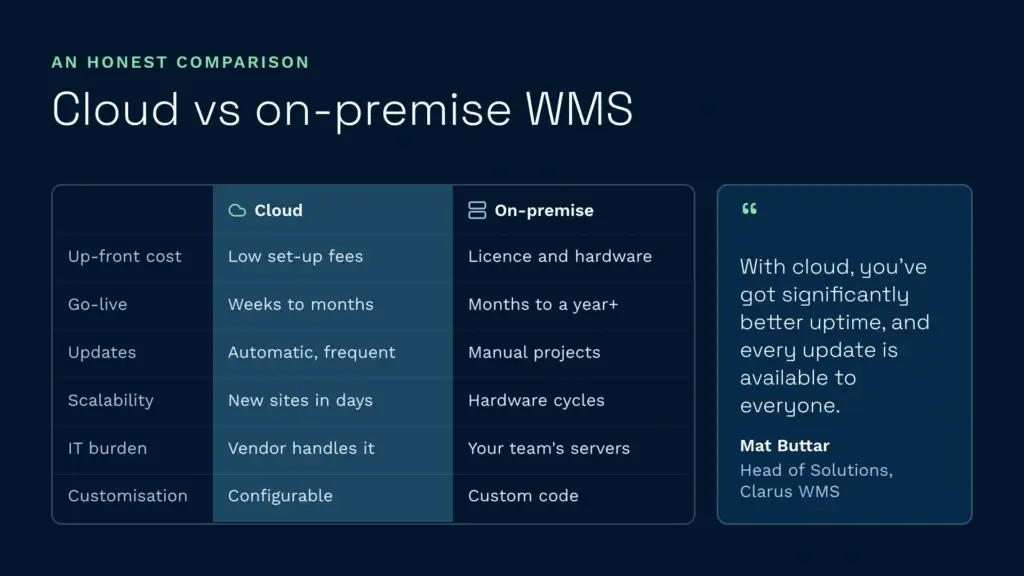
On-premise WMS still runs in older plants and some large retail operations. The real question has moved from where the server sits to how the vendor runs the platform.
| Factor | WMS en la Nube | WMS local |
|---|---|---|
| Coste inicial | Low, mostly set-up fees | Elevado gasto en licencias y hardware |
| Es hora de ponerlo en marcha | Semanas a meses | Months to a year or more |
| Actualizaciones | Automático, frecuente | Manual, basado en proyectos |
| Escalabilidad | Añade usuarios y sitios en cuestión de días | Ciclo de compra de hardware |
| Carga informática | El proveedor se encarga de la infraestructura | El equipo interno es el responsable de los servidores |
| Nivel de personalización | Configurable, con menos código personalizado | Se puede personalizar en gran medida, pero queda rígido una vez |
Mat Buttar, Head of Solutions at Clarus WMS, explains the difference on the cloud side: “cloud-based, you’ve got significantly better uptime… being a SaaS product, any update we do is available to anybody that wants it once it’s developed. On-premise solutions, you’re limited by server life, server size, manual updates, downtime to update.”
The trade-off used to be customisation against convenience. Modern cloud platforms cover most 3PL workflows through configuration, such as client-specific rules, workflow automations and flags, and the remaining requirements are usually met through APIs.
¿Es seguro el sistema de gestión de almacenes (WMS) en la nube?
Security is the question that stops most boards from approving a move, and the right question is about the vendor’s evidence rather than the label. Independent certification such as ISO/IEC 27001 is one way to check a vendor’s controls. The answer depends on the vendor, so ask for the certificate and the scope it covers, not a verbal assurance.
Qué debes preguntar a tu proveedor sobre la seguridad
- Certificaciones: Ask for the ISO 27001 certificate or a SOC 2 Type II report, not marketing claims.
- Ubicación de los datos: Confirm which regions your data sits in, so you know where you stand on UK GDPR.
- Copias de seguridad y recuperación: What’s the recovery point and recovery time if a region goes down? A good answer is minutes, not days.
- Controles de acceso: Role-based permissions, single sign-on and audit logs as standard.
- Aislamiento de los inquilinos: In multi-tenant cloud, how is your data separated from other customers’ data?
- Data-processing terms: Ask to see them in the contract. If you hold personal data about your clients’ customers, the ICO’s guidance on international transfers explains when a restricted transfer applies, which matters if the vendor’s support or hosting sits outside the UK.
Calendario de implementación de un sistema de gestión de almacenes (WMS) en la nube
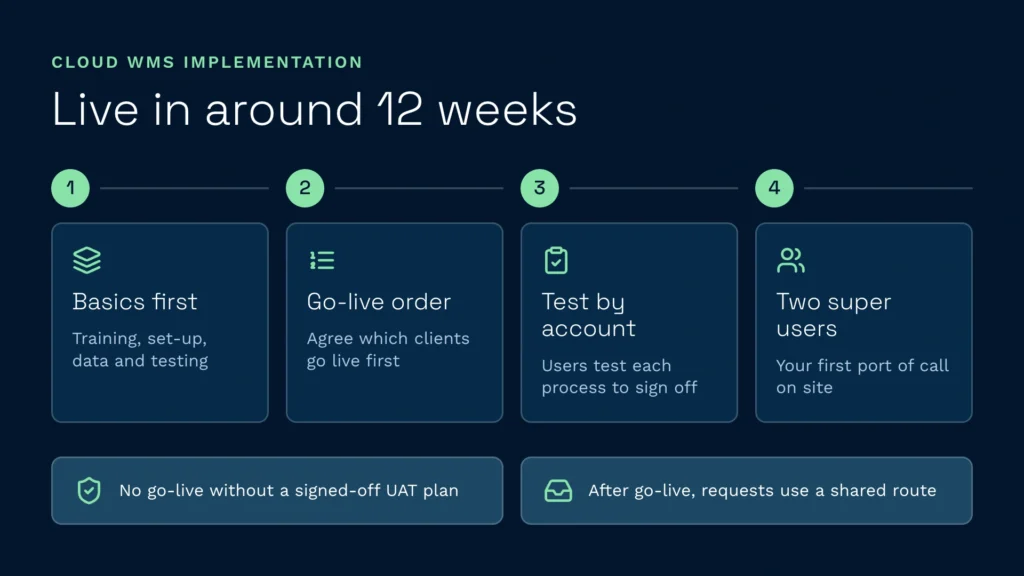
An old enterprise rollout could run for many months. A cloud WMS project depends on the complexity of your operation and the support both sides give it. A standard Clarus project aims to go live within around 12 weeks, and the sequence Clarus follows is:
- Basics first: Super user training, domain set-up, master data gathering and population, and testing. The question at this stage is whether the system works the way your business works, for every client.
- Agree the go-live order: Decide with the customer which clients or accounts go live first, based on how complex their requirements are.
- Manual user acceptance testing, by account: Each process is tested by the people who will use it, and the UAT schedule is the sign-off.
- Name at least two super users: Two people inside your business learn why the system was set up the way it was, run the testing and become the first port of call on site.
Clarus is firm on phasing. A big-bang go-live is “fine if you have time for UAT”, but don’t do one without a full UAT schedule that every party signs off, including the customer. After go-live, requests go into a shared requests route, so the product team can judge whether they belong in the system. Talk to the team about what a go-live would look like for your operation.
Si eres un proveedor de servicios logísticos externos (3PL) que gestiona varios clientes en una misma planta, consulta nuestra guía sobre cómo Solución de gestión de almacenes adaptada a los servicios 3PL and how multi-client billing, separate client logins and per-client SLAs work in practice.
Por qué los proveedores de servicios logísticos externos (3PL) son los que más se benefician de los sistemas de gestión de almacenes (WMS) en la nube
3PLs onboard new clients often, bill each one differently and need to scale up and down without buying servers, which is where a cloud platform earns its place. In Clarus, facturación de clientes, customer self-service y reportando per client are part of the core system. For a full comparison, read our guide to the El mejor sistema de gestión de almacenes (WMS) para empresas de logística 3PL, and for the cost and benefits case, see cloud WMS benefits for modern warehouse operations.
En qué se diferencia Clarus
Clarus WMS is cloud-native and serverless, and it’s ISO 27001 certified. It’s built for multi-client operations, with more than 200 out-of-the-box integrations and an Asistente de IA that works on live warehouse data. A standard project aims to go live within around 12 weeks. For more context on the UK market, see our Guía sobre los sistemas de gestión de almacenes (WMS) en el Reino Unido.
Integrations, APIs and reporting in a cloud WMS
A cloud WMS is judged on three things beyond the core warehouse workflow: integration depth, reporting, and the quality of the mobile app on the warehouse floor. A platform with weak integrations leaves you typing tracking numbers by hand. Weak reporting leaves you exporting CSVs to Excel every Monday. A clunky scanner app slows every pick.
A web-based WMS is only as useful as its connections. Clarus is «API-first» and supports API, EDI, XML and CSV files over SFTP. It also runs an MCP server, so AI tools can query live warehouse data. The library holds more than 200 out-of-the-box integrations, including Tienda virtual and carriers such as DHL, UPS, FedEx y Royal Mail, and the full list is on the integrations hub.
Where a system has an API, the link is near-instant. Where it doesn’t, as with some older Sistemas ERP, interface files can be mapped and exchanged instead. Mat’s test is simple: “What do you want to send us? What can you send us? What do you want to do with it when it gets here?” Ask the same three questions of any vendor you shortlist.
When you evaluate a cloud based WMS system, run three tests:
- Conecta tu soporte superior: If it’s not a standard connector, ask how long a custom integration takes.
- Genera un informe real: Pide al proveedor que te muestre la rentabilidad por cliente correspondiente a una semana de datos de demostración.
- Coloca una púa en el dispositivo: Utiliza el escáner real, no una demo en tableta. La latencia y el diseño de la pantalla son importantes.
Support, multi-site and handheld use
Apoyo Ask any vendor for its response and resolution targets in writing, and ask for a reference customer you can call about how support actually performed.
Multiple sites: Clarus runs multi-warehouse and multi-site operations from a single environment. Setting up a new site means creating the warehouse, importing the location and stock data, then receiving orders. Mat’s caveat is the one that matters: “As long as you got the data.” Scanner-based working at a new site takes a little longer to set up than the back-office side. For a stock accuracy example, see how RTS achieved 99% stock accuracy across Europe with cloud WMS.
Handheld use on the floor: The handheld app checks each scan against the task. If a picker scans a location that doesn’t match, the screen shows a red message and the right location, so the picker sees the mistake before the pallet moves. The escaneando y flujos de trabajo portátiles pages cover the detail.
Errores habituales a la hora de elegir un sistema de gestión de almacenes (WMS) en la nube
Los errores que vemos con más frecuencia:
- Comprar por las características, no por cómo queda: A 500-feature platform you’ll use 30 of is worse than a focused tool that fits your workflow. Smaller operations should read our guide to the El mejor software de gestión de almacenes para pequeñas empresas.
- No hacer caso al equipo de sala: If pickers hate the scanner app, the project fails however clever the back office is.
- Omitir llamadas de referencia: Talk to two or three live customers and ask about support response times. Independent reviews on Capterra y G2 are a useful second check.
- Subestimar el trabajo de integración: “Pre-built” doesn’t always mean zero configuration.
- Elegir la opción más barata: Switching cost is high, and a cheaper platform that fails you in 18 months costs more than the right one.
For a wider shortlist, see our round-up of the El mejor software de gestión de almacenes para 2026, o ponte en contacto to talk through your operation with the Clarus team.