

For most businesses in 2026, strong starting points are Microsoft Dynamics 365 Business Central for small and mid-sized firms, Oracle NetSuite for fast-growing multi-entity businesses, and SAP S/4HANA for large, complex enterprises. The right choice still depends on your size, industry and budget, so this guide compares the leading systems side by side and explains how to pick one.
Your enterprise resource planning (ERP) system touches everything: finance, HR, procurement, inventory and supply chain. The right one cuts costs and gives you real-time visibility across the business. With dozens of systems on the market, this guide covers what ERP does, how the top systems compare, what they cost, and when an ERP needs a sistema de gestión de almacenes alongside it.
What is ERP software and why does your business need it?
ERP stands for enterprise resource planning. It’s software that brings your core business processes into one system. Finance, HR, procurement, manufacturing and order management all share the same database, so information is updated in real time.
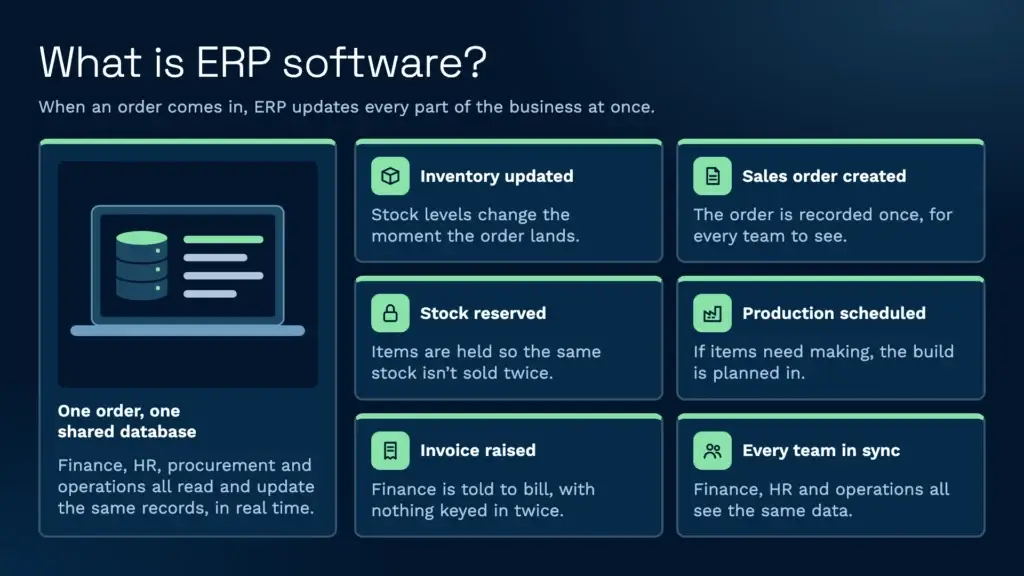
Without ERP, your finance team uses one tool, HR uses another and operations uses a third. Data sits in different places and doesn’t sync. Getting an accurate picture of cash flow or stock means asking several departments, and decisions get delayed.
ERP solves this. When an order comes in, the system updates inventory, creates a sales order, schedules production if needed, reserves stock and tells finance to raise an invoice. Everyone works from the same data, with no conflicting spreadsheets.
Best ERP software compared
This table compares eight of the most widely used ERP systems on the points that matter most when you’re shortlisting.
| ERP system | Mejor para | Despliegue | Business size | Warehouse features | Modelo de precios |
|---|---|---|---|---|---|
| SAP S/4HANA | Large, complex multinationals | En la nube o en las propias instalaciones | Empresa | SAP Extended Warehouse Management available as an add-on | Quote-based |
| Oracle NetSuite | Growing businesses with several entities | Nube | Desde el segmento medio hasta las grandes empresas | Inventory management, with an optional WMS module | Annual subscription: base licence plus users and modules |
| Microsoft Dynamics 365 Business Central | SMEs already using Microsoft 365 | Cloud, with an on-premise option | Small to mid-sized | Bins, picks and put-aways | Per user per month, from £61.50 (Essentials) |
| Sage Intacct | Finance-led businesses | Nube | Small to mid-sized | Inventory module, no full WMS | Subscription, from £1,200 per month |
| Infor CloudSuite | Industry-specific manufacturing and distribution | Nube | Desde el segmento medio hasta las grandes empresas | Infor WMS available | Quote-based subscription |
| Epicor Kinetic | Manufacturers | En la nube o en las propias instalaciones | Mid-market | Inventory and warehouse features | Quote-based |
| Acumatica | Growing businesses that want unlimited users | Nube | Small to mid-sized | Warehouse management add-on | Based on resources used, not number of users |
| Odoo | Small businesses wanting a modular, low-cost start | Cloud or self-hosted | Small to mid-sized | Inventory and barcode apps | Free Community edition, paid Enterprise per user |
Prices are UK list prices excluding VAT, taken from the vendors’ own pricing pages in November 2026. Most ERP pricing also depends on modules, users and implementation, so treat these as starting points.
¿Cuáles son los 10 mejores sistemas ERP?
The ERP market is crowded, but a handful of systems lead. Here are ten of the most widely used, in no particular order:
- SAP: One of the most widely used ERPs for large enterprises. SAP S/4HANA handles complex, multi-country operations, and SAP Business One serves smaller firms. Large implementations can take a year or more.
- Oracle NetSuite: Cloud-native and aimed at fast-growing mid-sized businesses. Strong for multi-subsidiary operations and ecommerce.
- Microsoft Dynamics 365: Business Central suits SMEs, and Finance and Supply Chain Management suits larger organisations. Works closely with Microsoft 365 and Azure.
- Salvia: Sage Intacct is a cloud financial management system for finance-led businesses, and Sage X3 covers manufacturing and distribution.
- Informar: Industry-specific CloudSuites for manufacturing, distribution, food and beverage, and healthcare. Strong on supply chain and warehouse features.
- Epicor: Built for manufacturing and distribution. Epicor Kinetic is its main manufacturing ERP.
- Acumatica: Cloud ERP for growing mid-sized businesses. Priced on resources used rather than per user, so adding staff doesn’t add licence fees.
- Odoo: Modular and open source. You can start with a few apps and add more as you grow.
- Plex: A cloud manufacturing platform, now part of Rockwell Automation, aimed at discrete manufacturers who want ERP and shop-floor control together.
- Día laborable: Started in HR and now offers Financial Management. Aimed at large organisations that put people and finance first.
For a longer side-by-side review, see our ERP comparison guide.
Best ERP by business type
There’s no single best ERP. The right one depends on what your business does:
- Best for small businesses: Microsoft Dynamics 365 Business Central or Odoo. Both start small and grow with you. See our guide to ERP for SMEs.
- Best for manufacturing: Epicor Kinetic, Plex or Infor CloudSuite Industrial, which all offer production planning and shop-floor tools.
- Best for food and beverage: Infor CloudSuite Food and Beverage, built for batch traceability, recipes and shelf-life control.
- Best for distribution and wholesale: Oracle NetSuite or Acumatica, which both cover multi-location stock, purchasing and sales.
- Best for 3PL and logistics: an ERP for finance, paired with a specialist WMS for the warehouse. Many ERPs aren’t built for multi-client warehousing, client-specific rules or activity-based billing.
- Best open source ERP: Odoo. The Community edition is free to download and run yourself.
- Best for accounting-led businesses: Sage Intacct for small to mid-sized firms, or Workday Financial Management for large organisations.
Types of ERP system
ERP systems differ in how they’re delivered and who they’re built for:
- Cloud ERP: Hosted by the vendor and paid for by subscription. Updates happen automatically and you can log in from anywhere. NetSuite, Acumatica and Business Central are cloud-first.
- On-premise ERP: Installed on your own servers. You get more control, but you take on hardware, upgrades and security.
- Hybrid ERP: Some modules in the cloud and some on-premise. Common in large businesses moving to the cloud in stages.
- Industry-specific ERP: Built around one sector’s processes, such as Plex for manufacturing or Infor’s food and beverage suite.
- General ERP: Broad systems you configure for your own industry, such as SAP or Dynamics 365.
How much does ERP software cost?
ERP pricing is rarely a single figure. Vendors commonly use one of four pricing models:
- Per user per month: You pay for each named user. For example, Dynamics 365 Business Central Essentials costs £61.50 per user per month, billed annually.
- Platform subscription: A base fee plus users and modules. Sage Intacct starts from £1,200 per month, and NetSuite uses a similar base licence plus add-ons.
- Resource-based: You pay for the computing resources and transaction volume you use, not for users. Acumatica works this way.
- Perpetual licence: A one-off licence fee plus yearly maintenance. Still offered for some on-premise systems.
Most enterprise vendors, including SAP, Infor and Epicor, don’t publish list prices and quote each project individually.
The licence is only part of the cost. Implementation, data migration, training, integrations and ongoing support can add a significant amount, so compare the total cost over five years rather than the first year’s fees. The same applies to warehouse software, as our Guía de costes de WMS explains.
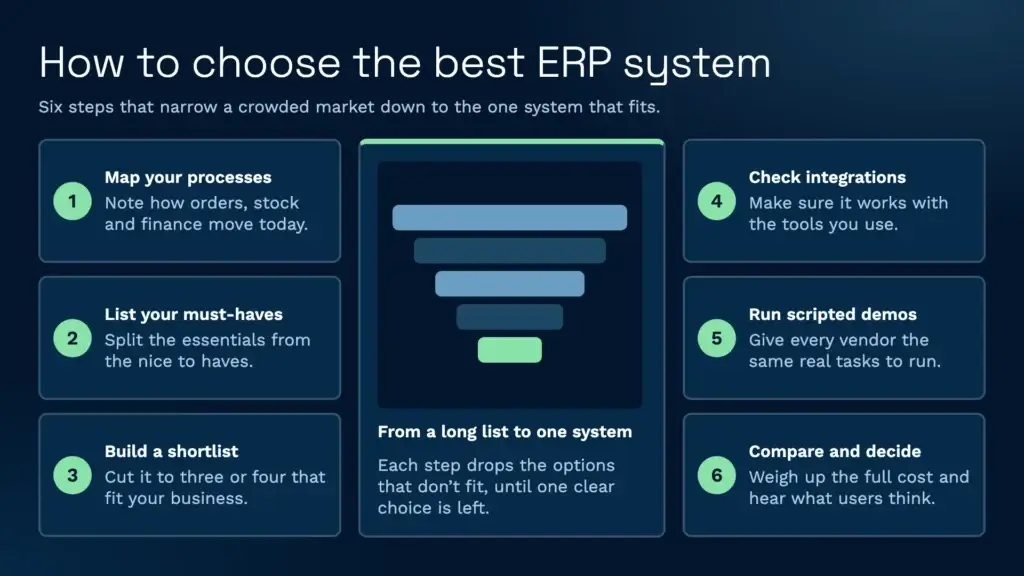
How to choose the best ERP system in six steps
- Map your processes. Write down how orders, purchasing, finance and stock move through the business today, and where they break.
- List your must-haves. Separate the features you can’t run without from the ones that would be nice to have.
- Shortlist by size and industry. Use the comparison table above to narrow the field to three or four systems that fit.
- Check integrations. Make sure each system connects to the tools you already rely on, such as your ecommerce platforms, carriers and warehouse system.
- Run scripted demos. Give each vendor the same real scenarios to walk through, so you’re comparing like for like.
- Compare total cost and references. Look at five-year costs, and speak to existing customers of a similar size in your industry.
Key features to look for in ERP software
When you’re comparing systems, prioritise these features:
- Datos en tiempo real: Look for systems that update instantly across all modules rather than in overnight batches.
- Open APIs: You’ll connect to a warehouse system, ecommerce platforms, payment providers and more, so a well-documented API matters.
- Acceso desde el móvil: Approvals, expenses and dashboards should work on any device.
- Industry templates: Pre-built configurations for your sector save time during implementation.
- Escalabilidad: Check the system can handle a second warehouse, a new entity or an acquisition.
- Informes y análisis: You need dashboards, forecasting and drill-down reports, not just transaction lists.
- Implementation and support: A good implementation partner and responsive support matter as much as the software.
- Estructura de costes: Understand whether you pay per user, per module or per transaction, and what the total cost of ownership looks like over five years.
ERP vs WMS: what’s the difference?
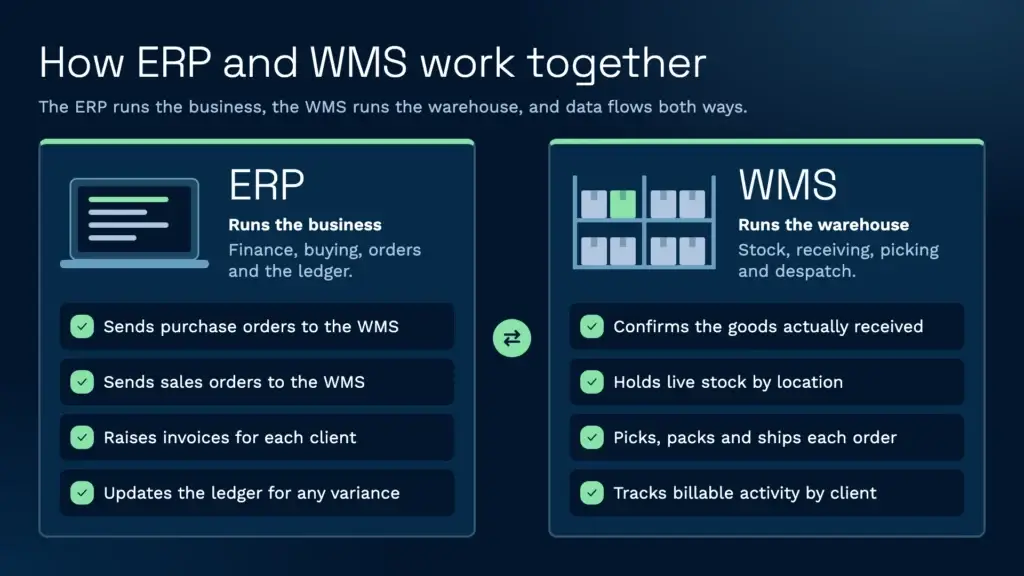
ERP and warehouse management systems are often confused, but they do different jobs.
ERP covers the whole business. Finance, HR, procurement, order management and the general ledger. It answers questions like “How much profit did we make?” and “What do we owe suppliers?”
A WMS focuses on the warehouse. It tracks stock by location, manages receiving and put-away, picks and packs orders, runs cycle counts and plans labour. It answers “Where is this SKU?” and “What’s the fastest way to pick this order?”
As Mathew Buttar, Head of Solutions at Clarus, puts it, a WMS is “the control of a movement of one item throughout its warehouse life cycle”, while the ERP has to trust the WMS’s stock levels for ordering and valuation, so the two “have to work hand in hand.”
When does an ERP need a WMS alongside it?
Many ERPs include inventory features, and for a single small stockroom that can be enough. You’ll usually need a dedicated WMS when:
- You run more than one warehouse, or a large single site with many locations.
- You’re a 3PL storing stock for several clients, each with their own rules and billing.
- You need barcode scanning at every step, from receiving to despatch.
- You handle batch, lot or expiry tracking that has to be enforced on the warehouse floor.
- Order volumes are high enough that pick routes and labour planning affect your margins.
- You ship through many carriers and marketplaces.
In these cases, the ERP stays as the financial backbone and the WMS runs the warehouse. Clarus isn’t an ERP. It’s the warehouse layer that sits alongside one. Clarus has a native Brightpearl integration and connects to other ERPs through its open API or file-based interfaces. You can see the full list on our integrations page.
How ERP and warehouse management systems work together
Here’s how data flows between the two systems.
Inbound receiving
A purchase order is created in the ERP and sent to the WMS, which prepares the receiving dock, assigns locations and checks goods on arrival. Once confirmed, the WMS updates the ERP with what was actually received, which triggers a goods receipt and the accounting entry.
Inventory visibility
The WMS holds the truth about what’s physically in the warehouse, and the ERP relies on it. When a customer orders, the ERP knows the item is available because the WMS has confirmed it’s there, in a specific location, ready to pick.
Order fulfilment
A sales order enters the ERP and is sent to the WMS, which allocates stock, picks, packs and prints the label. Once it ships, the WMS tells the ERP, which closes the order, raises the invoice and records the revenue.
Facturación de 3PL
For logistics operators, the WMS tracks storage, handling and activity by client, and turns it into billable charges such as receipts, picks, lines and weight. The ERP or finance system then raises invoices for each client. Without a WMS built for multiple clients, this means a lot of manual reconciliation.
Clarus is built for this. It tracks billable activity automatically and produces facturación de clientes ready for invoicing. Almacén de St John’s Hall, for example, cut its invoicing time by 90%.
Cycle counting and reconciliation
The WMS guides cycle counts, records the results and flags discrepancies. The ERP adjusts the general ledger for any variance, so your financial records stay accurate without shutting down for a full stock take.
How we compared these ERP systems
We compared each system on who it’s built for, how it’s deployed, business size, warehouse capability and pricing model. Information comes from each vendor’s own website and published pricing pages, checked in November 2026. Where a vendor doesn’t publish prices, we’ve described its pricing model instead. Clarus is a warehouse management system, not an ERP, so it isn’t ranked in this list.
Habla con un experto en almacenes
If your ERP is in place and you need a warehouse system that fits the way you work, Clarus is worth a conversation. We work with 3PLs and distributors to run warehouses alongside the ERP they already use. Compare your options with our guide to the best warehouse management systems, o ponte en contacto para discutir tus requisitos.